The IgniteAI Agentis an AI tool that answers your prompts and helps you manage students, communications, discussions, assignments, quizzes, extensions, and grades in Canvas.
To grant or revoke access, the IgniteAI Agent must be enabled or disabled. This action requires the IgniteAI Agent permission and is currently available only to admins in the US, LATAM, EMEA, Middle East, and APAC.
When the IgniteAI Agent account-level feature option is enabled, a Display IgniteAI Agent Button feature option becomes available in User Settings. This allows you to control whether the Agent button displays in your own interface.
Notes:
- Enable IgniteAI Agent - Teachers for instructors in the Feature Options tab.
- The Agent is fully tested in English. Results in other languages may vary.
Open Feature Options
In Global Navigation, click the Admin button [1] and click the Settings link [2].
In the Admin Settings page, click the Feature Options tab [3].
Enable IgniteAI
Locate the IgniteAI Agent - Admins link [1]. To view more information about the feature, click the feature name [2]. To enable IgniteAI Agent, click the Feature State icon [3] and select the Enabled option [4].
You can now start using the IgniteAI Agent.
The first time you open the IgniteAI Agent, a dialog displays.
To remove it from view, click the Disable and hide Agent button [1]. To keep it visible, click the Enable and continue button [2].
Disable IgniteAI
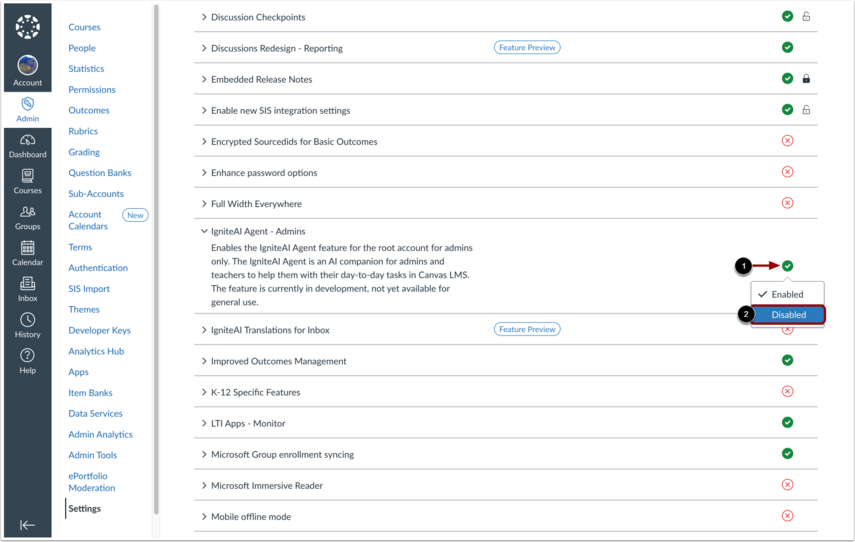
To disable the IgniteAI Agent, click the Feature State icon [1] and select the Disabled option [2].
You can also control the visibility of the Agent button in your own user settings.
In Global Navigation, click the Account link [1], then click the Settings link [2].
Locate the Display IgniteAI Agent Button feature option.
To turn the Agent button on or off, click the Feature State icon. A green check indicates the button is displayed. A red X indicates the button is hidden.