Upcoming Canvas Changes
2025-06-21
- Feature Enforcement: New Course and User Analytics
For more information, please see Upcoming Canvas Changes.
Release notes outline upcoming customer-impacting changes that are expected to display in beta and/or production environments. Please note that features considered for future development are not included in the notes.
Unless otherwise stated, all features in this release are available in the Beta environment on 2025-04-21 and the Production environment on 2025-05-17.
All Resources | Features in this release may be included in product blogs and other content areas.
- Institutions are responsible for conducting thorough evaluations of their custom CSS/JS with each release and deploy to assess potential impacts.
- Subscribe to the Canvas release notes to be notified of updates.
New Features
Back to Table of Contents
New Quizzes
Text Block
Instructor
Beta Environment Availability | 2025-04-22 |
|---|
Location to Enable Feature | None |
Subaccount Configuration | None |
Account/Course Setting to Enable | None |
Permissions | None |
Affects User Interface | Yes |
Affected Areas | New Quizzes |
Related Ideas | None |
Summary
In New Quizzes, instructors are able to provide students additional context with standalone text or prompts that are not tied to questions on a New Quiz.
Change Benefit
This update allows instructors to add sections to their quizzes that do not require a question to include instructions or other information to guide the student. In addition, it also improves ease of migration from Classic Quizzes to New Quizzes.
Feature Workflow

New Quizzes: Add Content
To add a text block to a quiz, click the Add button in a quiz.
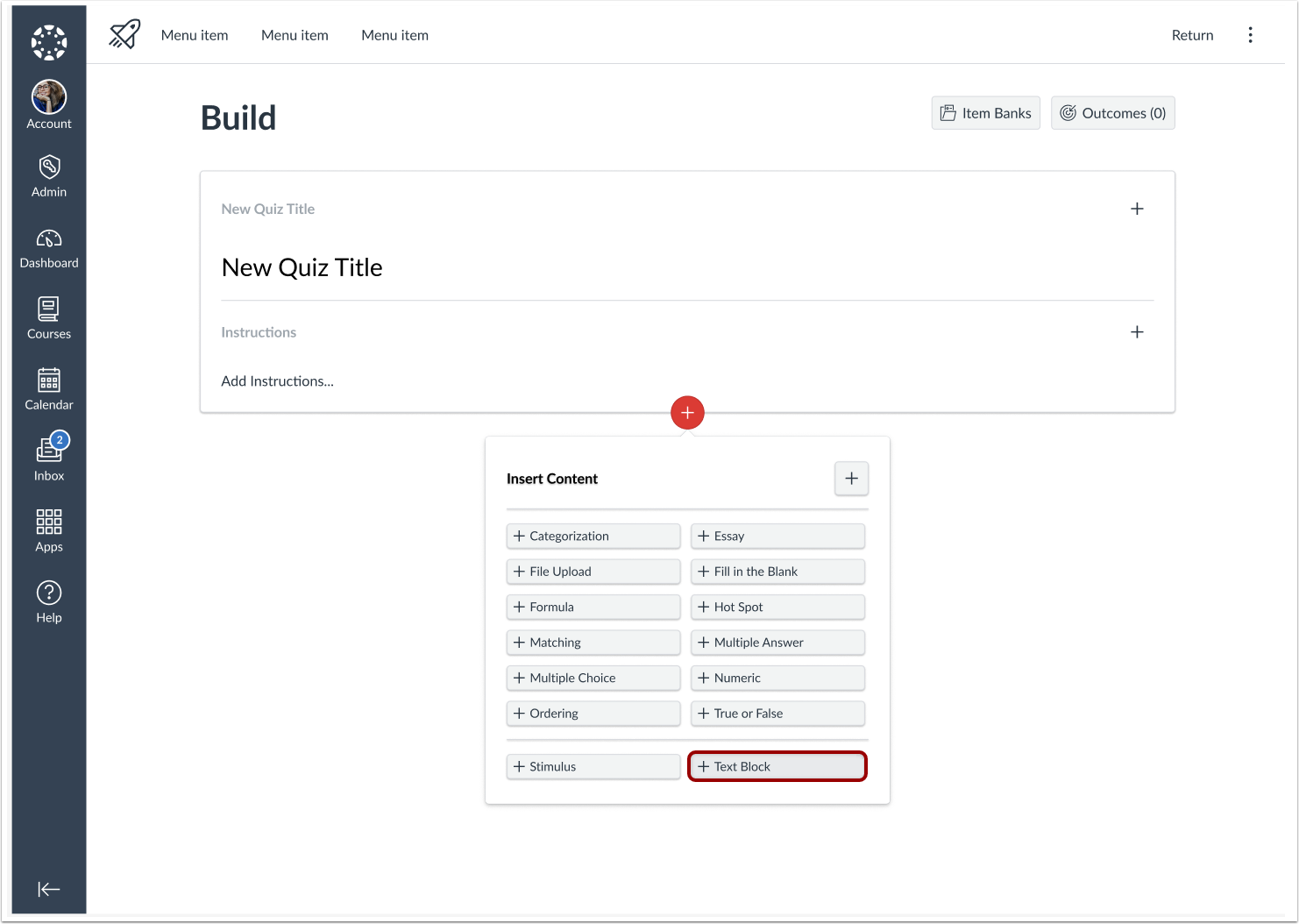
New Quizzes: Add Text Block
Click the Text Block button.
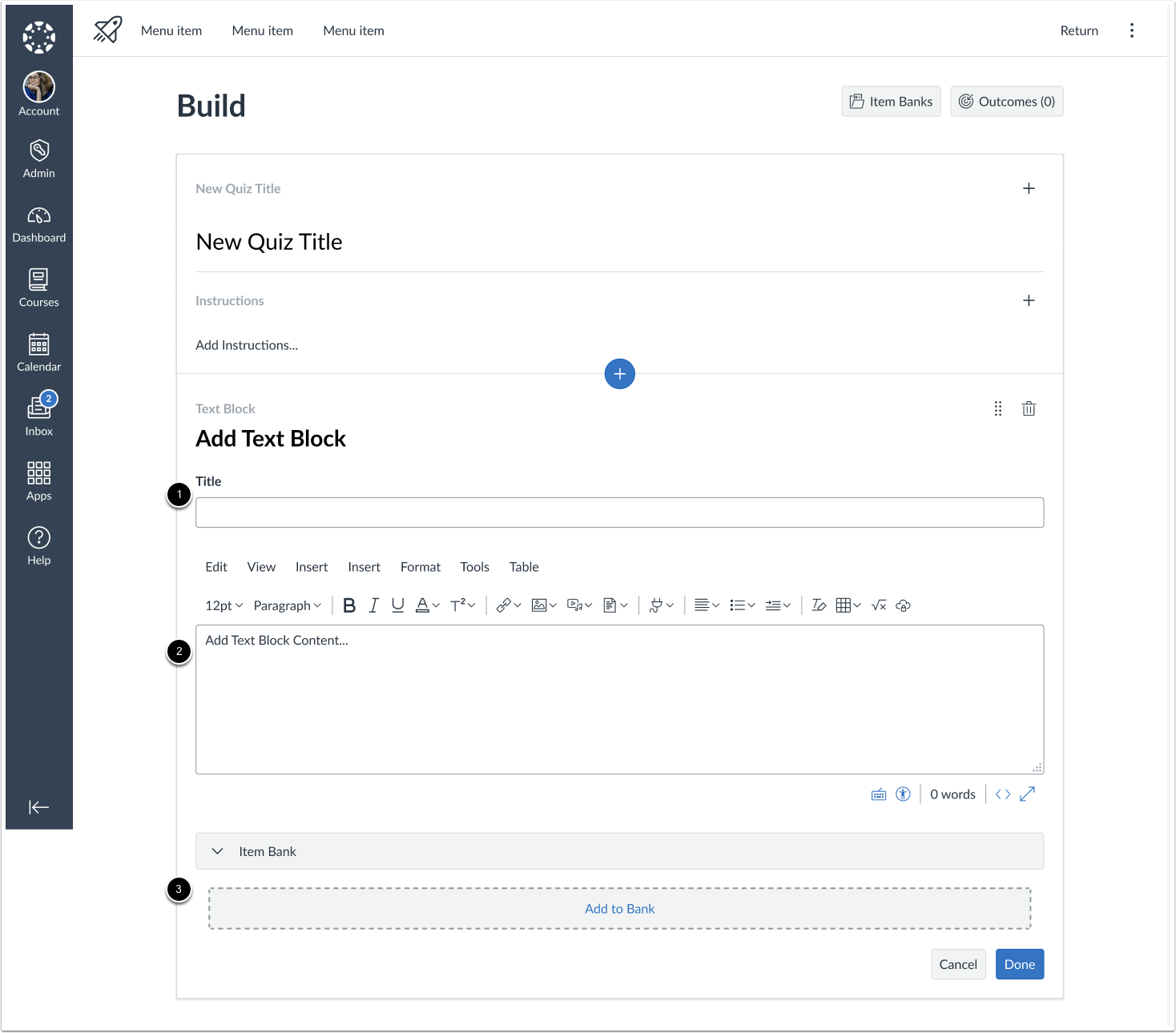
New Quizzes: Edit Text Block
In the Title field [1], add a text block title. In the Content field [2], add Text Block content using the Rich Content Editor. To add content to an item bank, click the Add to Bank button [3].
Discussions
Permalink for Discussion Entries
All Users
Summary
In Discussions, each reply includes a copyable permalink allowing users to share a direct link to that specific reply. If the reply is part of a thread, the thread will expand to reveal it.
Change Benefit
This update makes it easier to navigate and reference specific replies in a discussion.
Feature Workflow
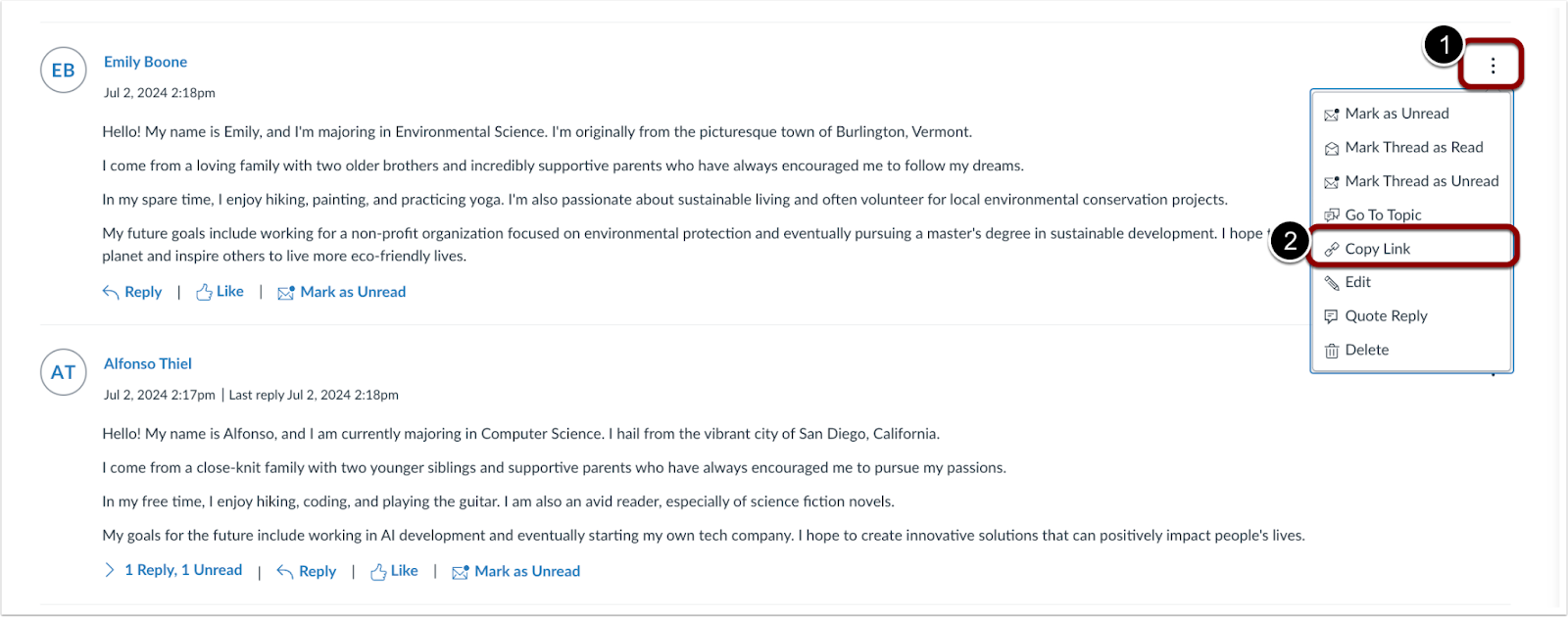
Discussions: Permalink for Discussion Entries
Click the Options [1] icon, then select the Copy Link [2] option to copy the permanent link.
Other Updates
Back to Table of Contents
Accessibility Updates
Over the coming months, a series of updates will be introduced to enhance Canvas's accessibility, intuitiveness, and equity, with a focus on improving usability for assistive technology users. These updates will include changes in the following areas:
Enhanced Structural Clarity
Refined semantic markup in the user interface to improve communication of content relationships and hierarchy.
Improved Error Feedback
In the user interface, improved error messages in forms and interactive elements provide clearer and more accessible feedback. Error messages were added to required fields that previously lacked them, while existing error states were updated to follow a consistent pattern. Focused states for missing or incorrect fields ensure a uniform experience for all users, whether using a mouse, keyboard, or screen reader.
Gradebook
Gradebook Icon Update for LTI Assignment and Grade Service
Instructor
Account/Course Setting to Enable | N/A |
|---|
Permissions | Inherent to user role |
Affects User Interface | No |
Affected Areas | Gradebook |
Related Ideas | None |
Summary
The activity progress values for Started and In Progress in tools using the LTI Assignment and Grade Service are updated. These statuses no longer trigger the Needs Grading icon in the gradebook.
Change Benefit
This update reduces confusion in the gradebook.