Release notes outline upcoming customer-impacting changes that are expected to display in beta and/or production environments. Please note that features considered for future development are not included in the notes.
Unless otherwise stated, all features in this release are available in the Beta environment on 2026-03-04 and the Production environment on 2026-03-11.
New Features
User Interface
IgniteAI Agent Availability for Instructors
Affected User Roles: Instructors
Feature Option Name to Enable in Canvas LMS | - IgniteAI Agent-Teachers
- Display IgniteAI Agent Button
|
Product Hub | IgniteAI Agent |
Enable Feature Option Location & Default Status | IgniteAI Agent-Teachers Note: IgniteAI Agent-Teachers is only visible when the IgniteAI Agent - Admins flag is enabled.
Display IgniteAI Agent Button See the Canvas Feature Option Summary to learn more about Feature Options. |
Subaccount Configuration | No |
Permissions | IgniteAI Agent-Faculty and Support |
Affects User Interface | Yes |
Affected Areas | User Interface, User Settings |
Mobile App Support | Not available |
Free-for-Teacher Availability | Not available |
Summary
When the IgniteAI Agent -Teacher account-level feature is enabled the IgniteAI Agent is available to instructors to simplify complex tasks in Canvas LMS. With a single prompt, it can automate multi step processes. Using over 500 Canvas APIs, the agent can assist with course content creation, course management, student communications, and other tasks.
Additionally, a Display IgniteAI Agent Button option displays in User Settings. The first time an instructor opens the Agent, a prompt lets them choose whether to keep the button enabled or disable it.
Notes:
- This product is currently available only in North America (NORAM), excluding Canada.
- Institutions can access this feature at no additional cost through June 30, 2026. After that date, the Agent may incur additional costs. Further information regarding the future pricing structure will be shared prior to the transition date.
Change Benefit
This feature saves educators time by handling repetitive steps and making routine workflows easier, so they can focus more on teaching and supporting students.
Feature Workflow
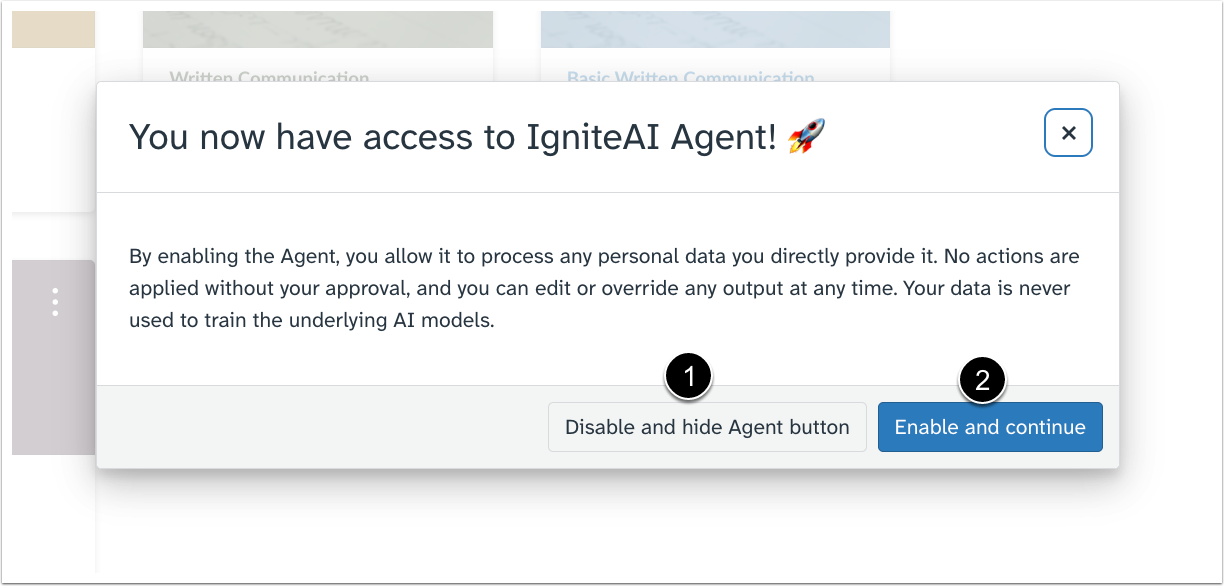
Once the IgniteAI Agent-Teacher feature option is enabled, instructors can choose to Disable and Hide the Agent button [1] or Enable and Continue [2] within their own interface.

In User Settings, instructors can manage the visibility of the Agent button using the Display IgniteAI Agent Button feature option.

In the user interface, click the IgniteAI Agent icon.

Instructors using the IgniteAI Agent assistant can choose their input method: either select from example prompts [1] or enter a custom prompt [2]. For managing the conversation, click the New Chat icon [3] to start a new session, or click the Chat History icon [4] to view past conversations. To exit the agent, click the Close icon [5].

After generating a response [1], instructors can copy the content using the Copy icon [2]. Feedback can also be provided immediately by Liking [3] or Disliking [4] the response.
Other Updates
Permissions
Admin Permission Default Status [Added on 2026-03-16]
Affected User Roles Admin
Feature Option Name to Enable in Canvas LMS | IgniteAI Agent- Admin |
|---|
Enable Feature Option Location & Default Status | Account (Disabled) See the Canvas Feature Option Summary to learn more about Feature Options. |
Subaccount Configuration | No |
Account/Course Setting to Enable | None |
Permissions | IgniteAI Agent-Admins |
Affects User Interface | No |
Affected Areas | Permissions |
Summary
The IgniteAI Agent-Admins permission is enabled by default.
Change Benefit
This update allows teams to jump straight into managing AI workflows without waiting for manual setup or access approvals.
Change Log
Date | Description |
|---|
2026-03-16 | Added Permissions: Admin Permission Default Status |
