Canvas deploys contain code changes that are intended to fix bugs, improve performance, and prepare for new features. These deploys take place every two weeks and can be tested in the beta environment before the production deploy date indicated in the title of this document. Institutions are responsible for conducting thorough evaluations of their custom CSS/JS with each release and deploy to assess potential impacts.
Fixed bugs are located in Known Issues.
Unless otherwise stated, all features in this deploy are available in the Beta environment on 2025-10-23 and the Production environment on 2025-11-05.
Subscribe to the release notes page to be notified of new release and deploy notes
For Canvas Platform Service changes (API, GraphQL, Canvas Data), please see the appropriate page in the Change Log.
Updated Features
Account Settings
Restrict Personal Access Tokens Includes Observers
Admin
Feature Option Name to Enable | N/A |
|---|
Enable Feature Option Location & Default Status | N/A |
Subaccount Configuration | N/A |
Account/Course Setting to Enable | None |
Permissions | Account-level settings - manage |
Affects User Interface | Yes |
Affected Areas | Account Settings |
Related Ideas | None |
Summary
In Account Settings, the Restrict students from creating personal access tokens feature is updated to include observers.
Change Benefit
This update improves data security by allowing administrators to block student-only and observer accounts from creating personal access tokens while still allowing users with higher-level roles to generate them when needed.
Feature Workflow

Account Setting Restrict students and observers from creating personal access tokens
In account settings, the Restrict students and observers from creating personal access tokens text is updated.
Reports
APIs Missing User-Agents Report
Admin
Feature Option Name to Enable | N/A |
|---|
Enable Feature Option Location & Default Status | N/A |
Subaccount Configuration | N/A |
Account/Course Setting to Enable | None |
Permissions | Reports-manage |
Affects User Interface | Yes |
Affected Areas | Reports |
Related Ideas | None |
Related blog | Enforcing User-Agent Header for Canvas API Requests |
Summary
Admins can run a report to identify APIs missing a User-Agent, helping ensure all API requests include this required header.
Change Benefit
This update helps admins quickly identify APIs that are not sending a User-Agent, improving security, compliance, and overall visibility into API usage within Canvas.
Feature Workflow

Requests Without User Agent Report
A Requests Without User Agent report is available.
User Settings
Access Token Expiration Date Required
Student
Feature Option Name to Enable | N/A |
|---|
Enable Feature Option Location & Default Status | N/A |
Subaccount Configuration | N/A |
Account/Course Setting to Enable | Name of Feature |
Permissions | Inherent to user role |
Affects User Interface | Yes |
Affected Areas | Access Tokens |
Related Ideas | None |
Summary
When creating an access token, students must set an expiration date within 120 days.
Note: Users who have both instructor and student roles are not affected by this limitation, as the presence of a non-student role exempts them.
Change Benefit
This update helps protect academic integrity by limiting the lifespan of student-generated access tokens, reducing the risk that students can use them to bypass assignments or cheat.
Feature Workflow
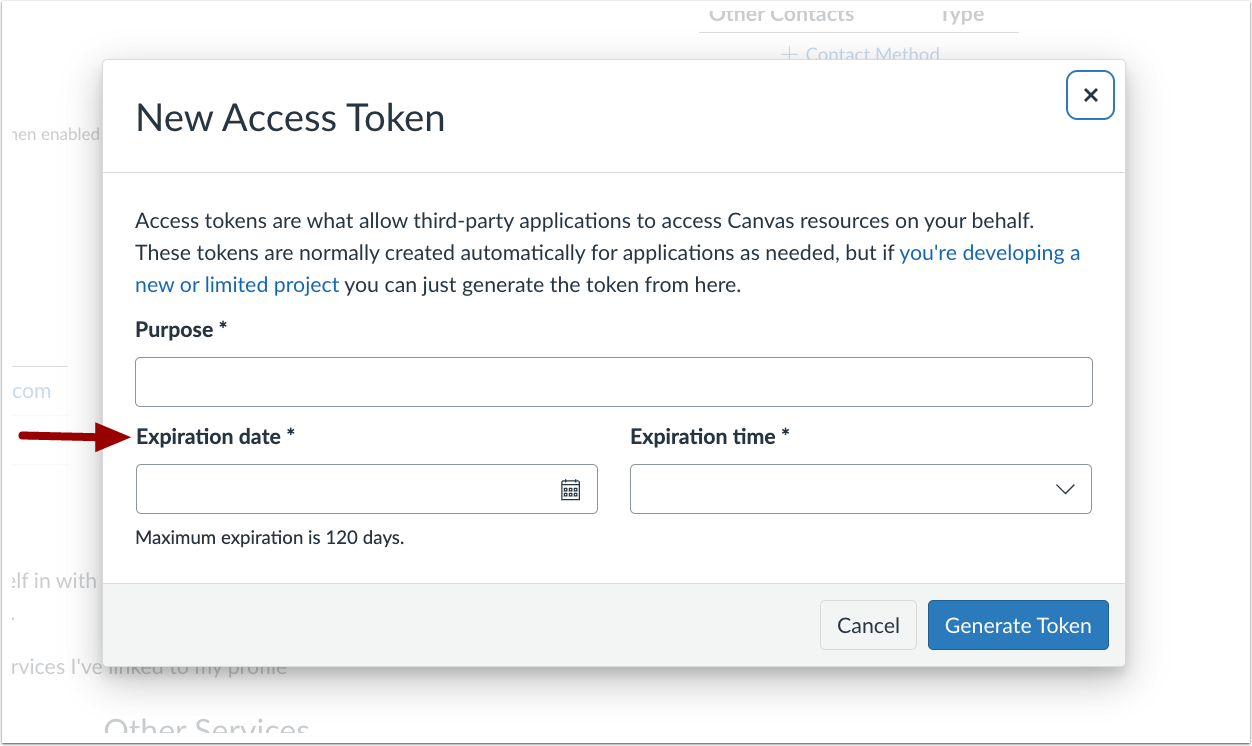
When creating a New Access Token, the Expiration date field is required for students.
Back to Table of Contents
Other Updates
External Apps
Boolean Values Returned as Strings in LTI 1.3 Launches
Admin
Summary
In alignment with the LTI 1.3 specification, Canvas returns boolean values as strings (e.g., "true" or "false") in custom variable expansions during LTI launches. This update affects parameters such as $Canvas.assignment.published and ensures consistent formatting across all LTI 1.3 integrations.
The following variables are impacted in this update:
- is_root
- anon_grading
- lockdown_enabled
- hide_in_gradebook
- user_student_view
- ai_quiz_generation
- section_restricted
- assignment_published
- omit_from_final_grade
Developer Keys
User-Agent Notification
Admin
Summary
In the Developer Keys page, a notification displays informing admins that API requests require the user-agent header to be set and links them to the report to identify any non-compliant API calls.
Change Benefit
This update helps admins stay informed about API requirements, ensuring that all requests include a User-Agent header to maintain security and proper API functionality.
Feature Workflow

Developer Key Page Banner
A banner displays helpful resources informing admins of upcoming enforcement of user-agent headers.
Reports
Failed Report Error Code
Admin
Affects User Interface | Yes |
|---|
Affected Areas | Reports |
Related Ideas | None |
Summary
When an account report fails, an error message displays with an accompanying error code.
Change Benefit
This update provides an error code that helps streamline communication with support teams, enabling faster and more accurate troubleshooting.
Back to Table of Contents
Feature Preview Change Log Updates
A Feature Preview indicates a feature option in active development. Users who opt in to the feature and join the Community user group can help improve the feature through direct feedback.
Enhanced Rubrics
Rubric Trash Icon Text Update
Instructor
Feature Preview to Enable | Enhanced Rubrics |
|---|
Feature Preview User Group | Enhanced Rubrics |
Enable Feature Option Location & Default Status | - Beta: Account/Course (Enabled/Unlocked)
- Production: Account/Course (Disabled/Unlocked)
See the Canvas Feature Option Summary to learn more about Feature Options. |
Subaccount Configuration | Yes |
Permissions | Rubrics-add/edit/delete |
Affects User Interface | No |
Affected Areas | Assignments |
Mobile App Support | Not available |
Free-for-Teacher Availability | Not available |
Related Ideas | None |
Summary
The rubric trashcan icon popover text displays Unlink Rubric when a rubric is associated with multiple assignments and Delete Rubric when it is only associated with the current assignment.
Change Benefit
This update improves clarity for instructors by ensuring the popover text accurately reflects the action being taken, reducing confusion when managing rubrics across multiple assignments.
Feature Workflow
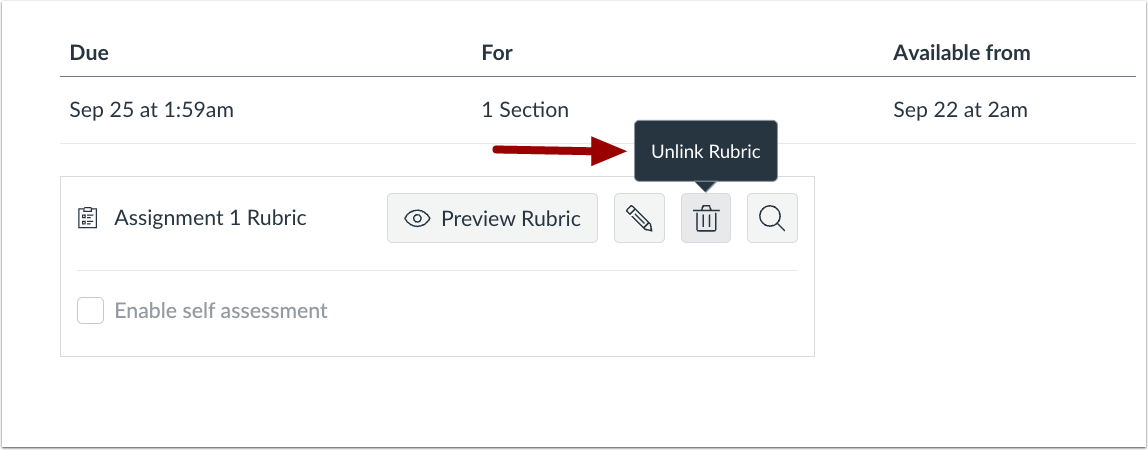
Rubric Trashcan Icon Popover Text
The rubric trashcan icon popover text displays Unlink Rubric.
Back to Table of Contents
