In this Canvas release (March 30), the beta label has been removed from the New Gradebook in addition to other feature options in Canvas. In Notifications, SMS notifications have been shortened to distribute one message about the related content, and instructors can enable a notification to be notified of link errors in their courses.
As other updates, Slovenian has been added as a supported language in Canvas. The Submissions - View and Make Comments permission has been removed from Canvas. And as part of course groups, the group membership edit message has been reworded for functionality clarity.
Feature Options
- For institutions using the New Gradebook, the Final Grade Override column retains all percentages entered for grade overrides. Additionally, content is included in SIS syncs.
External Tools (LTI)
- For institutions using Commons, admins who have enabled a branding image for approved content can reset the custom branding image back to the default approved content icon. Additionally, the Back button includes more context and directs the user to the previously visited page or back to the Search page.
- For institutions using Quizzes.Next, tags can be added to item bank items, and item banks can be searched and filtered by tags or item type.
Release notes also include API updates and fixed bugs.
Release notes describe upcoming Canvas functionality and are subject to change. |
Feature OptionsThe following feature options are addressed in this release: - Course: New Gradebook, Final Grade Override
|
Release Notes Change Log
BACK TO TABLE OF CONTENTS
Commons
Custom Branding Default Reset
This feature is used in conjunction with an external tool (LTI) in Canvas. Please view the content below for additional details. For more information about LTI tools, please see the Canvas Release Notes FAQ.
Location to Enable Feature | Commons LTI |
Configuration Details | Commons LTI |
Affected Canvas Areas | Commons LTI |
Beta/Test Environment Support | Functionality affects content in the beta environment only; New/updated features not available until production release |
Affects User Interface | Yes |
Affected User Roles | Admins |
Summary
Commons admins who have enabled a branding image for approved content can reset the custom branding image back to the default approved content icon.
Change Benefit
This update allows admins to remove the custom branding image and reset the approved content icon to its default state.
Affected User Roles & Behaviors
Admins
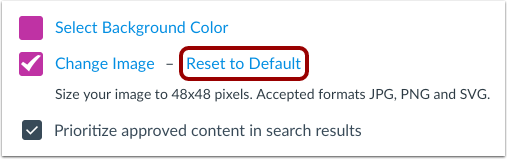
When Commons admins have enabled the Approved Content and used a branding image, they can use the Reset to Default link to reset the custom branding image back to the default approved content icon.
The Reset to Default link is only available when Approved Content option is enabled and a custom branding image is used. The default state displays a white checkmark icon for approved content.
New Gradebook
This feature has been changed from beta status to production ready. Details are included in the Beta Label Removals Update.
These features are used in conjunction with a feature option in Canvas. Please view the content below for additional details. For more information about LTI tools, please see the Canvas Release Notes FAQ.
Final Grade Override Percentage Scores
Summary
Percentages added as an override grade are displayed as the entered percentage and the grade associated with the grading scheme. The lower bound of the grading scheme is not factored into the percentage display.
Change Benefit
This change allows instructors to adjust the final grade using a specific percentage and have that percentage apply for the grade.
Affected User Roles & Behaviors
Instructors
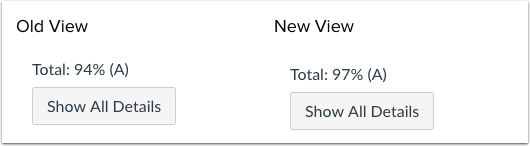
When the Final Grade Override feature option is enabled for a course, instructors can enter a specific percentage and have that percentage apply for the grade. Previously the percentage adjusted to the lower bound of the grading scheme.
For instance, if an instructor added a grade override as 97%, and the grade range for A was from 94% to 100%, the student would be shown the grade of A with 97%. Previously the A grade would have shown a 94%.
Feature Idea Contributions
Canvas features are always welcome to feedback. Product teams may make adjustments at any time via the Canvas Feature Idea process.
Final Grade Override SIS Sync
Summary
When the Final Grade Override feature option is enabled, any entries in the Override column display in SIS syncs.
Change Benefit
This change adds override grades to SIS syncs.
Affected User Roles & Behaviors
Instructors
Instructors can enable the Final Grade Override feature, add override grades, and view the override grades as part of an SIS sync. The final grade override is used in place of the calculated final grade/score if the Include Final Grade Overrides checkbox is selected.
Feature Idea Contributions
Final Grade Override Data should Export to SIS
Canvas features are always welcome to feedback. Product teams may make adjustments at any time via the Canvas Feature Idea process.
Notifications
Content Link Error
Location to Enable Feature | Notifications |
Configuration Details | Content Link Error |
Affected Canvas Areas | Notifications |
Affects User Interface | Yes |
Affected User Roles | Instructors |
Summary
The Notifications page includes a new alert for instructors to be notified about broken links in a course.
Change Benefit
This change allows instructors to be notified about broken links via notifications when they are accessed by students in the course.
Affected User Roles & Behaviors
Instructors
If instructors want to be notified of broken links in their course, instructors can visit their Notification Preferences page and select the Content Link Error notification. Instructors are notified with both the location and content of the link error. The Notification default is set to daily delivery.
This notification is triggered in the following conditions:
- The link cannot be accessed by students because of a permission error
- The link is broken
- The link is unpublished
Deleted links are not included in this notification and can be validated using the Validate Links in Content option in Course settings.

Feature Idea Contributions
Better Feedback on Broken Links
Canvas Error Report - Send Broken Link errors to instructor
Canvas features are always welcome to feedback. Product teams may make adjustments at any time via the Canvas Feature Idea process.
SMS Message Content
Location to Enable Feature | Notifications |
Configuration Details | Cell Number (SMS) Notifications |
Affected Canvas Areas | Notifications |
Affects User Interface | No |
Affected User Roles | All Users |
Summary
Cellular (SMS) Notifications have been shortened to distribute one message about the related content. Additionally, content no longer includes direct URLs to access the content within the course.
Change Benefit
This change minimizes the number of text messages sent to a subscribed user.
Affected User Roles & Behaviors
All Users
Any user can select text messages as an option for receiving notification updates. However, notifications sent via text message have been shortened to minimize the number of messages a user receives.
Depending on the notification type, text messages include the following minimized content:
- Submission Graded: assignment name and score (if score is included in the notification)
- Assignment Created: course name and due date (if the assignment includes multiple due dates)
- New Discussion Entry: discussion topic and user name who posted the discussion reply
- New Announcement: announcement title
- Conversation Message: user name who sent the message
- Assignment Due Date Changed: assignment name and new due date
Users who prefer accessing the content directly should consider accessing the Canvas apps and enabling push notifications.
Feature Idea Contributions
Canvas features are always welcome to feedback. Product teams may make adjustments at any time via the Canvas Feature Idea process.
Quizzes.Next
These features are used in conjunction with an external tool (LTI) in Canvas. Please view the content below for additional details. For more information abo