Upcoming Canvas ChangesInternet Explorer 11: August 3On August 3, Internet Explorer 11 will no longer be supported as a Canvas browser. New Gradebook: January 18On 18 January 2020, the existing Canvas Gradebook will be replaced with the New Gradebook. For more information, please see Upcoming Canvas Changes.
In this Canvas release (May 11), instructors enrolled in courses associated with a trust account can copy those courses using the Course Import Tool.
Feature Options
- The Canvas Parent feature option has been removed from Canvas.
- For institutions using the New Gradebook, Final Grade Overrides are displayed in the Student Context Card.
External Tools (LTI)
- For institutions using the Quizzes.Next LTI, the Canvas beta environment supports most Quizzes.Next features.
Release notes also include API updates and fixed bugs.
Release notes describe upcoming Canvas functionality and are subject to change. |
Feature OptionsThe following feature options are addressed in this release: - Account: Canvas Parent (removed)
- Course: Final Grade Override
|
Release Notes Change Log
BACK TO TABLE OF CONTENTS
Account Settings
Canvas Parent Feature Option Removal
Affected Canvas Areas | Account Settings - Feature Options |
Beta/Test Environment Support | Yes |
Permissions | Feature Options - enable / disable |
Affects User Interface | Yes |
Affected User Roles | Admins |
Feature Enhancement Ideas | Existing Account Settings feature ideas |
Specified Tag for Feature Ideas | Account Settings |
Summary
The Canvas Parent feature option has been removed from Canvas. Functionality has been replaced by pairing codes.
Change Benefit
This change allows admins to not have to control access to the Canvas Parent app, as the feature option no longer manages access. If a user has an observer account, that observer can access the Canvas Parent app.
Affected User Roles & Behaviors
Admins
The Feature Options tab in Account Settings no longer includes the Canvas Parent feature option. Users can only access the Canvas Parent app if they have an observer account and have a pairing code. For more information about pairing codes, please see the Pairing Codes - Frequently Asked Questions PDF.
Previously, the Canvas Parent app operated on a platform that allowed any user to create an account and link to a student if the user had the student’s credentials.
Course Import
Trust Account Course Copy
Location to Enable Feature | Course Import |
Configuration Details | Trust Account (contact Customer Success Manager) |
Affected Canvas Areas | Course Import |
Beta/Test Environment Support | Yes |
Permissions | Course Content - add / edit / delete |
Related APIs | Content Migrations API |
Affects User Interface | Yes |
Affected User Roles | Instructors |
Feature Enhancement Ideas | Existing Course Import feature ideas |
Specified Tag for Feature Ideas | Course Import |
Summary
Instructors enrolled in courses associated with a trust account can copy those courses using the Course Import Tool.
Change Benefit
This change allows instructors to copy courses where they are enrolled from another account. This option is currently limited to accounts located in the same region.
Affected User Roles & Behaviors
Instructors
Instead of creating two separate accounts and merging them together, a trust relationship allows separate Canvas accounts to share user identities, so a user can log in to one account and access courses from both accounts. When an instructor accesses a course that is associated with a trust account, that course can be copied in the Course Import Tool. Courses available for course copy are based strictly on enrollment; courses do not provide any indication that they are associated with a trust account.
The Course Import Tool includes the same functionality as with other courses; if the course account contains fewer than 100 courses, the Course Copy option displays a drop-down of all available courses that can be copied. Accounts with over 100 courses display a search menu.
New Gradebook
Student Context Card and Final Grade Override
Summary
Final Grade Overrides are displayed in the Student Context Card.
Change Benefit
This change allows Final Grade Overrides to be included in the Student Context Card.
Affected User Roles & Behaviors
Graders
When a course has enabled the Final Grade Override option in the New Gradebook Setting Menu, and the Student Context Card feature option is also enabled, clicking a student’s name in the New Gradebook (or any course location with a link to a student’s name) displays the override grade as the student’s grade. When an override is not set for a student, the Student Context Card displays the final grade.
Quizzes.Next
Beta Environment Support
Location to Enable Feature | Quizzes.Next |
Configuration Details | Quizzes.Next LTI |
Affected Canvas Areas | Quizzes.Next |
Beta Environment Support | Available after the 2019-05-11 Canvas release |
Affects User Interface | No |
Affected User Roles | Instructors, Admins (+ other users allowed Beta access) |
Feature Enhancement Ideas | Existing quizzes.next feature ideas |
Specified Tag for Feature Ideas | quizzes.next |
Summary
The Canvas beta environment supports most Quizzes.Next features. However, reports, statistics, and item bank search and tagging are not supported.
Change Benefit
This feature allows users to view most Quizzes.Next features in the Canvas beta environment instead of waiting for production releases.
Affected User Roles & Behaviors
Instructors, Admins
Instructors, admins, and other users with access can create, manage, and take Quizzes.Next assessments in the Canvas beta environment. The beta environment is refreshed every Saturday with data from the production environment.
If data changes are made directly in the beta environment, please be aware of the following exceptions:
- Quizzes.Next reports, statistics, item bank search, and item bank tagging are not currently supported in the beta environment.
- Outcomes added to Canvas in the beta environment after the beta refresh will not display in the Quizzes.Next beta environment. Outcomes must be added to the production environment to display in the beta environment.
BACK TO TABLE OF CONTENTS
Files
Restricted Access Permissions Interface
Location to Enable Feature | N/A |
Configuration Details | Files |
Affected Canvas Areas | Files |
Beta/Test Environment Support | Yes |
Permissions | Course Files - add / edit / delete |
Related APIs | Files API File Uploads API Page |
Affects User Interface | Yes |
Affected User Roles | Instructors |
Summary
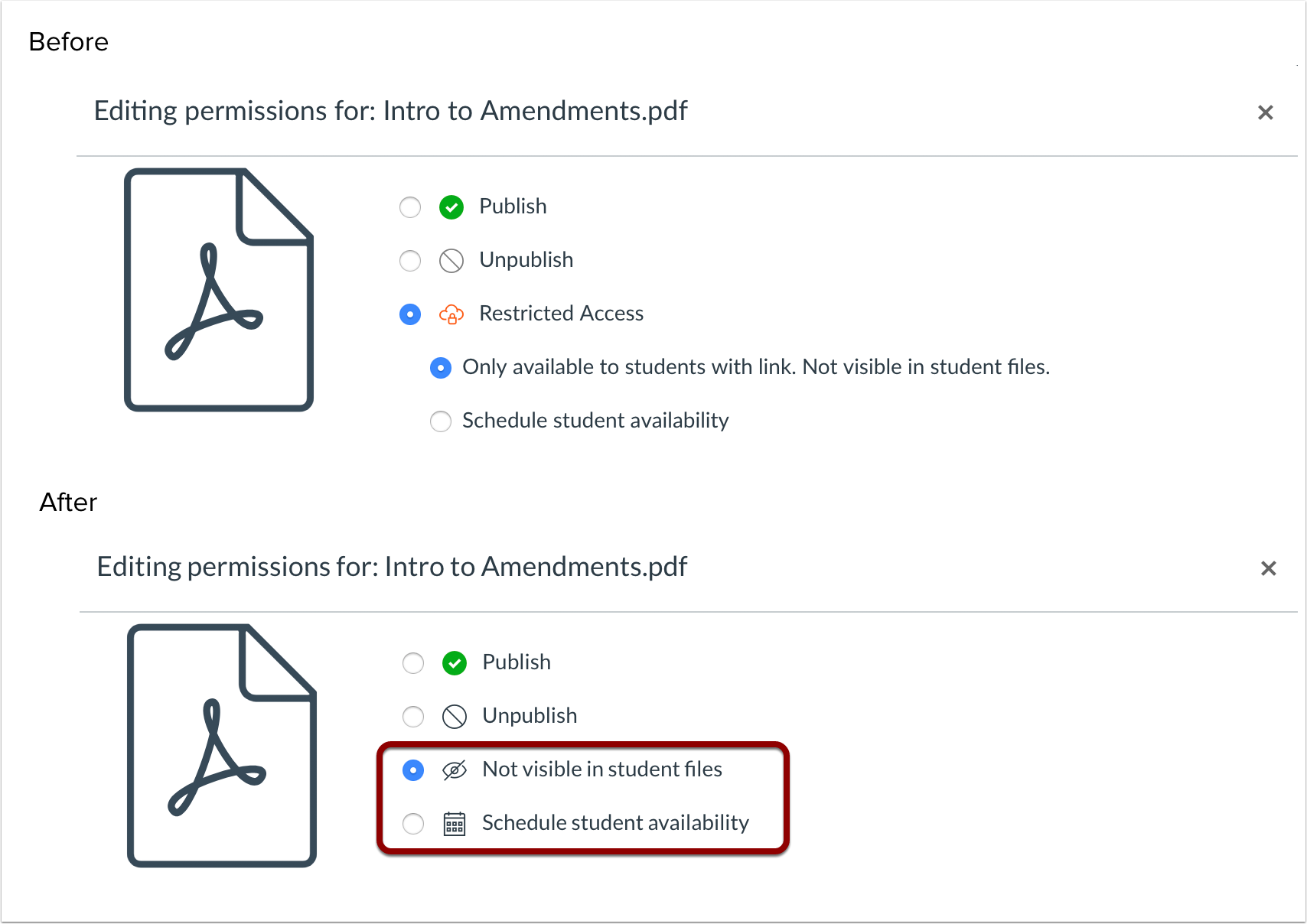
The Restricted Access files interface has been simplified in page design and includes individual icons for each permission type. However, no functionality has been affected.
Change Benefit
This change more clearly defines the two options offered for files set with restricted access.
Affected User Roles & Behaviors
Instructors
When permissions for a file are modified, the Files menu displays the Permissions window and includes a simplified interface. The Restricted Access options have been streamlined into two separate options and include individual icons for each permission type.
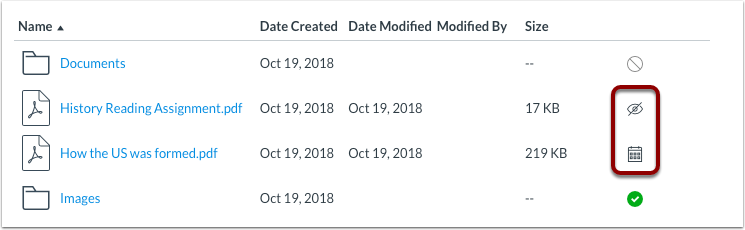
The icon for the specified option is reflected in the Files list.
BACK TO TABLE OF CONTENTS
API
API Change Log
Adjustments have been made to the following APIs as noted in the API Documentation change log:
Assignments API
SIS Imports API
Users API
BACK TO TABLE OF CONTENTS
Accessibility
Global Navigation
The Inbox counter can be read by screen readers.
Syllabus
Syllabus items can be identified by screen readers.
API
Update Authentication Provider API
The Update Authentication Provider API includes the required auth_type parameter.
Explanation: When a user viewed the Update Authentication Provider API, the example call did not include the required auth_type parameter. Canvas code has been updated to include the missing parameter in the example.
Assignments
External Tool (LTI) Submissions
When four or more external tools are enabled for a course, External Tool assignments can be submitted using the More tab.
Explanation: When an assignment was submitted using an external tool (LTI), and four or more LTI tools were enabled for the course, submitting the assignment using the More tab would not submit the assignment. Canvas code has been updated to correct behavior when uploading an assignment using the More tab.
Blueprint Courses
Rich Content Editor and File Links
File paths created in pages by linking files from the Rich Content Editor are retained in course copies.
<P style="margin-top: 0p