Upcoming Canvas ChangesCanvas Release Schedule Adjustments: July 15Starting July 15, the Canvas Release Schedule will be adjusted to support two-week deploys and monthly releases every third Saturday of the month. For more information, please see Upcoming Canvas Changes.
In this Canvas release (June 22), when students are not allowed to edit or delete their own discussion posts, the Settings menu for a discussion shows those features have been disabled. Canvas and Instructure logos have been updated throughout the interface.
Third-party platform providers can create external tools using IMS Global LTI 1.3 and LTI Advantage.
Feature Options
- For institutions using the New Gradebook, the View Filter and Student Name Secondary Info both include options to display student group data.
External Tools (LTI)
- For institutions using Commons, the Flickr image search has been replaced by Unsplash, and the empty page messages have been updated for consistency and clarity.
- For institutions using Quizzes.Next, instructors can give students extra time or attempts for an individual assessment, and the Question Navigator displays the assessment point total.
Release notes also include API updates and fixed bugs.
Release notes describe upcoming Canvas functionality and are subject to change. |
Feature OptionsThe following feature options are addressed in this release: |
Release Notes Change Log
BACK TO TABLE OF CONTENTS
Commons
Unsplash Image Search
This feature is used in conjunction with an external tool (LTI) in Canvas. Please view the content below for additional details. For more information about LTI tools, please see the Canvas Release Notes FAQ.
Location to Enable Feature | Commons LTI |
Configuration Details | Commons LTI |
Affected Canvas Areas | Commons LTI Any area with imported content |
Beta/Test Environment Support | Functionality affects content in the beta environment only; New/updated features not available until production release |
Permissions | Course Content - add / edit / delete Discussions - view Assignments and Quizzes - add / edit / delete |
Affects User Interface | Yes |
Affected User Roles | Instructors, Admins |
Feature Enhancement Ideas | Existing Commons feature ideas |
Specified Tag for Feature Ideas | Commons |
Summary
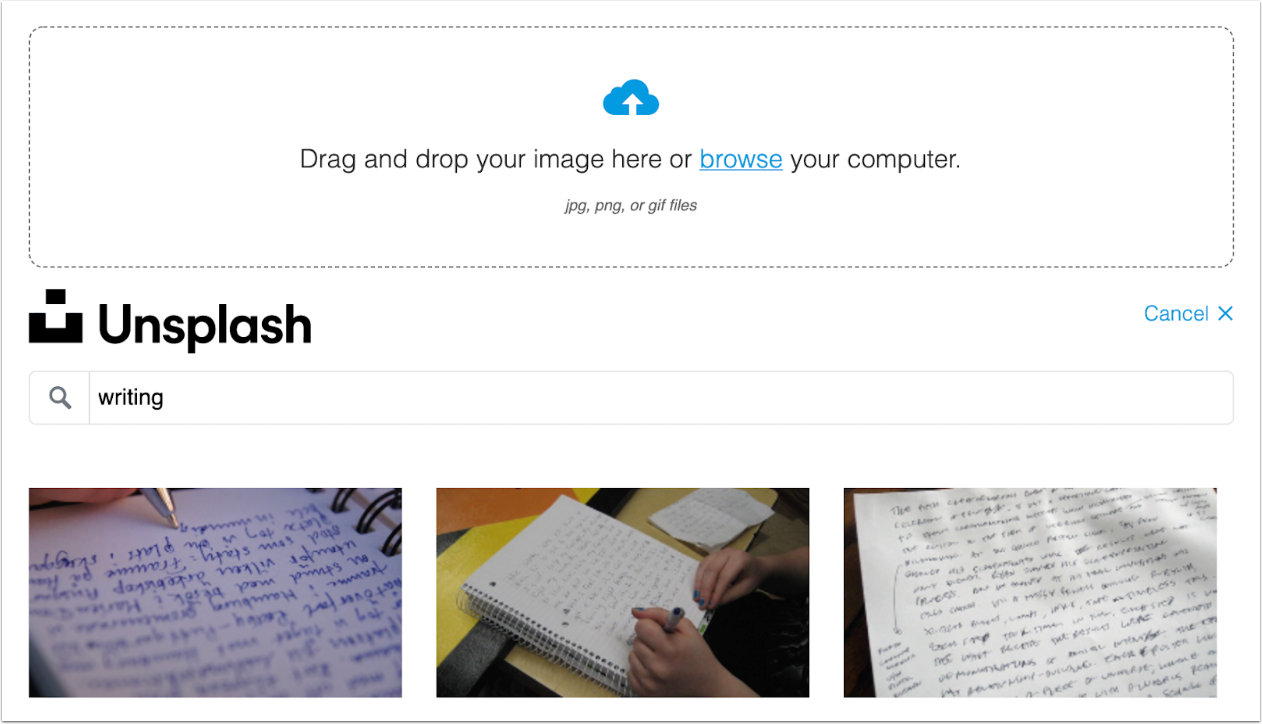
The Flickr image search has been replaced by Unsplash.
Change Benefit
This change replaces Flickr with Unsplash, which offers high-quality, safe images for use as resource thumbnails in Commons.
Affected User Roles & Behaviors
Instructors and Admins
When instructors and admins share a new resource or edit an existing resource, they can select an image to display as a thumbnail for their resource using Unsplash. Unsplash image search replaces the existing Flickr search functionality. The Flickr logo has been removed from the interface. Existing images imported from Flickr will not be affected.
New Gradebook
Student Group Data
This feature is used in conjunction with an existing feature option in Canvas. Please view the content below for additional details. For more information about feature options, please see the Canvas Release Notes FAQ.
Summary
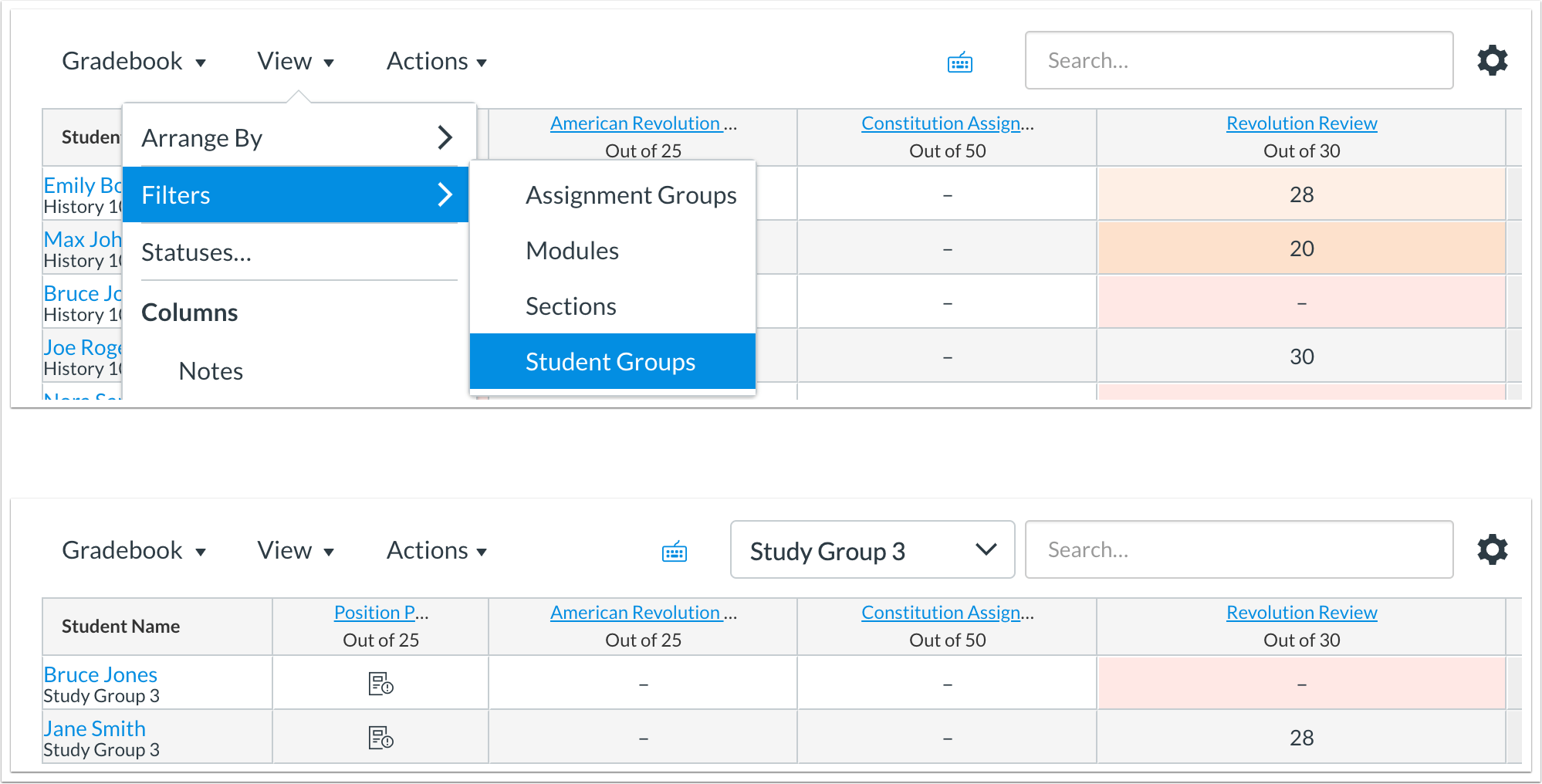
The New Gradebook View Filter and Student Name Secondary Info both include options to display student group data.
Change Benefit
This change allows instructors to filter the New Gradebook by student groups and view student name secondary info by group name.
Affected User Roles & Behaviors
Instructors
When viewing the View menu in the New Gradebook, the Filter option includes a Student Groups link. Instructors can select this option to filter the New Gradebook by student groups. Groups are displayed hierarchically.
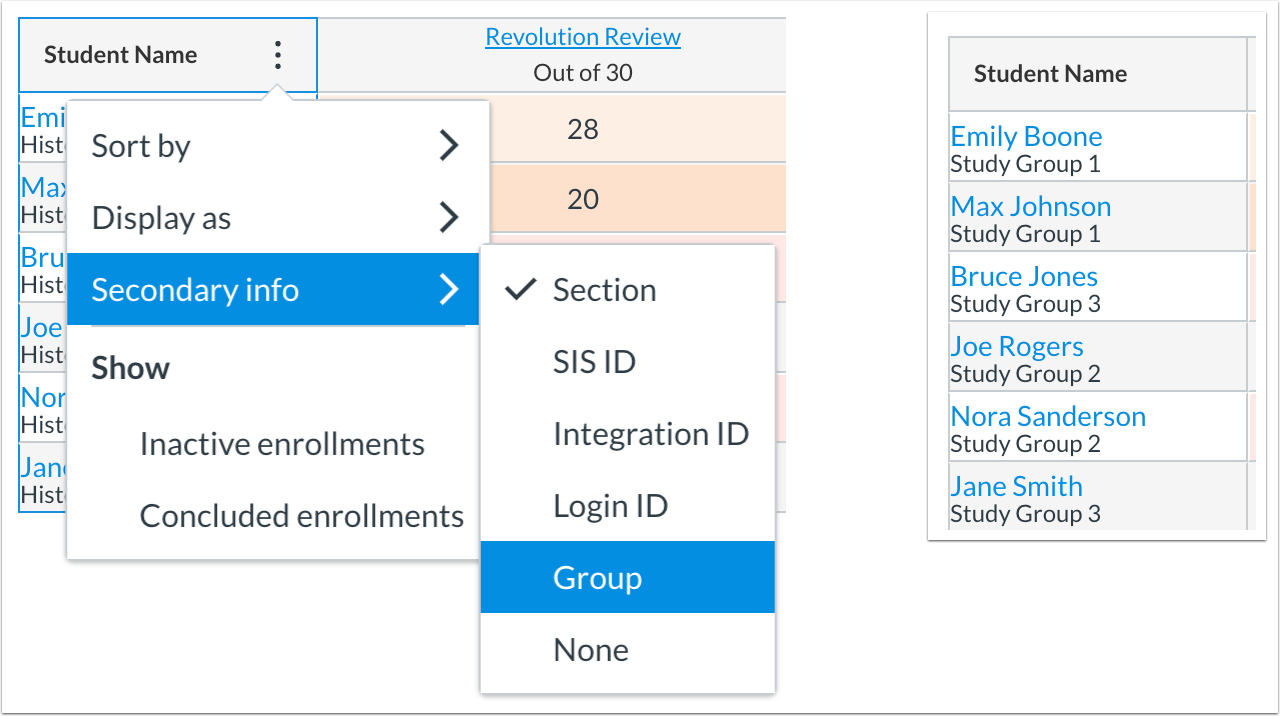
The Student Names column can also display group names as secondary info. The Groups option is located in the Secondary Info option.
Quizzes.Next
Assessment-Level Accommodations
This feature is used in conjunction with an external tool (LTI) in Canvas. Please view the content below for additional details. For more information about feature options, please see the Canvas Release Notes FAQ.
Location to Enable Feature | Quizzes.Next Moderate Page |
Configuration Details | Quizzes.Next |
Affected Canvas Areas | Quizzes.Next |
Beta/Test Environment Support | Yes (after production release) |
Affects User Interface | Yes |
Affected User Roles | Instructors, Students |
Feature Enhancement Ideas | Existing quizzes.next feature ideas |
Specified Tag for Feature Ideas | quizzes.next |
Summary
Instructors can provide accommodations to students in an individual assessment.
Change Benefit
This change allows instructors to give students extra time or attempts for a specific assessment without applying the accommodation to all assessments in a course.
Affected User Roles & Behaviors
Instructors
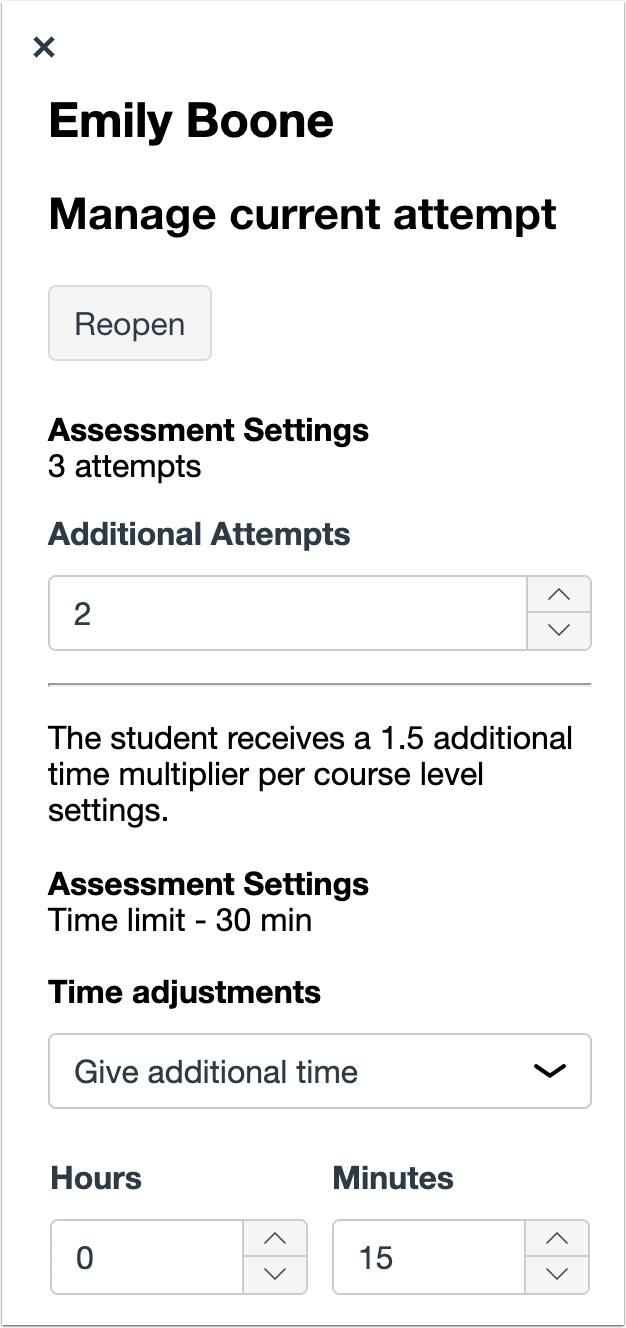
Instructors can provide students with assessment-level accommodations of additional time or attempts. These features operate in addition to the existing course-level accommodation of giving extra time to a student. Assessment-level accommodations cannot reduce the effect of course-level accommodations.
Assessment-level accommodations can be managed by opening the Moderation panel for any student on the Moderate page. From the Moderation panel, instructors can enter the number of additional attempts, give the student additional time, or remove the time limit completely.
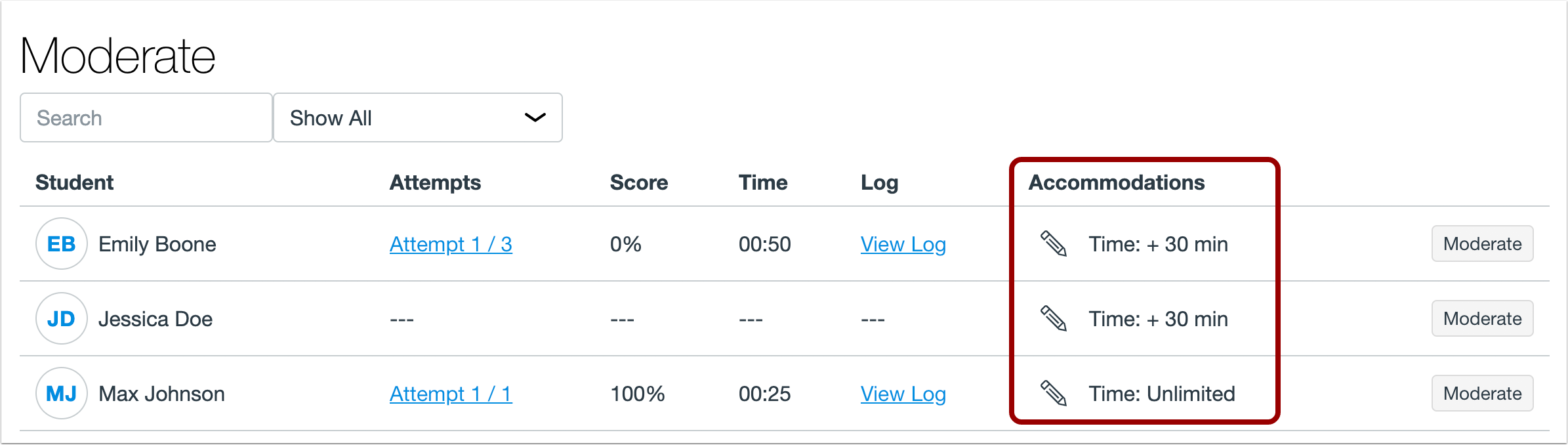
The course-level accommodations that were previously managed from the Moderation panel have been moved to the Accommodations column and can be accessed by clicking the Edit icon. The Accommodations column also displays the cumulative effect of course-level and assessment-level time accommodations that apply to a student.
Students
If an assessment-level accommodation has been applied to a student, the student will not see any type of notification about the accommodation. However, they can view the effect of the accommodation in their assessment time limit and/or attempt total.
Assessment Point Total
This feature is used in conjunction with an external app (LTI) in Canvas. Please view the content below for additional details. For more information about feature options, please see the Canvas Release Notes FAQ.
Location to Enable Feature | Assignments |
Configuration Details | Quizzes.Next |
Affected Canvas Areas | Quizzes.Next |
Beta/Test Environment Support | Yes |
Affects User Interface | Yes |
Affected User Roles | Instructors |
Feature Enhancement Ideas | Existing quizzes.next feature ideas |
Specified Tag for Feature Ideas | quizzes.next |
Summary
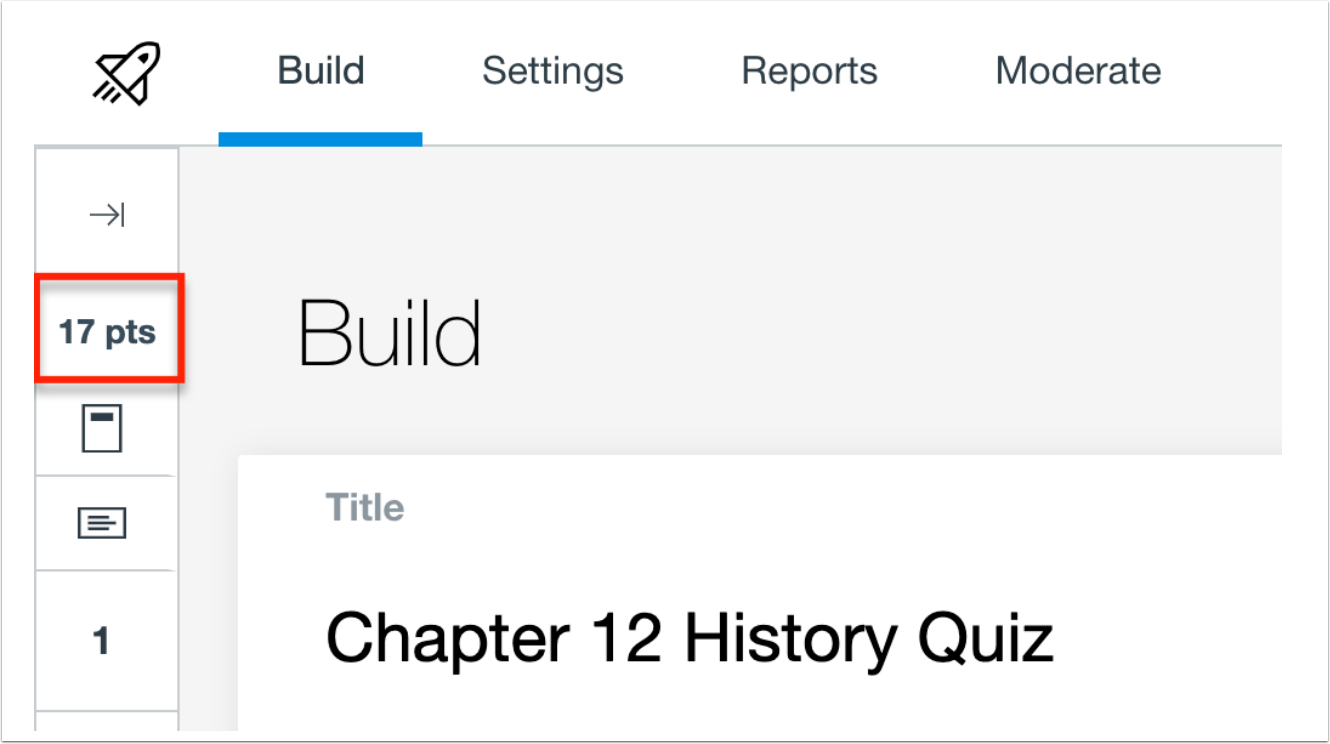
The Question Navigator displays the assessment point total.
Change Benefit
This change allows instructors to view the point total for an assessment from the Build page.
Affected User Roles & Behaviors
Instructors
Instructors can view the point total for an assessment in the Question Navigator.
BACK TO TABLE OF CONTENTS
Canvas Interface
Branding Update
Location to Enable Feature | N/A |
Configuration Details | N/A |
Affected Canvas Areas | Locations with default Canvas branding |
Beta Environment Support | Yes |
Affects User Interface | Yes |
Affected User Roles | All Users |
Summary
The Canvas and Instructure logos have been updated throughout the interface.
Change Benefit
This change promotes consistency with updated Canvas and Instructure branding.
Affected User Roles & Behaviors
All Users
The Canvas web interface displays updated logos for Canvas and Instructure. These icons may display in the Canvas Login page and the Dashboard page footer.
Commons
Empty Page Message Update
This feature is used in conjunction with an external tool (LTI) in Canvas. Please view the content below for additional details. For more information about LTI tools, please see the Canvas Release Notes FAQ.
Location to Enable Feature | Commons LTI |
Configuration Details | Commons LTI |
Affected Canvas Areas | Commons LTI Any area with imported content |
Beta/Test Environment Support | Functionality affects content in the beta environment only; New/updated features not available until production release |
Permissions | Course Content - add / edit / delete Discussions - view Assignments and Quizzes - add / edit / delete |
Affects User Interface | Yes |
Affected User Roles | Instructors, Admins |
Summary
The empty page messages have been updated in Commons for consistency and clarity. Empty page messages display when no search results are found or if a page in Commons has no content to display.
Change Benefit
This change improves the consistency of page messages throughout Commons.
Affected User Roles & Behaviors
Instructors and Admins
When users view pages in Commons that have no content to display, such as Shared, Imported, Updates, and Favorites, or if a user’s search yields no search results, the empty page messages and images is more consistent.
Discussions
Reply Settings Interface Change
Location to Enable Feature | Discussions |
<SPAN |





.png)