You can view upcoming assignments, discussions, quizzes, and events for each of your subjects in the Homeroom Schedule or the To Do List.
Note: If the Schedule tab does not display in your homeroom or subject, it has been hidden by your instructor.
View Homeroom Schedule
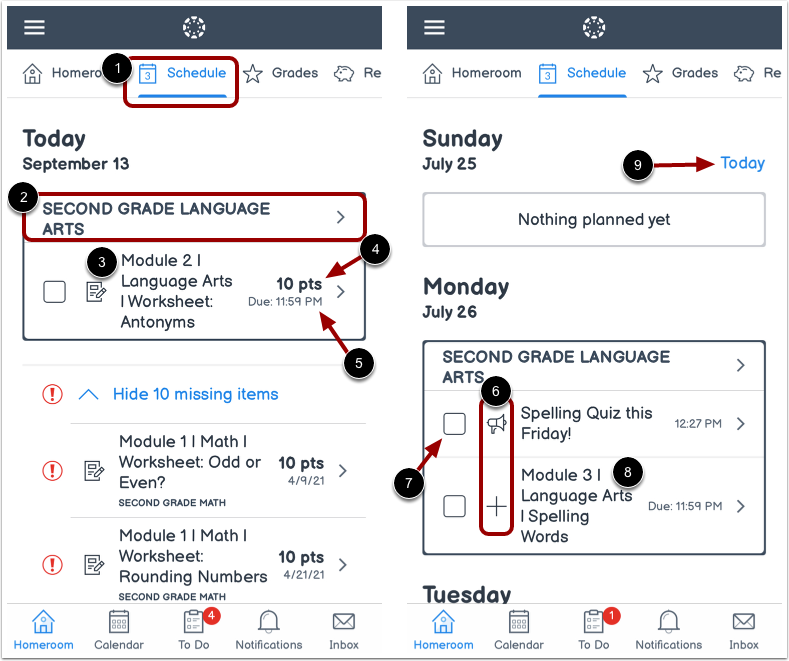
In the Schedule tab [1], you can view various action items for all of your subjects by date.
Each item displays the subject name [2], item name [3], number of points (if points have been assigned) [4], and the due date [5].
Each item also displays an icon to differentiate between different assignment types and other items in the Schedule [6].
When you submit an online assignment, the item is automatically marked as completed. To manually mark non-submission items as complete, click the item's checkbox [7].
To view item details, click the name of the item [8].
To return to the current date, tap the Today link [9].
Open To Do List
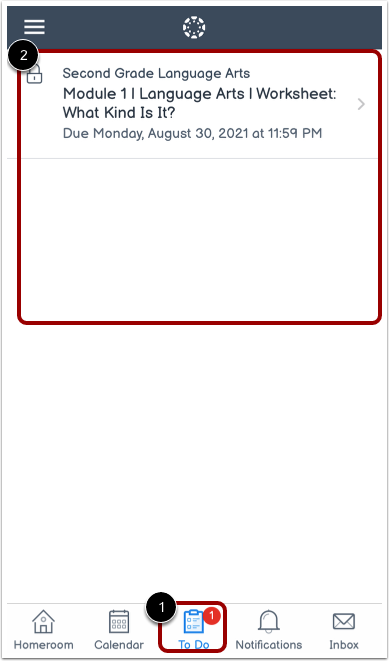
You can view upcoming tasks in the To Do List.
To open your To Do List, click the To Do icon [1]. Then view the items [2].