We’re excited to share that beginning May 4, admins can add custom JavaScript (JS) and CSS directly within the Modern Storefront.
We’ve heard from many of you that customization is essential to how you engage learners and represent your brand. With this update, admins have greater flexibility to create fully branded, dynamic storefront experiences tailored to their specific needs, without relying on the Legacy Storefront.
What’s New
This release introduces:
- Custom JS and CSS support – Add and manage custom scripts and styling directly within the Modern Storefront.
- Custom script activation – Enable custom script usage with the new “Load custom scripts on modern storefront” setting at the parent catalog level.
- Updated ‘Branding’ tab – Manage custom JavaScript and CSS from the updated Branding page in the root account (formerly Email Branding).
By adding support for existing custom JS and CSS use cases in the Modern Storefront, this update gives admins greater control over branding and functionality, and enables them to make a smooth transition away from the Legacy Storefront.
Why We Built This Update
Until now, moving to the Modern Storefront meant giving up the ability to use custom scripts and styling. This created a tough choice between modernization and flexibility.
We built this update to remove that barrier.
With this update, you can take advantage of the Modern Storefront’s improved design and performance while continuing to deliver the tailored, high-impact experiences your learners expect. This also supports our long-term plan to transition away from the Legacy Storefront so we can continue investing in a more modern, flexible experience for all Catalog customers.
Key Benefits
Bring Your Brand to Life
Create a storefront experience that reflects your institution’s identity with full control over styling and functionality.
Move Forward with Confidence
Reduce reliance on legacy tools and transition to the Modern Storefront without losing the customization your team depends on.
Customize with Flexibility
Easily manage when and how scripts are applied to meet your specific needs.
Create More Engaging Experiences
Deliver a more dynamic, interactive storefront to help drive learner engagement and enrollment.
How to Enable Custom JS and CSS
Getting started is simple:
- From the Admin view, navigate to the Catalogs page and click on your Root Account:

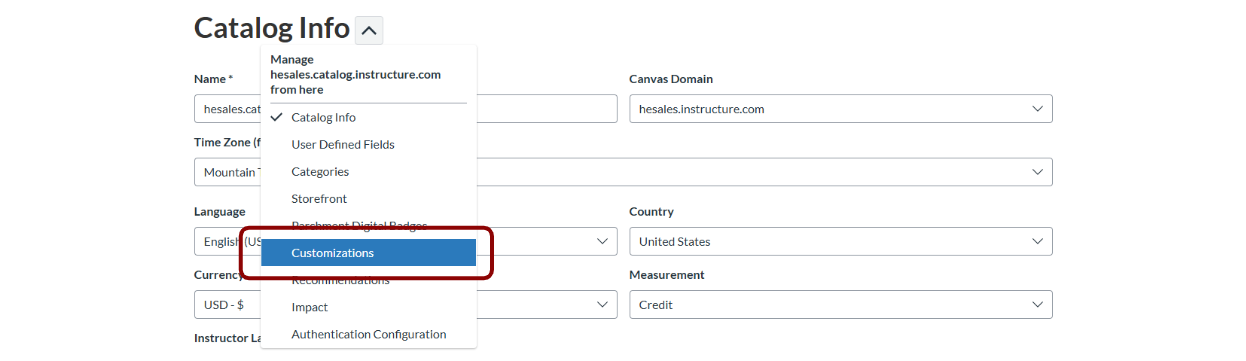
2. On that Root Account page, open the sub-menu next to the Catalog Info tab, and select the Customizations tab, which defaults to the Branding page:
3. On the Branding page, add your custom CSS and custom JS in the respective sections:
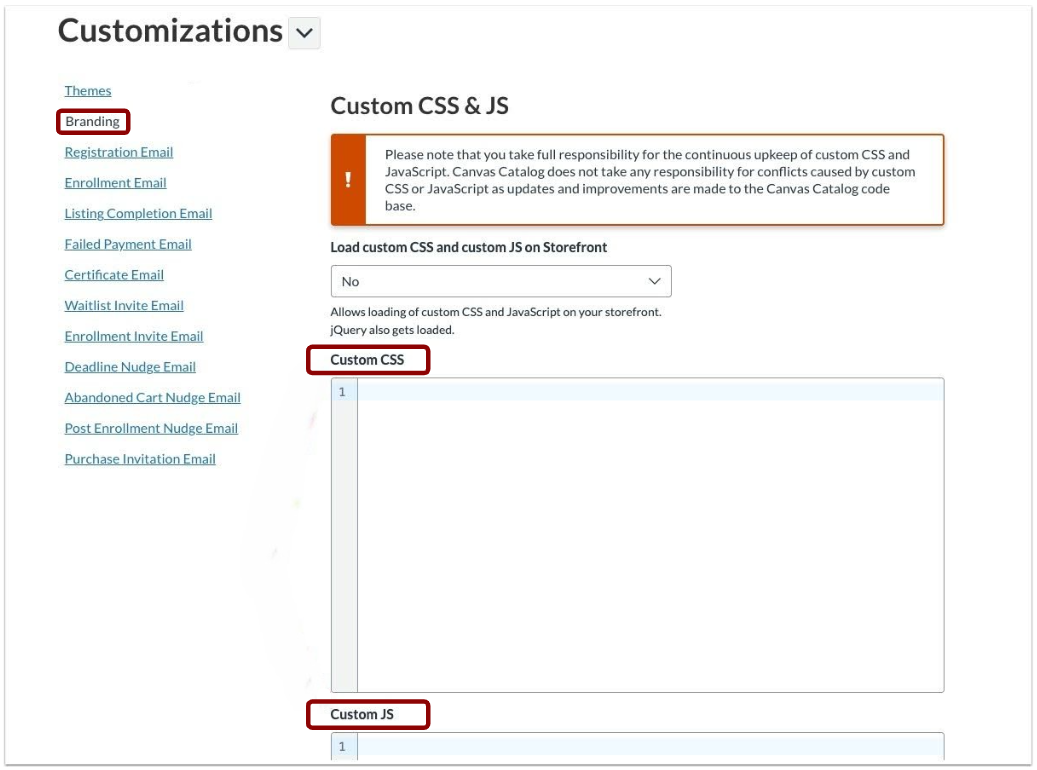
4. Set the option ‘Load custom CSS and custom JS on Storefront’ to Yes:

5. Save to publish your changes.
Your customizations will be reflected in your Modern Storefront experience.
What’s Next
This release is a major step forward for Canvas Catalog. With customization coming to the Modern Storefront, more institutions will be able to confidently transition away from the Legacy Storefront experience as we prepare to sunset it in 2027.
We will continue investing in enhancements that expand flexibility, improve performance, and make it easier to deliver engaging storefront experiences.
Custom JavaScript and CSS support in the Modern Storefront is available since May 4. For more information, check out the Release Notes.
Release Notes