Canvas on iOS 26: Experience "Liquid Glass"
We’re excited to unveil a fresh look for the Canvas mobile apps on iOS 26! This update embraces Apple’s new Liquid Glass design system, bringing a more modern, fluid, and immersive feel to our Learner, Educator, and Parent experiences.
What’s Changing?
The core of this redesign is the Liquid Glass effect—a translucent material that lets your background shine through while keeping controls clear and focused.
- Floating Toolbars: We’ve removed explicit toolbar borders. Titles, subtitles, and buttons now "hover" over your content, which beautifully fades out behind them.
- Dynamic Navigation: To give you more room for what matters, navigation titles now intelligently align to the side when space is tight.
- Floating Tab Bars: On iPhone, your tab bar is now a sleek, floating capsule. On iPad, look for the new top-screen tab bar and floating sidebar.
- System-Native Menus: We’ve swapped custom bottom sheets for native iOS 26 menus, making the app faster and more intuitive.
Personalize Your Canvas
Learners, educators and parents can now take advantage of system-wide customization.
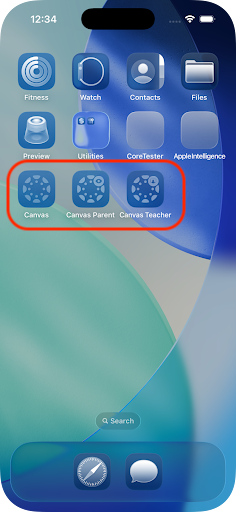
Your Canvas app icons now support Liquid Glass layers and can be tinted to match your personal wallpaper or device theme. |
|
|---|
While the look is new, our commitment to accessibility remains. We’ve ensured all new components work perfectly with VoiceOver and maintain high contrast for easy reading.