Dear Parchment Digital Badges Community,
We are excited to introduce a change many of you have been asking for. Starting from January 26 in Beta and moving to Production on February 9, your grading setup in Canvas will power badge awarding in Parchment Digital Badges This ensures that badges are issued according to the academic standards and requirements established by your institution and instructors.
Instructors spend time building fair, thoughtful grading models in Canvas. Until now, badge awarding did not always follow that structure. Manual triggers, misaligned thresholds, and lack of Letter Grade support made it harder than it should have been to connect grading with recognition.
With this Parchment Digital Badges update, we are closing that gap. Badge awarding now reflects your Canvas grading rules automatically. Whether you grade using points, percentages, or letter grades, badges will follow your setup with less configuration, more clarity, and greater academic alignment.
What’s New in Parchment Digital Badges:
1. Assignment-Based Awarding Now Reflects Canvas Grading
When you select an assignment as a badge requirement, Parchment Digital Badges reads the grading settings from Canvas and automatically sets the appropriate trigger type. If your Canvas grading settings change later, the system will prompt you with a Sync needed message so you can realign the badge configuration with one click.
The result: badge awarding now stays aligned with your gradebook, without manual intervention.
2. Full Support for Letter Grade Awarding
Badge awarding based on Letter Grades is now available. This applies in two ways:
- Assignment-based awarding: If your course uses a letter or GPA grading scheme, Parchment Digital Badges will present Letter Grade as the trigger type and allow you to choose a threshold like “B or higher.”
- Course-based awarding: Letter Grade is now available as a manual trigger option for final course grades.
This feature is especially helpful for programs that rely on GPA or credit-bearing assessments.
Why This Update Matters
Previously, instructors and badge issuers often had to guess how to configure badge triggers. This created several issues:
- Badge awarding sometimes happened too early or too late, or at all
- Letter Grade schemes were not supported
- Support teams had to troubleshoot mis-awards with screenshots and manual adjustments
This release directly connects your Canvas grading setup with badge awarding logic. Here's what it means:
For instructors and badge issuers:
- Less setup time
- Fewer configuration errors
- Predictable badge behavior tied to the gradebook
For institutions:
- Better alignment with academic policy
- Fewer support tickets
- Increased trust in digital credentials
For learners:
- They receive badges when they meet the grade requirement
- They avoid confusion
- They gain timely recognition
What You’ll See in the LTI
Automatic trigger type selection for assignments
When setting a badge requirement using an assignment, the trigger type is auto-filled based on Canvas grading settings
- The trigger type field is locked to prevent mismatches
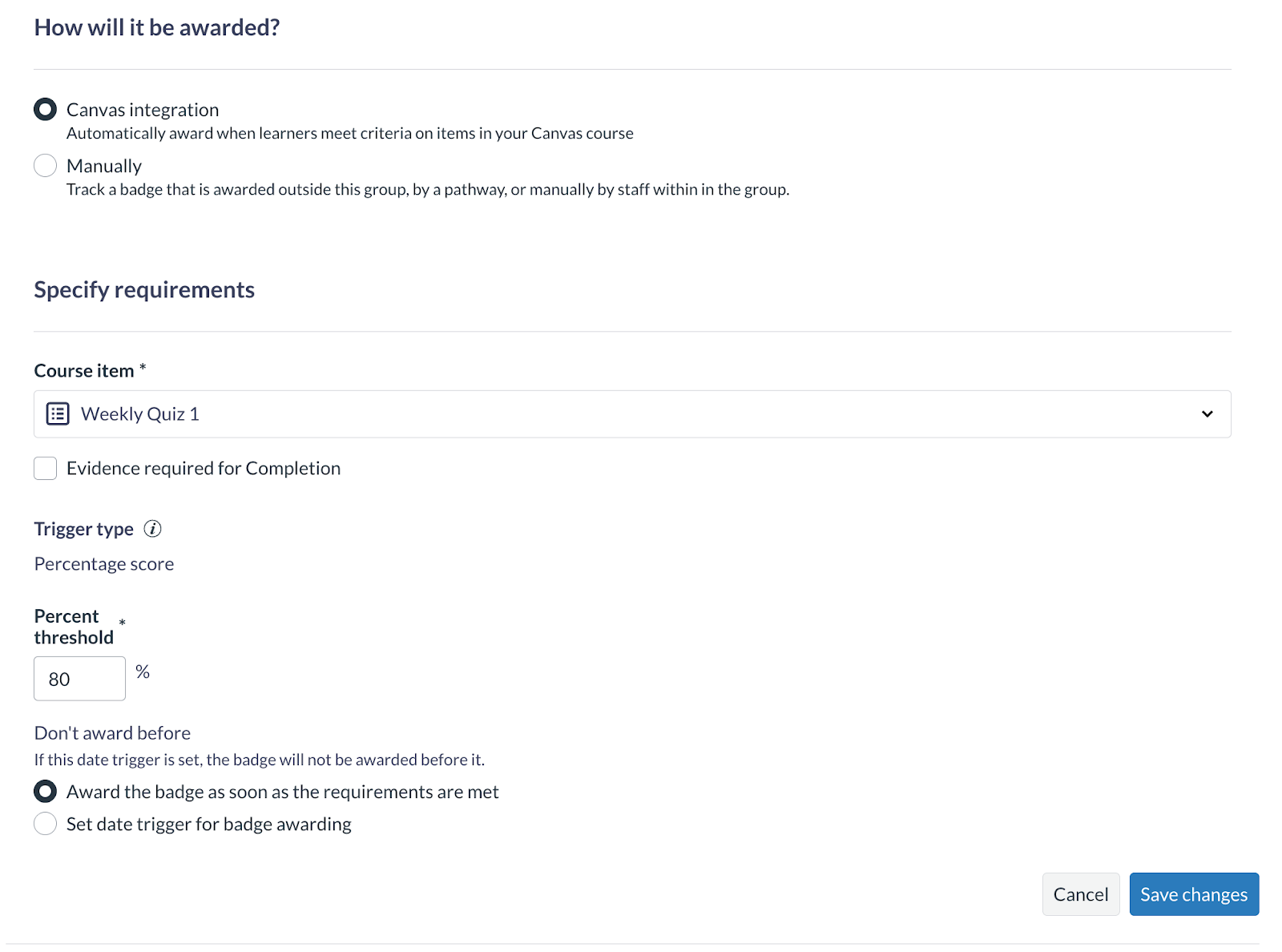
- An info message clarifies that the trigger is based on Canvas grading setting
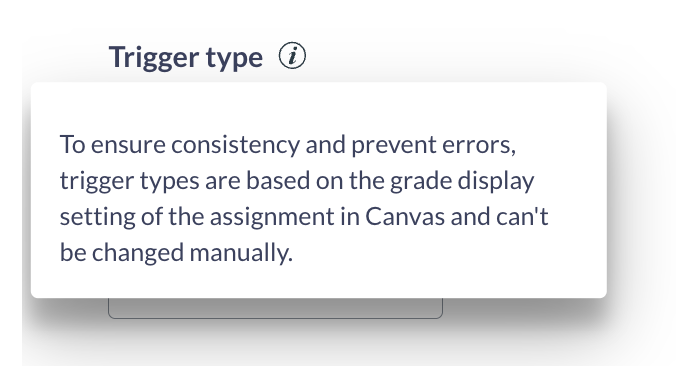
Letter Grade thresholds available where applicable
If your course uses a grading scheme, the Letter Grade trigger type becomes available. How this appears depends on the awarding method:
For assignment-based awarding:
- Parchment Digital Badges detects the assignment’s Display Grade As setting
- If the assignment is displayed as a Letter Grade or GPA, Letter Grade will be set as the trigger type automatically
- You’ll see a dropdown of letter thresholds from the Canvas grading scheme (e.g., A, B+, B, B–)
- The trigger type is locked to match the assignment’s grading model
For course-based awarding:
- You can manually select Letter Grade as the trigger type and choose the minimum grade required for awarding.
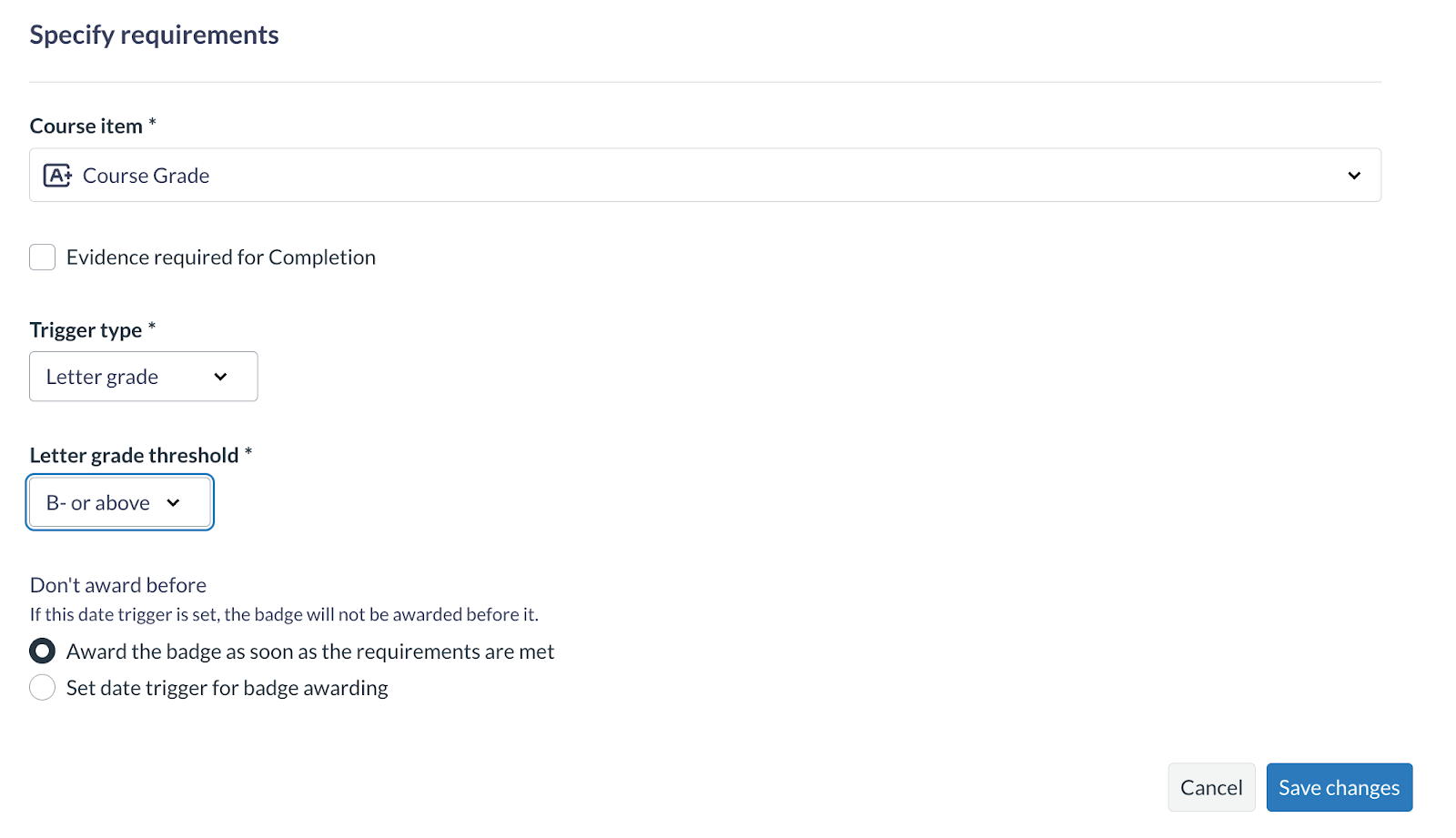
- While the trigger type is set manually, you will still receive a Sync needed prompt if the grading scheme changes and the selected threshold is no longer valid
This gives you flexibility to award based on either overall course grades or specific assignment performance while keeping logic tied to how grades are displayed in Canvas.
Sync needed prompts when Canvas grading changes
If grading settings change in Canvas after you’ve configured a requirement, you’ll see a Sync needed message in the following locations:
- The requirement edit panel
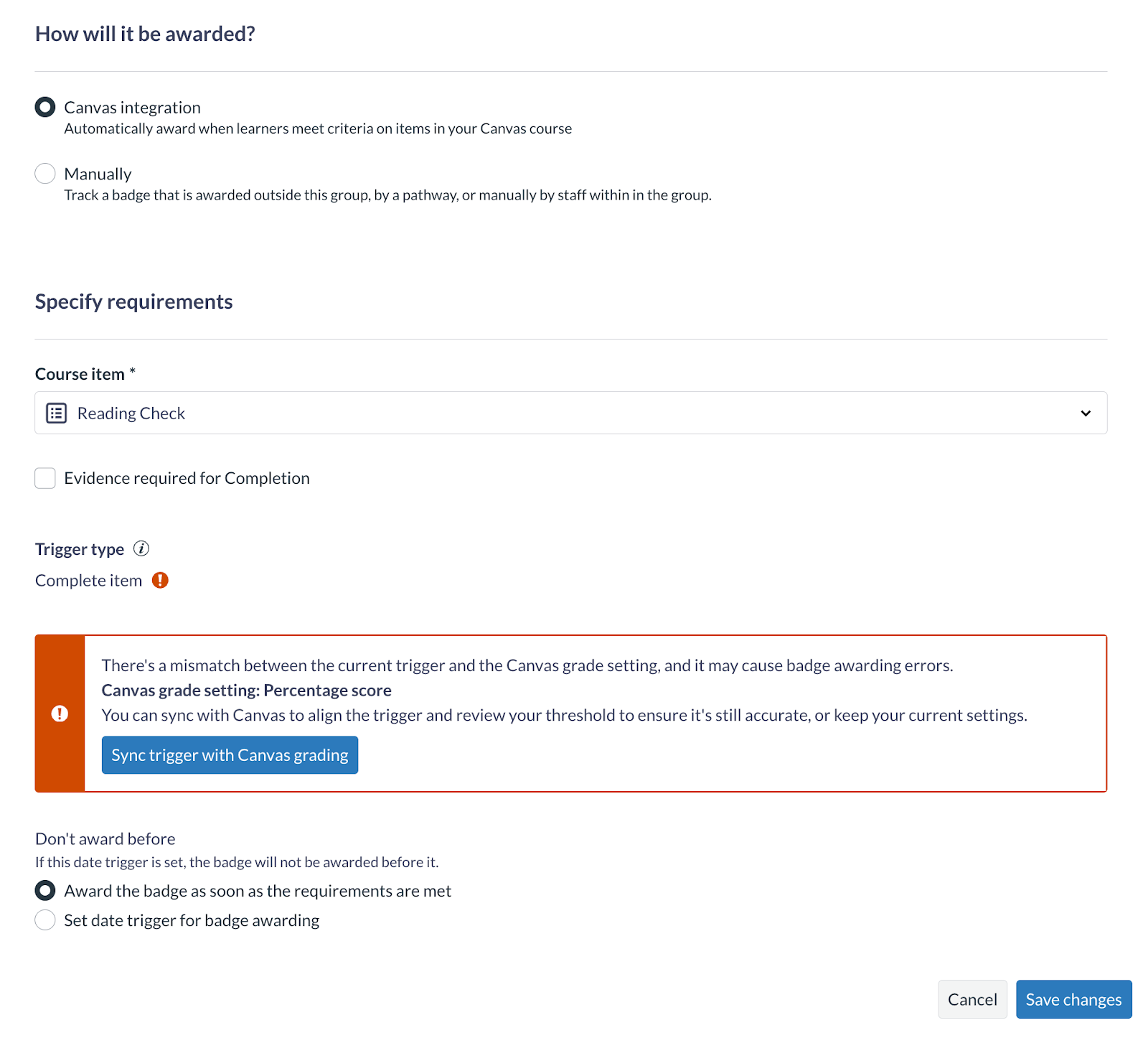

- The Canvas course badges view
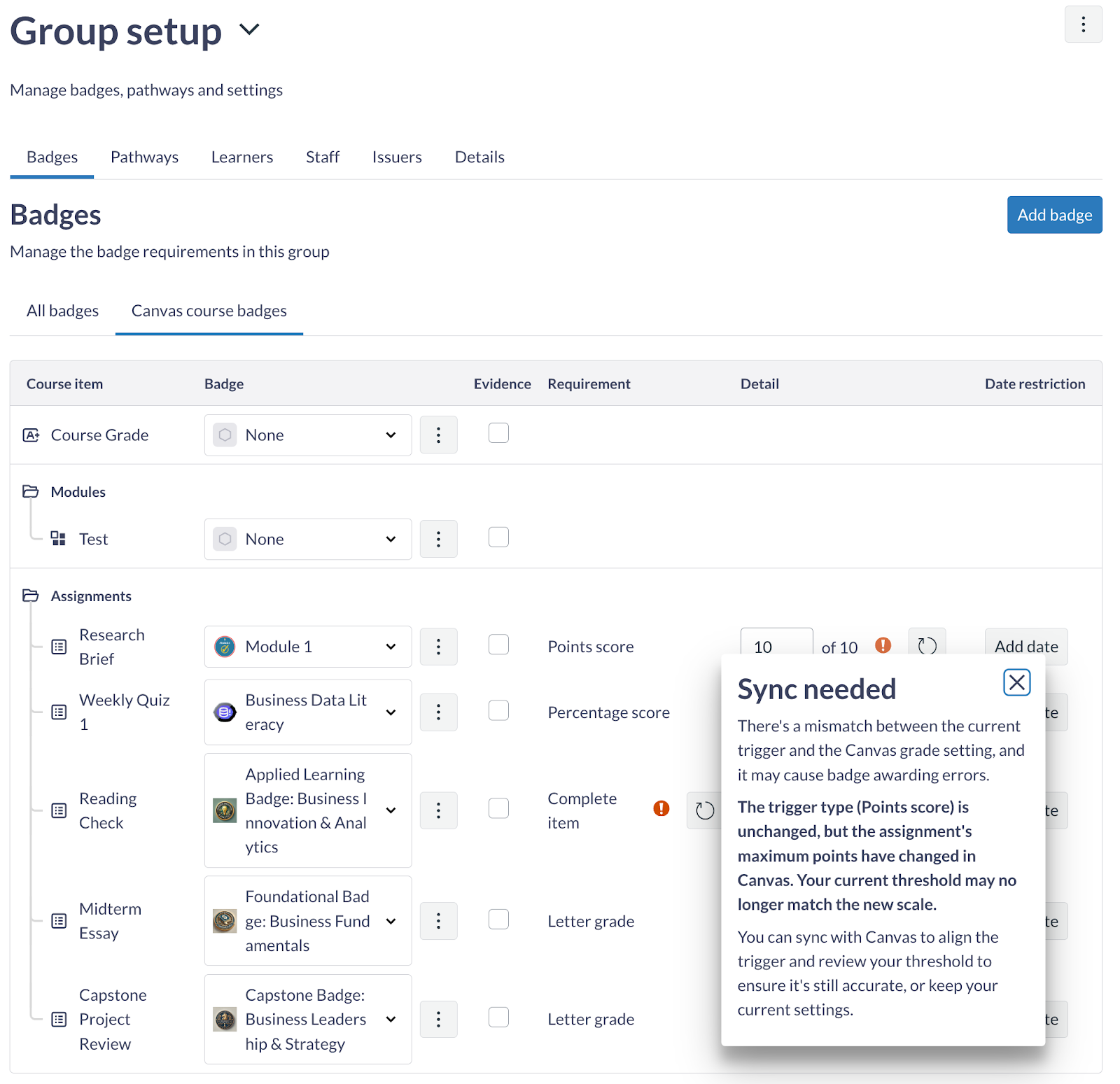
In some cases, you’ll also see a warning icon on the threshold field, which means the current threshold may no longer be valid in the updated grading context.
Sync will be required if:
- The assignment’s grading type changes
- The assignment’s maximum point value changes
- The course’s grading scheme changes and the selected letter threshold is no longer available
Clicking Sync with Canvas grading will:
- Refresh the grading context from Canvas
- Set the trigger type to match the updated assignment grading
- Convert the threshold to an equivalent value based on the new grading model (for example, converting 60% to 6 points if the max is now 10)
- Show the updated trigger and threshold fields, which you can adjust before saving
What happens if you skip syncing
If you ignore the Sync needed prompt:
- Badge awarding will continue based on the previous configuration
- In some cases, it may stop awarding entirely if the grading model no longer matches
- Canvas grades and badge outcomes may drift apart
We recommend completing the sync step when prompted to keep badge logic accurate and aligned.
Note: Learners do not need to take any action. This update affects only the issuing side.
Rollout timeline
These changes will be available according to the following schedule:
- Beta: January 26, 2026
- Production: February 9, 2026
We recommend using Beta to explore the new behavior with your own grading configurations before relying on it in production courses. Please see the release note here.
Thank you
Thank you to the instructors, issuers, administrators, and support teams who repeatedly raised concerns about assignment based awarding and Letter Grade support. Your detailed examples and patience directly shaped how this release works.
We hope this update makes your grading and credentialing workflows feel more connected, more reliable, and more aligned with how learning actually happens.
Ever in sync,
The Parchment Digital Badges Team