The Need
We've heard you—installing and managing LTI 1.3 tools has been a challenge. Getting an app running should not take a full page of technical instructions spanning across at least 3 web pages. As we’ve built out Canvas Apps, we knew that this was a core issue we needed to resolve. Our initial steps with the Discover page and Dynamic Registration started to chip away at this problem, but we knew we could do better than requiring you to still copy and paste Client IDs for deployment.
Beyond installation, we know tool management is a major undertaking. Tracking where a tool is available (down to the sub-account and course level) often requires keeping separate, complex spreadsheets. Making a tool available “everywhere except…” was next to impossible, requiring a tool to be installed in every context individually except. Plus, dealing with unique deployment IDs for every context added unnecessary overhead.
The Solution
To simplify these processes, we’re introducing the post-install tool details page, including the Availability and Exceptions tab. This is the new command center for app access controls as of the February 2026 production release! The core concept is straightforward: Available or Not Available.
When you configure a new tool, it starts out as Not Available by default. You can then switch it to Available to make the tool accessible organization-wide if needed. Or, if you prefer, you can leave it as Not Available.
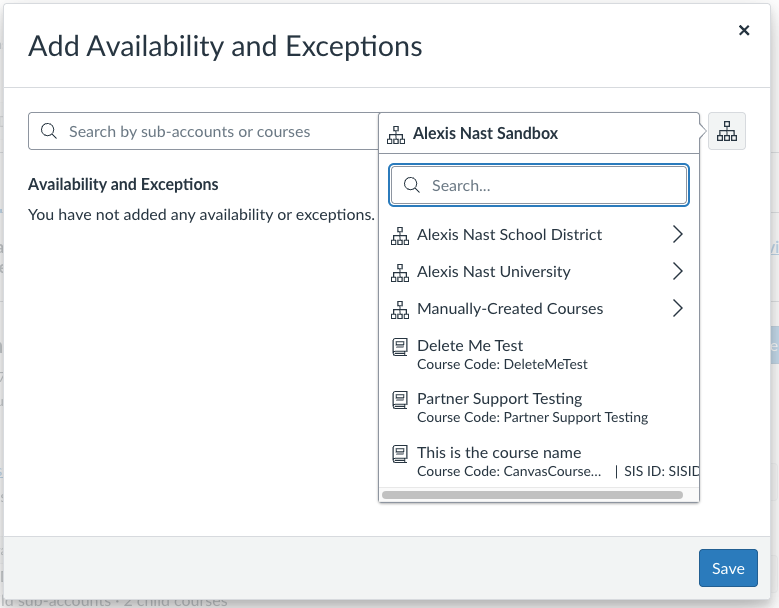
From here you can create “exceptions” to the root availability. For example, you could leave the tool as Not Available at the root level and make it available only in one Sub-Account (Carkeek Park Middle School in the screenshot below.)

If you later decide to deploy it to a second school, you can do that and it will use the same Deployment ID.
This model also supports the concept of making a tool available “everywhere except…” Now you would simply make the tool available everywhere and set up an exception for the excluded context. In the example below you can see that the tool is available in the entire school district except the Elementary sub-account.

This feature is designed to give you granular control with centralized visibility.
Honed by customers
A huge thank you to customers who have tested our early experiences! Their feedback has been invaluable in shaping this feature leading up to General Availability. We’ve incorporated several thoughtful suggestions:
- Each context listed is now a direct link, making it easy to jump in and verify your settings look exactly as expected.
- Sub-accounts now appear first when browsing for contexts, streamlining the most common way availability is managed.
- You can now use the ID from a course URL to search and add a tool's context—perfect for when instructors send a direct link to their class.
- When a course is copied, its course-level exceptions are not copied, preventing the accidental spread of tools into new courses where they aren't authorized, needed, or funded.
History Tab
We know that when a tool stops working, you need answers fast. That's why, alongside Availability and Exceptions, we’ve created the new History Tab.

This tab provides transparency by logging every update to a tool:
- When the change occurred
- Who made it
- Which fields were affected (including availability and exceptions)
- Before and after values for the fields

If a tool disappears or suddenly breaks, you can instantly check the full change log for configuration or availability/exception updates to troubleshoot quickly. This should simplify troubleshooting and improve transparency across your organization.
What’s Next?
We’re not done yet! We’re continuing to work on improvements to make tool management even smoother, including:
- Linking directly to the documentation
- Taking you to the Availability & Exceptions page immediately after installation
- Enabling you to modify the default icon for an app
The planned work will not change major functionality, but we hope it continues to make the process easier and more efficient. If you have feedback, please let us know in the comments or join the Feature Group which will be available until April 17, 2026.
We are also conducting research about the impact of Canvas integrated apps on teaching and learning. We invite all administrators to participate in this survey.