Release notes outline upcoming customer-impacting changes that are expected to be displayed in production environments. Please note that features considered for future development are not included in the notes.
Unless otherwise stated, all features in this release are available in the Production environment as of 2026-03-19.
New Features
Assessments
School Administrator Benchmark Progress and Delegation
Affected User Roles | School Administrators |
Affects User Interface | Yes |
Affected Areas | Trackers, Benchmark Progress Page |
Summary
This update empowers School Administrators with direct oversight and management of benchmark assessments within their schools. Principals can view their school’s benchmark progress page and have a secure mechanism for administrators to re-open available benchmark assessments for specific students.
Change Benefit
- Enhanced Assessment Security: Eliminates the need to disable Secure Benchmarking mode for an entire school to accommodate a single student, maintaining the integrity of the assessment environment.
- Operational Efficiency: Provides a direct, targeted workflow for administrators to manage re-takes, reducing the administrative burden and technical overhead previously required for individual student adjustments.
- Direct Oversight: Principals and school leaders gain immediate visibility into testing progress, allowing for more informed, data-driven decisions during the benchmark window.
Feature Workflow
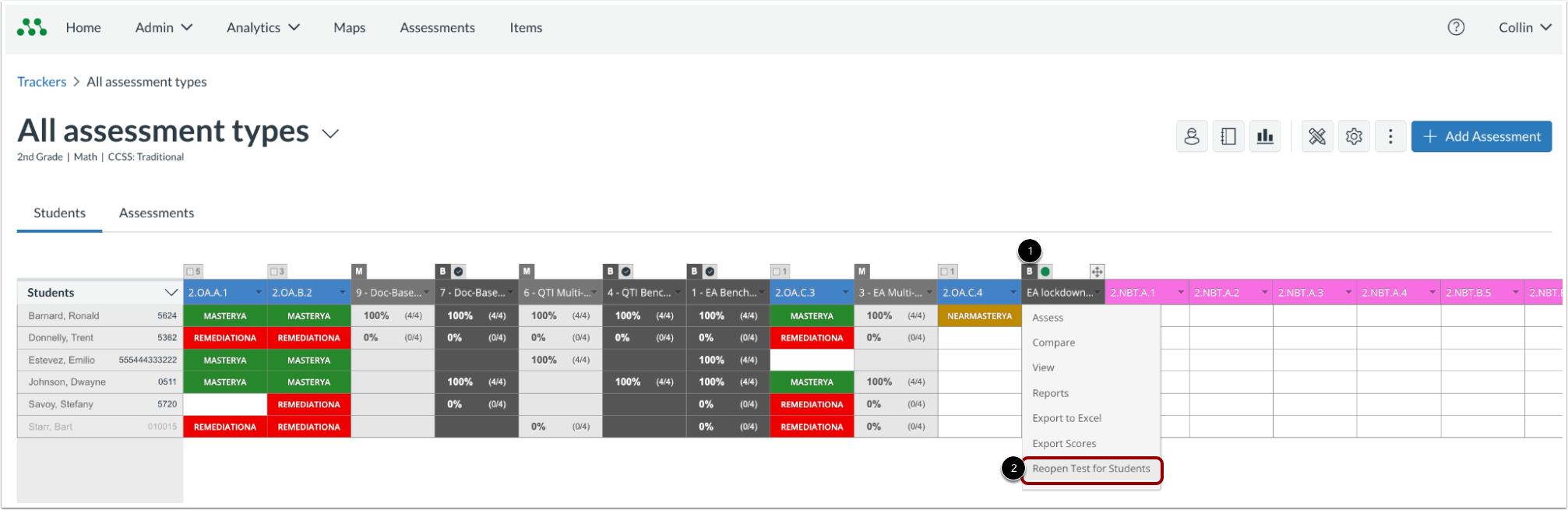
Navigate to the Tracker containing an available benchmark assessment. Locate the specific benchmark and click the benchmark drop-down button [1]. Then click the Reopen Test for Students link [2].

In the modal, select the individual students who require a re-open [1]. Then click the Reopen Test for Students button [2] to reset their scores and allow them to re-access the assessment.

A notification displays, indicating that student scores for that assessment have been reset.
Updated Features
Reporting
Completion of Feature Deprecations
Affected User Roles | Teachers, School Admins, District Admins |
Affects User Interface | Yes |
Affected Areas | Analytics, Custom Reports, Overview Dashboards |
Summary
This release completes the planned deprecation of legacy reporting tools with the following changes:
- Custom Reports: This feature is moved from its previous read-only state to being fully removed from the interface.
- Legacy Overview Reports: Links to these reports in the footers of the District and School Overview dashboards are removed.
Change Benefit
Retiring these legacy codebases ensures the platform remains compliant with WCAG 2.1 accessibility standards and reduces data discrepancies between old and new systems. All historical data is now accessible through modern, high-fidelity dashboards such as the Assessment Results and Analytics Overview pages.