Feature Area
Parchment Learner Dashboard
Affected User Roles
Feature Availability | All Parchment.com users, including learners and third party orderers. |
|---|
Permissions | Learner role which is obtained on login/account creation from parchment.com |
Affected Areas | The entire learner experience within parchment.com which includes ordering, enrollment, and credential management. There is also an updated third party ordering experience. |
The new Parchment Learner Dashboard is the foundation for all things credential-related. It is a permanent home for your awards and achievements, designed to stay with you throughout your learning journey all the way to the workforce.
We are introducing a 15x faster experience that is fully accessible (WCAG 2.1AA) and mobile-optimized. At the heart of this update is the concept of Enrollments, which groups your credentials and available services by institution. Whether you’re managing multiple credentials from the same university system or registering for dual enrollment, your entire journey is now organized and intuitive.
Within your Profile, you gain unprecedented control and security:
- Manage & Share: Toggle credential access between Public and Private with one click.
- Streamlined Access: Claim multiple credentials in a single session and view a unified order history.
- K-12 Enhancements: A simplified workflow for unofficial transcript self-views ensures learners know exactly what they are ordering.
- Professional Flexibility: Seamlessly switch between ordering your credentials and managing your achievements, all under one account.
This isn't just a dashboard; it’s a career-long toolkit designed to turn every earned credential into a new opportunity.
New Learner Dashboard Feature Video
https://vimeo.com/1169908780?share=copy&fl=sv&fe=ci
New Claiming Experience Video
https://vimeo.com/1172322740?share=copy&fl=sv&fe=ci
Change Benefit
Here are all the changes and enhancements that come with the new Learner Dashboard:
Efficiency and Performance:
- Dashboard loads up to 15x faster than previous learner dashboard experience within Parchment.com.
- WCAG 2.1AA compliant throughout the entire experience.
- Designed to work optimally in both desktop and mobile.
Lifelong Credential Management:
- Entirely new user experience when accessing your Learner Dashboard.
- All available services and earned credentials are grouped together by institution.
- Member hierarchy is now supported so credentials earned from different schools or locations within one institution can be grouped together.
- Access and manage credentials easier than ever before.
- All new public and private pages of each digital credential you’ve earned.
- Easily toggle a digital credential’s access between Public and Private.
- Easily access any and all Parchment services offered by each institution you are enrolled in to further your education and acquire more skills.
- Streamlined Claiming: The ability to claim multiple credentials of different types in a single session removes repetitive administrative tasks for the learner.
- K12 - New and improved workflow for Unofficial Self-Views that simplifies the fulfillment process for admins and reduces confusion among learners - actually know what you’re ordering in advance.
Ordering Enhancements:
- Choose from any orderable product available at each institution you’re enrolled in.
- Able to order from any child institution associated with your parent institution (An example of this would be you earned a Certificate from the Professional and Continuing Education department while also earning a diploma from the engineering school within your institution).
- All new Order History available to see any open and completed transactions made within parchment.com.
Registration Improvements:
- Security: Enhanced security measures prevent fraudulent account creation and unauthorized access to learner accounts.
- Simplified Account Creation: Multiple registration token entry points streamline the process for various learner experiences including credential claiming and college application ordering.
Third Party Ordering (TPO) Improvements:
- Reduced Support Intervention: An improved account creation flow, featuring an email domain check, helps prevent learners from inadvertently creating TPO accounts.
- Seamless Role Switching: A standalone application enables users to hold multiple roles simultaneously. Users can be both a TPO and a learner using the same email address, fluidly switching between applications as needed.
- Streamlined Upgrades: A new account creation process simplifies the upgrade from TPO to Receive for users requiring advanced ordering and credential management capabilities.
New Interstitial Page:
- Easily access all Parchment applications in one place.
- Added security to your account with new roles and permissions assigned on your behalf for all services and experiences you use with Parchment.
- Administrators can have a learner account associated with their same email address.
Feature Workflow
Lifelong Credential Management:
As a learner who creates or accesses their parchment.com account anytime after March 14th, 2026, you will get an all new experience within what we are calling the Parchment Learner Dashboard. The new Learner Dashboard lets you view, manage, and share your earned credentials, provides a way to easily order additional credentials that you’ve already earned, or access services available to you via the institution.

Whenever you order a credential from your institution(s) and they fulfill that order or your institution issues a new credential to you, the learner, the digital version will be available in your Learner Dashboard when you next login. As you can see here, this learner now has a Transcript and Diploma from Apple Tree High School.
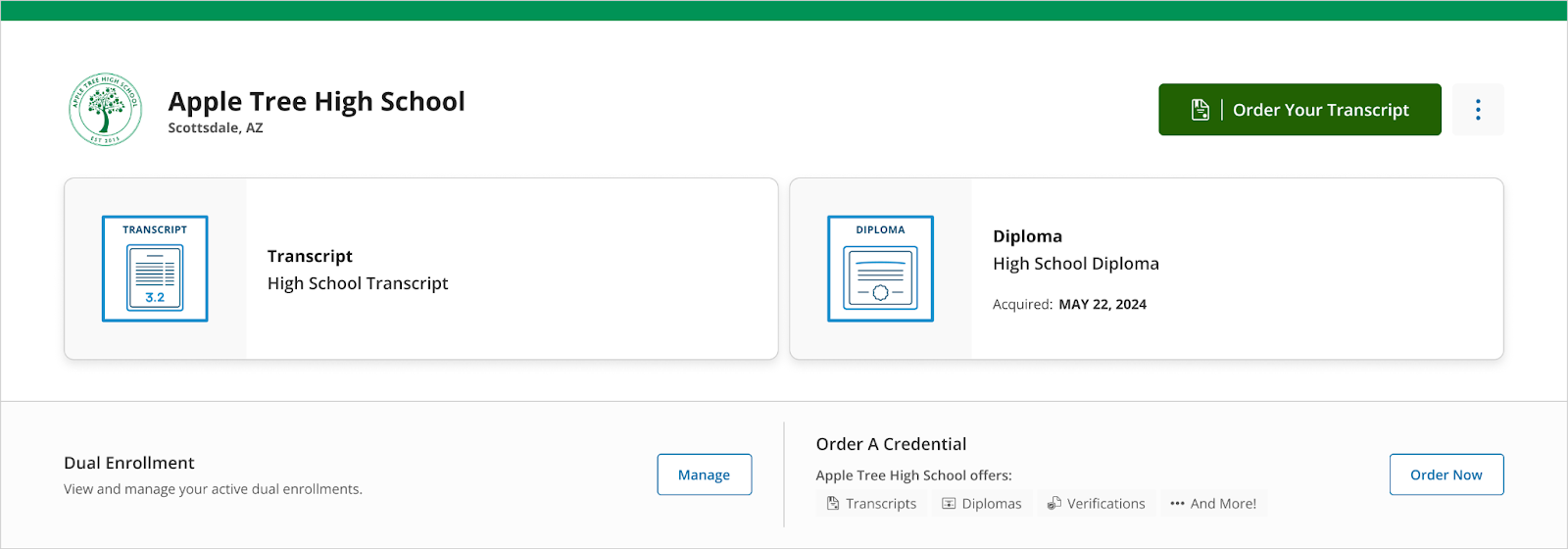
Every institution you earn credentials from will appear in your dashboard. This happens automatically when they are awarded by the institution or when you order your credentials and the institution fulfills your order. This means as you navigate through your lifelong learning journey, all credentials and achievements are in one place.
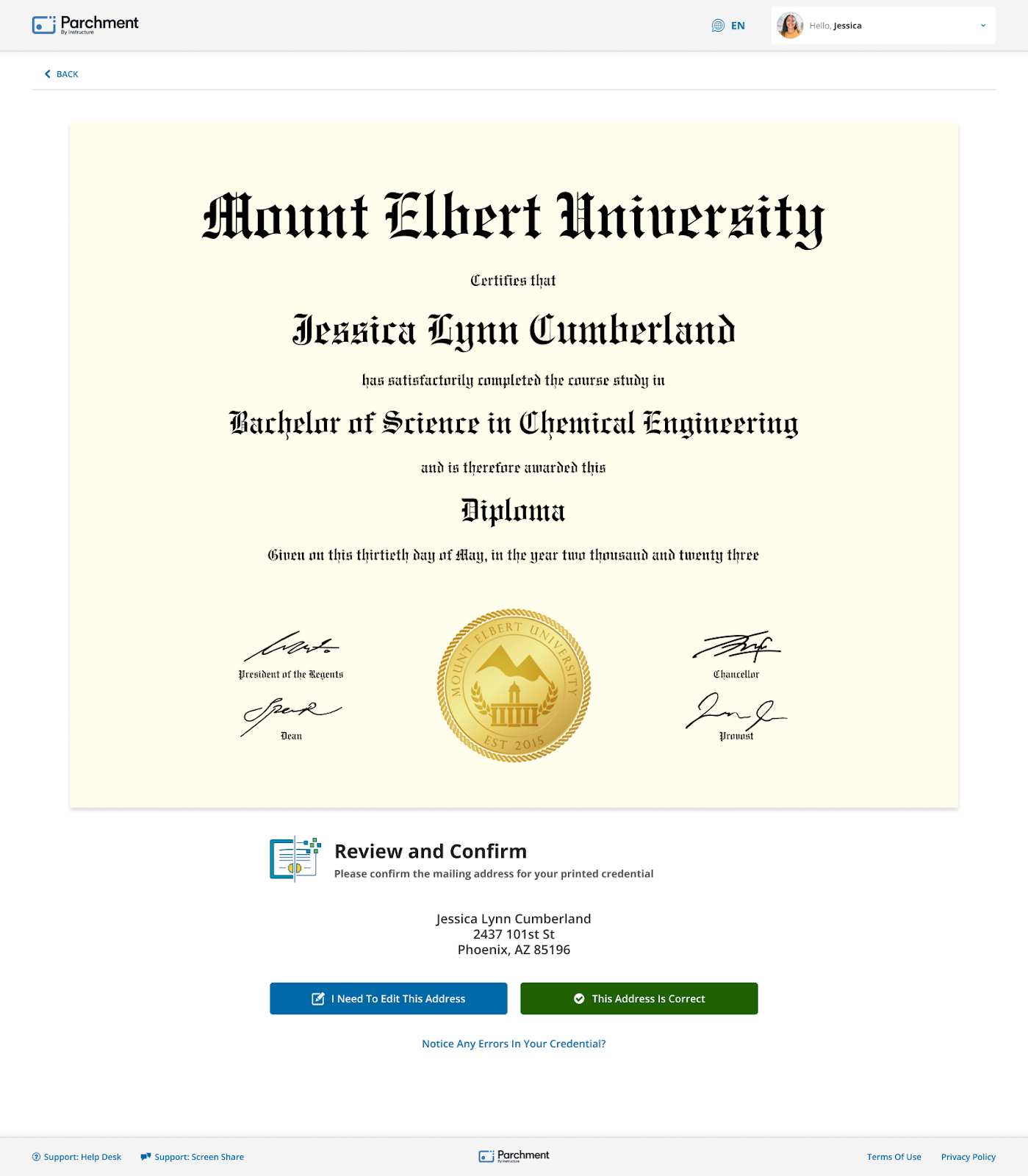
Each time a digital credential is issued to you from Parchment via your institution, you will be taken through an updated claim experience that helps to show a preview of the credential you earned and if it is paired with a paper version that is printed and delivered to you by Parchment, the existing 72 hour address verification window is still available to take advantage of to make sure we deliver your paper credential to the correct location.
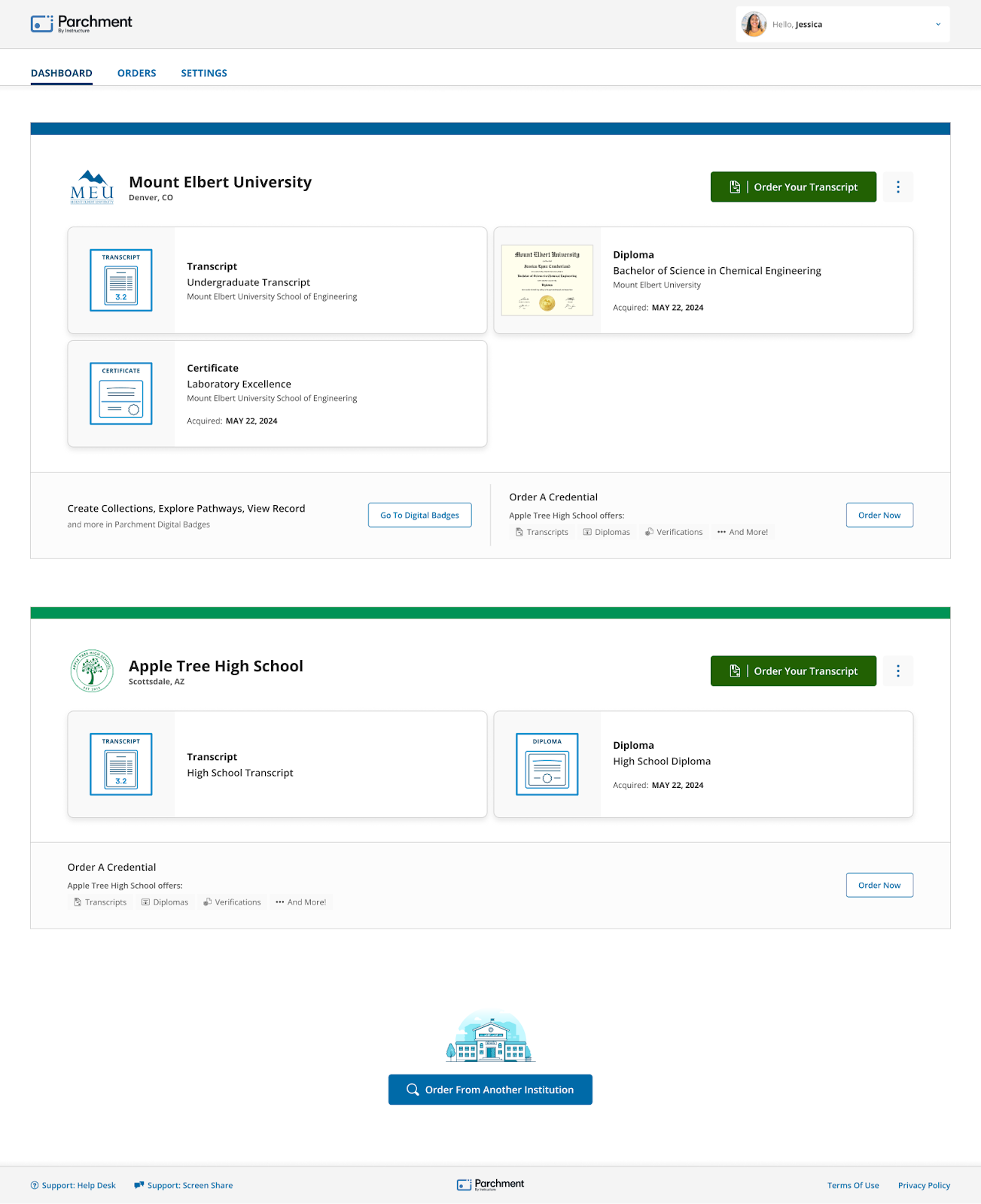
As you can see below, this learner has credentials awarded from a high school and now a university. We also updated the dashboard to combine credentials you have earned throughout the entire university. It is common that one part of the campus issues a learner a certificate from the Engineering program at a smaller campus, but then also issues a diploma to that same learner from the main campus. We have eliminated the confusion that came with these credentials appearing as if they came from 2 completely different institutions.
When you click on one of your digital credentials in the dashboard, you are taken to the all new View Credential page where you can set the public visibility of the credential, share it through social media, share the public credential link (more on that below), and/or download the digital credential onto your computer or mobile device.
From this same page, you will get a full preview of your digital credential which will include any metadata your institution applied to it when it was issued. This data is a great way for those viewing your digital credential online to see what exactly you learned and the skills you achieved while earning your credential.
We also will now provide you with a direct link to ordering an additional copy of the credential you are viewing that you can send to yourself or have it sent to someone else on your behalf.


When you do make your digital credentials publicly available, that allows a third party with the ability to easily verify your credential which can help expedite applying to a new school or helping to get a new job. They simply click the link you share with them or make available on your LinkedIn or Facebook page and they will see the same digital credential webpage you have access to above, but it will be the view only version of the page.

In addition to everything above, we also updated the Account Settings experience in the dashboard to give more control over your settings, make it much easier to navigate, and even add a profile picture that will show up on all of your publicly available credential pages.

From here, you can also easily manage your enrollments. This allows you to update the information linked to your institutions as needed or delete schools you may have added by mistake.
We have also added an easier way to add secondary email addresses to your account as well as being able to change your password while logged in if desired. We strongly recommend any learner that has their Parchment account linked to a school email address to add a personal email address to their account so they can ensure they will always be able to access their account.

This update also includes an easier way to merge multiple Parchment accounts you may have into one. This is helpful when your high school may have issued your Transcript to one email address while your college issued your Diploma to a different email address. If you have credentials linked to multiple accounts, simply go through the account merge process on the Authentication Settings page.

Ordering Enhancements:
With the changes made to roll up all your earned credentials by the parent level of an institution versus each part of the campus separated out in your dashboard, we updated the order flow to reflect this hierarchy concept. You’ll easily be able to see all the types of credentials your institution offers throughout their organization. This will help prevent ordering the wrong credential and quicker turnaround times to receive your ordered credential.

The other ordering enhancement is around a new Order History experience. Within your Parchment Learner Dashboard is an Orders tab that will give a complete history of Open Orders and Completed Orders. You can reference this page to help know when to expect your printed credential or to reference order numbers if you ever need support. Of course, you will also be able to kick off a new order from this page as well.

Registration Improvements
- WCAG 2.1 compliant
- The Registration application now accepts registration tokens from more entry paths, including those generated from the Credential Claim, Dual Enrollment, and Send Admin experiences, simplifying the registration process for learners and supporting more user experiences
- New guiding questions help ensure that the user selects the appropriate registration type between Learner and Third Party (TPO)
- The Registration application dynamically displays a college discovery opt-in to current high school Learners; Learners that opt in can provide additional personal and academic information that is shared with colleges and universities they express interest in
- Registration UI displays the member’s banner message(s) and new branding accents


TPO Improvements
- WCAG 2.1 compliant
- Dedicated suite disambiguates third party (TPO) users from learners and admin users; in conjunction with new user directory model, users will be able to have multiple roles that grant them access to multiple distinct suites (user experiences)
- A missing TPO information experience collects information required to complete the TPO profile for a user with one or more existing permissions (e.g. Learner)
- The new Order History view prioritizes incomplete orders for improved tracking
New TPO App Video: https://vimeo.com/1170039992?share=copy&fl=sv&fe=ci


Other Updates
Feature Area
Parchment Learner Dashboard Accessibility
Affected User Roles
Feature Availability | All parchment.com account users |
|---|
Affects User Interface | Yes |
Affected Areas | Parchment Learner Dashboard |
Summary
The Department of Justice adopted WCAG 2.1 AA as the technical standard for accessibility compliance based on the new ADA Title II web rule that was put into place. What this decision means for education institutions is that they must only offer tools and experiences to their learners that meet these accessibility standards. Parchment is doing their part to provide a learner experience on behalf of these institutions that meets those needs.
The launch of the new Parchment Learner Dashboard meets the WCAG 2.1 AA standards and was built to provide a accessible experience for all learners.
Change Benefit
Expanded reach and inclusivity
- All learners who have earned credentials and achievements and/or are looking to further their learning journey have full support to do when using the Parchment Learner Dashboard.
- Learners with temporary or permanent disabilities will have a way to navigate this experience on any device.
New and enhanced learner experience
- Improved touch targets to prevent frustrating errors, particularly on smaller devices.
- Designed from the ground up with accessibility in mind which leads to a more consistent navigation pattern and improves usability for everyone.
- Screen reader support is enhanced by adding a more intuitive and scannable layout where the important action items are visually prioritized.
Legal Compliance and Institutional Trust
- Schools, universities, and employers can continue to rely on Parchment as their partner in providing credentials and educational resources on behalf of their learners as many public institutions are legally required to use tools that meet WCAG 2.1 AA standards.
Feature Workflow
All workflows detailed in this document above were built with design components that all meet or exceed WCAG 2.1 AA accessibility standards. This means each screen you encounter should be mouse and/or keyboard accessible and offer screen reader usability throughout. Additionally, this means an accessible experience on both desktop and mobile devices.
Feature Area
New Registration Invite Workflow - Unofficial Self-Views (USV)
Affected User Roles
Feature Availability | All Parchment admin account users and Parchment learners |
|---|
Account Setting to Enable If only course or account, delete the other word | Member Feature Toggle required (New Registration Invite) - Will be enabled for every member Member Product settings must have Unofficial Self-View settings enabled - Existing USV users will have them enabled for them.
|
Permissions | Transcript Services Administrator |
Affected Areas | Parchment Award Transcript Services, Parchment Learner Dashboard |
Summary
Within Transcript Services for Admins:
- ❌ Print Registration Codes button removed
- ❌ Registration Code column removed
- ❌ Last Emailed Date column removed
- ❌ Send Attempts column removed
- ❌ Member Settings → “Learners” tab hidden
- ✅ All invites are email-based
- ✅ Uses new email template that comes with a new registration token
- ✅ USV now controlled by linked Transcript Credential + product settings
Within Learner Dashboard for Learners:
- New Transcript tile will appear when successfully registered as a learner using the new invite process.
- Updated email for receiving registration invites.
- New Transcript visual experience with applied watermark when clicking the new Transcript tile.
Change Benefit
Easy access for K12 learners to view their unofficial transcript
- Enhances the user experience around transcripts in the learner dashboard while maintaining the option to order official transcripts through the existing workflow.
- Everything is handled from the invitation email the learner receives leading to less confusion in the process for learners.
More clear and simple user experience for administrators
- Significantly simplifies the fulfillment process for administrators by removing the need to create and fulfill orders every time.
- Syncs the self-view available to learners with the most recently uploaded transcript in the saved Credential Library.
Feature Workflow
The new Registration Invite workflow requires:
- Feature toggle enabled (activated by Parchment)
- Transcript product USV setting enabled (activated by Parchment)
- Transcript attached to learners an admin has added
- Email invite sent to learners admin has added
- Learner registration completed
Feature Area
Parchment Interstitial Page
Affected User Roles
Feature Availability | All parchment.com account users |
|---|
Affects User Interface | Yes |
Affected Areas | Parchment Application/Services Authentication |
Summary
Access to all Parchment services and experiences will all start from the same page we newly developed that we are calling the Parchment Interstitial Page. If you only have access to one Parchment experience, you will bypass this page and be taken directly to where you are trying to access.
Change Benefit
One login for everything
- We have updated the application redirection experience to easily allow you to choose between any of your Parchment services or your Parchment learner account from one place.
Administrators can be learners too!
- Historically, Parchment administrators were not allowed or able to also have Parchment learner accounts linked to the same email address. With this Interstitial page, this is now possible. Easily choose between a Parchment service you’re an administrator for or you may log into your Parchment lifelong learning account.
Enhanced security
- Whether you access Parchment via SSO or directly with your email address and password, you will be linked to unique roles and permissions within each Parchment experience all protected by the latest and greatest security features.
Feature Workflow
However you login to Parchment today, you will be taken to a page looking similar to the one below after authenticating via SSO or with your email address and password. On this page will be tiles for each Parchment suite of tools you have access to. This includes a learner dashboard if you have ever created a Parchment learner account or have had credentials issued to you from an institution you attended.
Accessing any of your tiles will then take you directly to that experience where your role and associated permissions will be applied.
Whenever you logout from any Parchment experience, you will then be redirected back to this page so you can switch as needed.