UPDATE: the official release of the Course Accessibility Checker is pushed back with a few days to Feburary 25h (late afternoon/evening). Please also note that the feature option will be Disabled/Unlocked by default instead of releasing it as Enabled. Our Beta testing after scanning for accessibility issues in tens of thousands of Pages and Assignments over the past several weeks prompted us to implement additional performance guardrails. This also involves temporarily disabling automatic scans when a Page or Assignment is updated outside the checker, requiring those resources to be re-scanned in those cases.
We are happy to share a major milestone in our journey of content accessibility in Canvas: the upcoming launch of our new Course Accessibility Checker. The tool will be integrated into the core Canvas experience and access to it can be controlled at both the account and course level.
As accessibility mandates and supporting all learners are top of mind for Canvas users around the world, we recognize the increased pressure to address accessibility at-scale across course content. Our primary goal is to provide instructors with a central interface to carry out remediations quickly and effectively, and administrators with the ability to monitor a large number of courses to ensure requirements are met. We also understand how imperative it is that this solution feels easy and intuitive, with minimal training burden for your users.
Sneak peek into the tool
The Course Accessibility Checker will be released in two phases. With new accessibility legislation taking effect in April, this approach ensures customers can start benefiting right away as we continue building on what we learned from early testers. Here’s what you can expect:
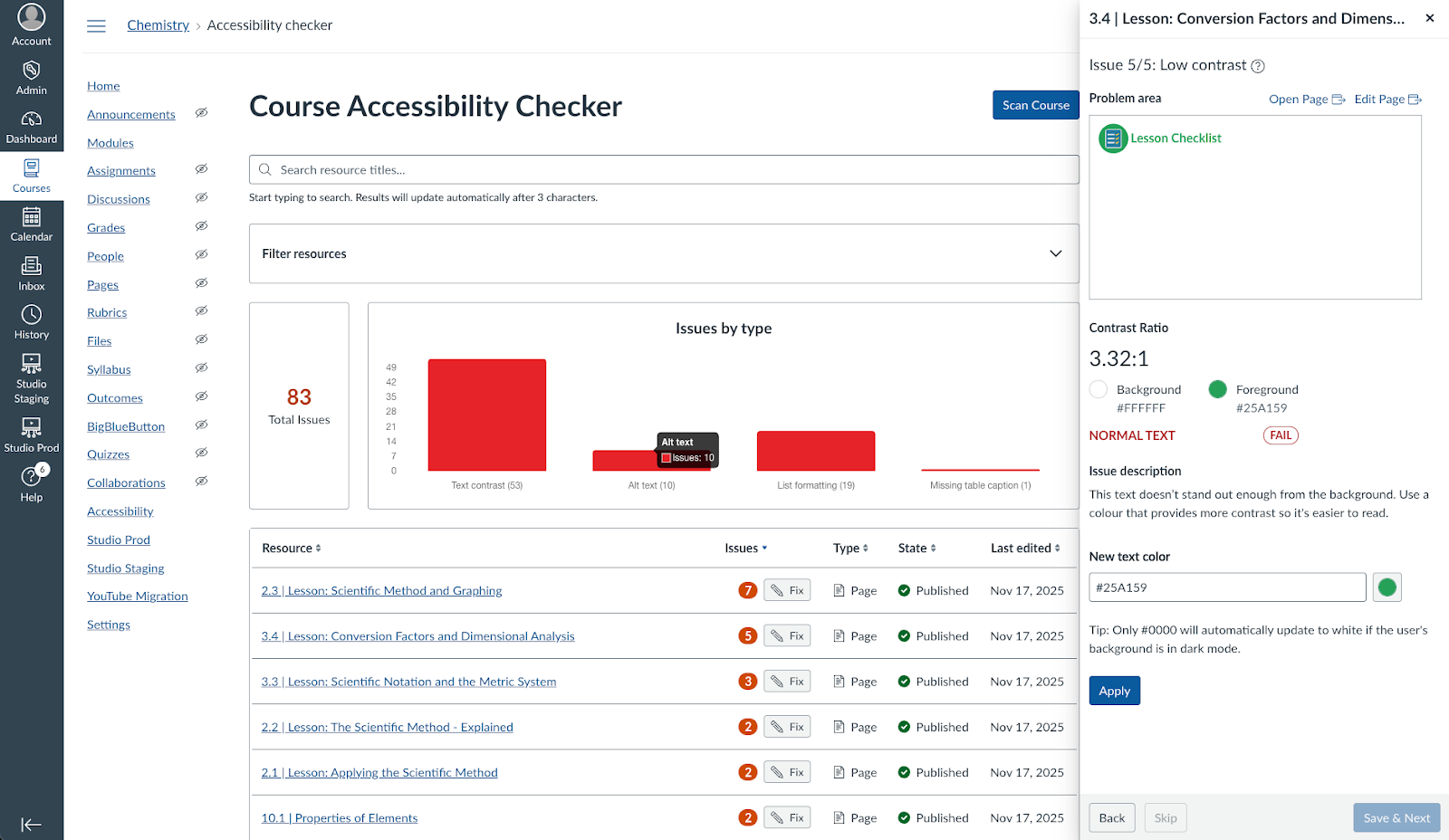
February 21, 2026 Release:
- Course-level central interface: accessible from the course navigation, it provides a birds-eye view of all accessibility issues identified.
- Scanning native Canvas content: detecting issues will initially be supported in Canvas Pages and Assignments.
- Wizard-style remediation: a fast, intuitive way to review and fix accessibility issues in learning resources without opening the content separately. The experience explains what’s incorrect and provides in-context controls to resolve issues immediately. We’ll begin by addressing the most common accessibility issues, including heading structure, image alt text, and hyperlink usage, with more to follow.
Planned for April 2026:
- AI-enabled remediation: IgniteAI will introduce image alt text and table caption generation options so educators don’t have to type or build them from scratch. This functionality will be controlled with a separate feature flag so that institutions can opt-in when they are ready for adopting AI in this capacity.
- Scanning native Canvas content: detecting issues will be supported for Discussions, Announcements and Syllabi.
- Administrator view: a simple list of courses with their active and resolved issue count for Administrators to follow progress across courses, both on root and subaccount level.
Looking into the future, we remain committed to making this tool as useful as possible. Now, let’s address some of the frequently asked questions so far.
Frequently asked questions
Does this tool detect issues for 2.1A or AA compliance?
Our accessibility rules are based on 2.1 AA compliance.
Will this tool replace the existing RCE-based Accessibility Checker?
No. Users can continue using the RCE Accessibility checker to scan and remediate content within a specific learning resource, while the new Course Accessibility checker can scan and remediate content at the course level (across learning resources).
How does this tool work with page versioning?
The tool always scans and remediates the current active revision. If a previous revision of a page is restored, any issues associated with that revision will then be displayed.
Does it also cover external content, such as PDFs?
While we’re already seeing strong demand for PDFs, the February and April release will support Canvas-native content only. After that, we’ll determine the best path forward for additional improvements.
How many concurrent users can use the checker?
To prevent overwriting changes, we recommend only one person edit the course at a time. This is coming from the massive content that needs to be scanned in the background and multiple users concurrently remediating may result in overwriting each other’s changes.
Will the checker support detecting videos without captions?
This is something we’re actively exploring. It’s an important area, and we plan to evaluate it after the February release.
What are the most important dates I need to be aware of?
- Initial functionality listed above will be available in Beta environments on January 30 and production on February 21, 2026
- Additional functionality is planned to be available in Beta environments in March and production environments in April 2026
Is there an additional cost to use the new Course Accessibility Checker?
The Course Accessibility Checker is included in the core Canvas experience for no additional cost.
Is there an additional cost to use the IgniteAI features included in the Accessibility Checker?
Those remediations will be included in the IgniteAI free access period we’re currently offering for all Canvas customers globally and that we highlighted in November’s New & Next Showcase. That means your institution will be free to use those AI features at least through June 30, 2026 while we continue to work with customers to shape our long-term commercial structure for AI features. Any future additions or changes to IgniteAI’s availability will be communicated.
Can I choose to opt out of IgniteAI capabilities that are a part of the Course Accessibility Checker?
The IgniteAI elements within the Course Accessibility Checker will be controlled with a separate feature flag, allowing institutions to opt-in if and when they are ready.
Can I still sign up to have access to these features before the release?
As we near the release of this feature, we are not accepting new early adopter participants. We are grateful to the institutions who have helped shape the Course Accessibility Checker alongside us so far!
(Updated) I no longer see a course-level flag. Is this intended?
Yes, this is intended. The flag is controlled at the account or sub-account level, rather than on a per-course basis. While course-level flexibility can be useful, configuring the flag at the sub-account level still provides flexibility for larger institutions. This design assumes that the preferred accessibility tool is selected at the account or sub-account level, rather than varying by individual course and that it is expected to be uncommon for instructors to be recommended to use different tools across courses within the same sub-account.
