Release notes outline upcoming customer-impacting changes that are expected to be displayed in production environments. Please note that features considered for future development are not included in the notes.
Unless otherwise stated, all features in this release are available in the Production environment as of 2026-01-23.
New Feature Previews
Data Management
Bulk Tracker Data Export
Enablement | To enable this feature, contact your Customer Success Manager (CSM). |
Affected User Roles | District Administrators |
|---|
Affects User Interface | Yes |
Affected Areas | Data Exports |
Summary
This feature allows districts to bulk export all active trackers within a specified district context. It exports progress report data of all district trackers to CSV at scale: instead of processing files one by one, the system collects all active tracker data at once and combines it into a single ZIP file.
Change Benefit
This update addresses the lack of a mechanism to provide a raw data export of tracker contents without the need for custom engineering intervention. This provides a quick and easy way for district teams to retrieve the data they own for compliance or financial reviews.
Feature Workflow

In the Admin dropdown, click the Data Exports link. Then click the Export all district trackers button [1]. Once your export is finished loading, it displays in the My Downloads table [2]. To download the trackers in a ZIP file, click the Download icon [3].
Benchmark Assessment Data Exports
Enablement | To enable this feature, contact your Customer Success Manager (CSM). |
Affected User Roles | District Administrators, School Administrators |
|---|
Affects User Interface | Yes |
Affected Areas | Analytics, Custom Reports |
Summary
The in-app Benchmark Assessment Data Exports allows District and School Administrators to download an export of their district or school’s benchmark assessment data. The export includes specific high-level fields such as school/site, subject/content area, assessment name, and student counts (total added vs. students with at least 1 score). It also provides a breakdown of cut scores. Additionally, the export includes the earliest assessment administration date to track when assessments were administered.
Change Benefit
This update helps districts meet reporting requirements by including assessment dates, while giving administrators a valuable snapshot of their data. It enables granular analysis of benchmark performance across schools and content areas without requiring complex custom reporting.
Feature Workflow
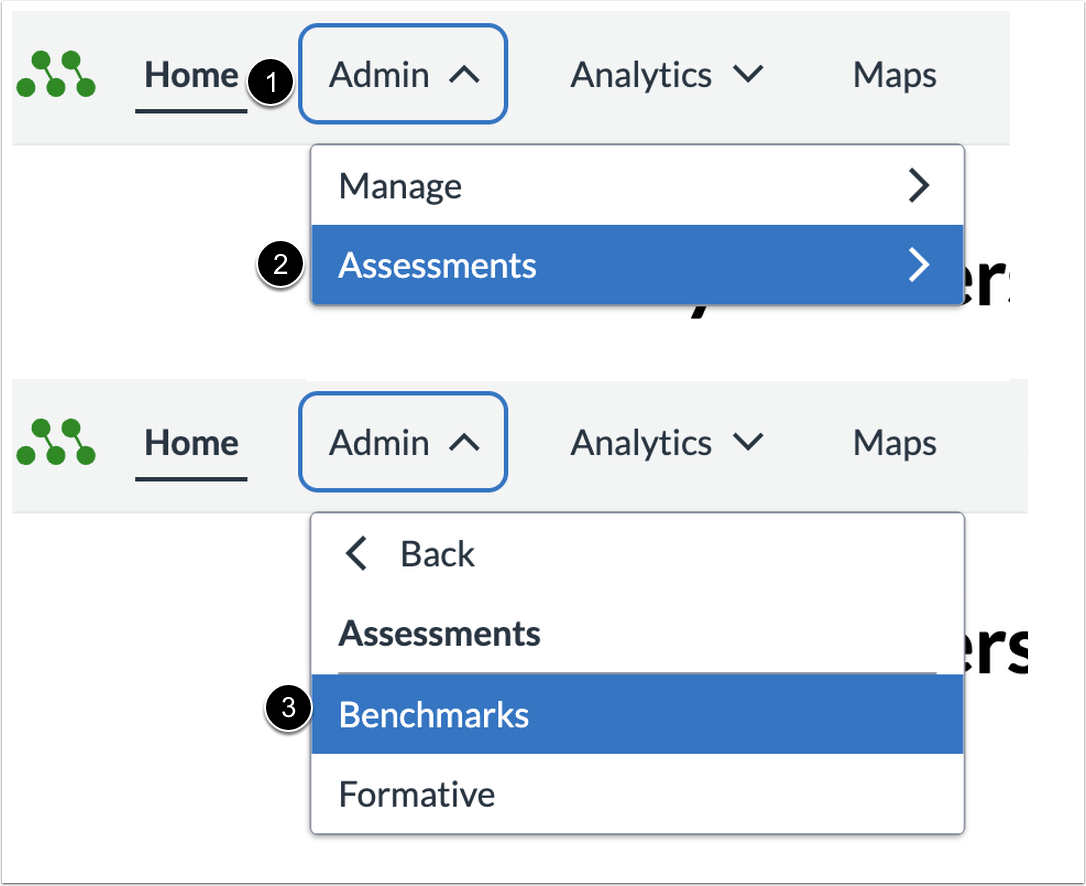
In the Admin dropdown [1], click the Assessments dropdown [2] and then click the Benchmarks link [3].

To open the Data Exports page, click the Export Benchmark Assessments Report button.

Once your export is finished loading, it displays in the My Downloads table [1]. To download the Benchmark Assessments Report in a ZIP file, click the download icon [2].
Change Log
Date | Description |
|---|
2026-01-23 | Added To enable this feature, contact your Customer Success Manager (CSM) to both features. |
