Release notes outline upcoming customer-impacting changes that are expected to be displayed in production environments. Please note that features considered for future development are not included in the notes.
Unless otherwise stated, all features in this release are available in the Production environment as of 2025-12-19.
New Feature Preview
Assessments
IgniteAI Item Authoring for Assessments
Summary
Powered by the IgniteAI engine, educators can generate draft multiple-choice questions directly from their instructional materials. By uploading source documents or pasting lesson text, users can instantly create standards-aligned, multiple-choice items that reflect the specific content taught in their classrooms.
Change Benefit
This feature addresses time constraints by shifting the user’s role from raw content generation to curation and refinement, significantly reducing the time required to build formative assessments. Furthermore, it ensures tighter alignment between instruction and assessment, minimizing the reliance on generic item banks that may not match the rigor or context of the lesson.
Feature Workflow
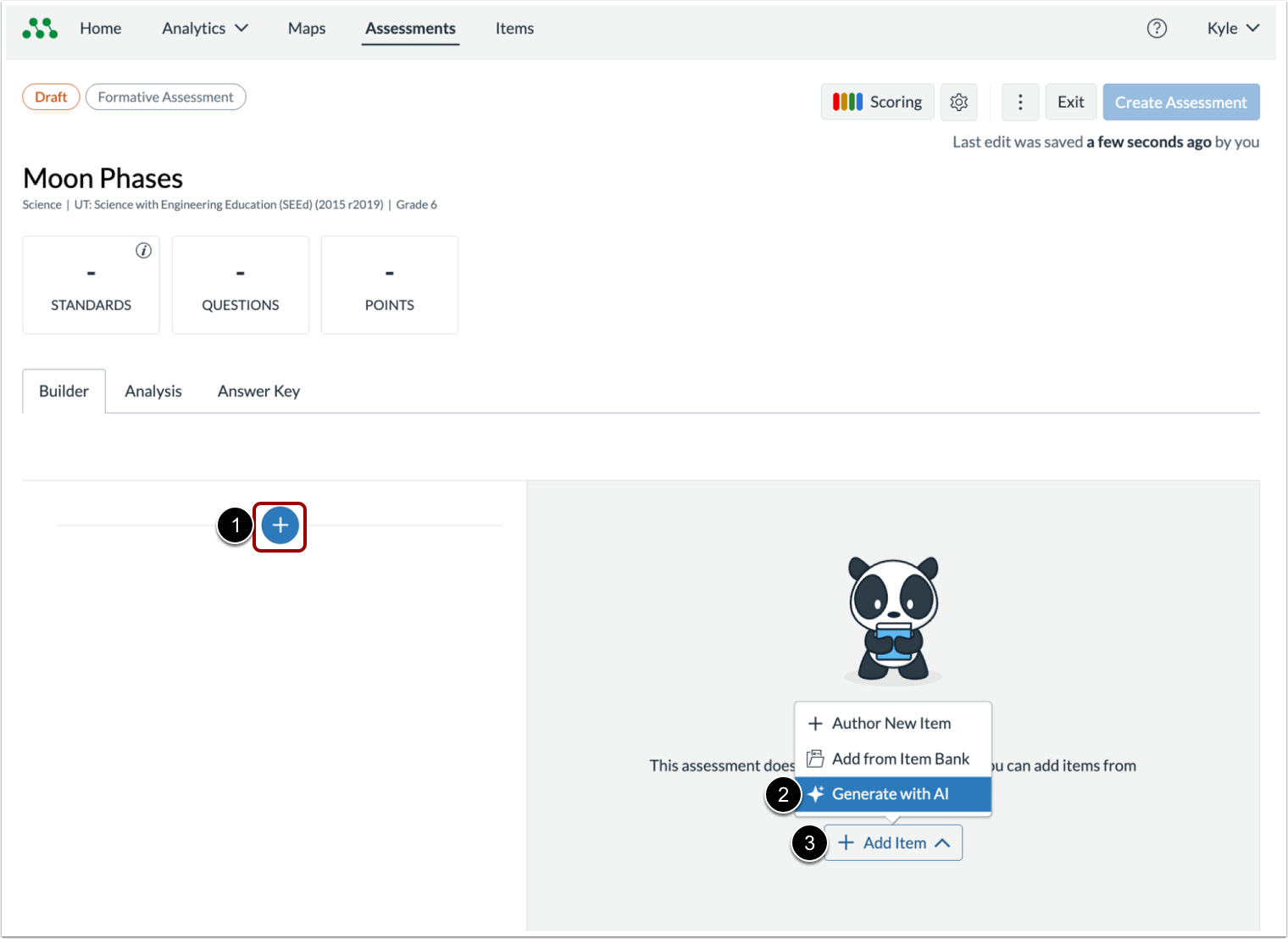
From the Assessment Builder in Mastery Connect, locate the add a new item option. Then, click the Plus (+) button [1] or Add Item button [2] and select Generate with AI link [3] in the dropdown menu.

Click Upload a file link, then drag and drop a supported file (PDF, DOC, DOCX).
Note: Files must be under 3 MB. You can alternatively paste text directly (up to 20,000 characters), but uploads result in more accurate generations.
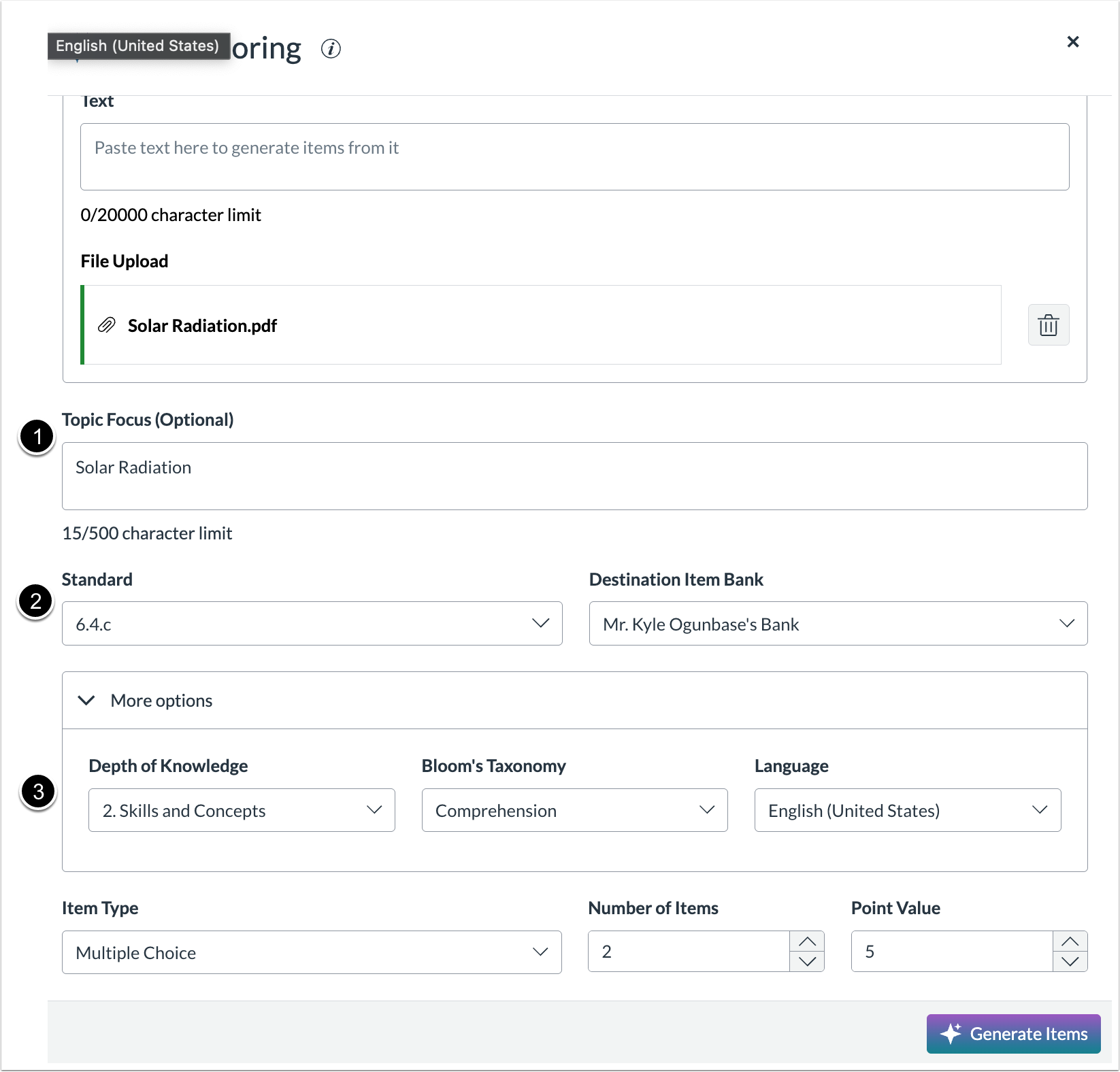
Enter a Topic Focus [1] (e.g., "Solar Radiation"), select the target Standard [2], and define the rigor by selecting Depth of Knowledge (DOK) and Bloom's Taxonomy levels [3].

Select the Number of Items [1] and Point Value [2], and then click Generate Items [3]. The system will process the content and produce draft questions.

Review the generated items. You have full control to regenerate items, edit the question text, modify distractors, change the correct answer, or delete irrelevant items.
New Features
Assessments
Alternate Terminology Pop-Ups
Affected User Roles | All Educator roles |
|---|
Affects User Interface | Yes |
Affected Areas | Item Bank, Assessment Builder |
Summary
An interaction capability for assessment content is available. Authors can embed Alternate Terminology supports within passages, questions, and answers. When configured, specific words or phrases display with a distinct visual indicator that, when clicked, opens a persistent pop-up modal containing definitions, simplifications, or images.
Change Benefit
This update enhances equity and accessibility by enabling content authors to provide accommodations for English Language Learners and students with IEPs. It ensures that student performance reflects mastery of the subject matter rather than language proficiency by providing contextual support for non-construct vocabulary without altering the assessment’s rigor.
Feature Workflow
For Educators:
- Open the item editor for a question or passage.
- Highlight the specific word or phrase requiring support.
- Select the Alternate Terminology Pop-Ups tool.
- Enter the definition text, upload a supporting image, or configure both.
- Save the item.
For Students:
- During an assessment, identify words marked with the visual indicator (dotted underline).
- Click or tap the word. Hovering will not trigger the pop-up modal, ensuring accessibility for touch devices.
- Review the content in the pop-up modal. The modal remains open until manually closed.
- Click the "X" icon or click the trigger word again to close the pop-up.
Updated Features
Reporting
Read-Only Access for Custom Reports [Read-Only Status Date Change: Updated 2026-02-19]
Affected User Roles | Teachers, School Admins, District Admins |
|---|
Affects User Interface | Yes |
Affected Areas | Analytics, Custom Reports |
Summary
On March 13, 2026, the Custom Reports feature is read-only. Full access to historical data and the delete function will persist, but the ability to create new reports, modify existing criteria, or add assessments will no longer be supported. This change is a necessary step in the modernization of the reporting infrastructure.
Change Benefit
This update retires legacy codebases to align with current accessibility standards (WCAG 2.1). It encourages the use of modern, accessible analytics dashboards recently introduced to the platform, including the Assessment Compare Dashboard that meets many of the Custom Report features, while ensuring that historical data remains available for compliance and record-keeping.
End of Life: Legacy Overview Report [End of Life Date Change: Updated 2026-02-19]
Affected User Roles | Teachers, School Admins, District Admins |
|---|
Affects User Interface | Yes |
Affected Areas | Analytics Footers, Overview Dashboards |
Summary
The Legacy Overview Reports are scheduled to be removed from the platform on March 13, 2026. Links previously located in the footers of the District Overview, School Overview, and Assessment Results dashboards will be removed.
Change Benefit
This update simplifies the analytics experience and reduces the risk of data discrepancies by removing redundant legacy views. All data previously accessible via the Legacy Overview Report is available through the updated Assessment Results and Analytics Overview dashboards, which offer superior visualization and accessibility.
Change Log
Date | Description |
|---|
2026-02-19 | Read-Only Access for Custom Reports - Date Changed to 2026-03-13
End of Life: Legacy Overview Report - Date Changed to 2026-03-13
|
2026-01-06 | Read-Only Access for Custom Reports - Date Changed to 2026-01-31
End of Life: Legacy Overview Report - Date Changed to 2026-01-31
|
