As you test the Canvas AI Authoring Assistant, please use this space to note any bugs/features that aren't working as intended. If you can share screencasts or links to the behavior, that may be helpful.
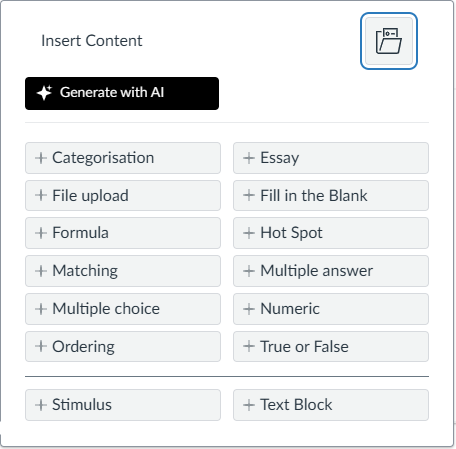
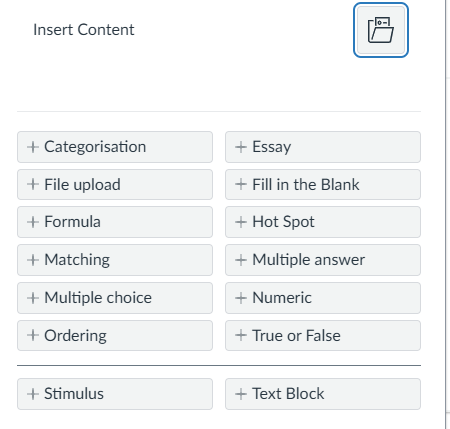
We're seeing some display issues with the 'generate with AI' button not displaying. I suspect that is due to a clash with some custom CSS in the sub-account where it is located. Perhaps the 'Generate with AI' button is using the same button class as other areas in Canvas. In our other environment there is no conflict and the button displays as expected.
https://bham.cloud.panopto.eu/Panopto/Pages/Viewer.aspx?id=e6821592-e08e-4dcf-a171-b330008bad72
Hi @MarcusVu yes they're correct. The issue doesn't appear in a fresh private browser. Thanks
I just tried accessing the AI item authoring tool for the first time, and received the error message that I have exceeded the limit of 70 questions for the week.
Afraid I am still having the same issue. I even tried logging out and back in to Canvas and still have the same problem.
I was able to generate two quizzes - great! Really love the tool.
However, when I tried to add additional questions to one of these quizzes (because the quiz needed to cover two different articles), I encountered another error message. It appeared to be working on it and then just said it couldn't generate questions at this time.
I was able to get around it by starting a new quiz, then putting the questions in the Item Bank, but this is unnecessarily cumbersome.
I'm trying to upload a Word doc file to generate questions. It's 4,846 characters. (Doc is attached.) I keep getting an error message (see screenshot). I've tried it 5-6 times. Logged out and back in. When I uploaded a shorter Word doc with only 862 characters, it generated questions. And when I tried to generate questions from a module page, it worked too.
Mac Safari - During the creation of questions, I was unable to edit the text that opens the rich text editor during the Review stage. I could only utilise a couple of buttons in the editor, but no text could be changed. Works fine in Firefox. Occasionally results in a locked window, forcing a screen refresh to continue.
Marcus when creating from course content, if the page does not contain much information, the following error appears:
You have considered add a message that indicates there is not enough content in the source or something that suggests it is a selection issue and not an error? Because the current message is interpreted that way.
Thank you.





 4.04.04 p.m..png "Captura de pantalla 2025-09-05 a la(s) 4.04.04 p.m..png")