With a simple-to-use Google Sheet, with only one plugin, anyone can make basic API calls without the need of assistance from a programmer or IT department. This easy-to-use form allows for customized reports that can be updated live as needed.
Is the link tiny.cc/InstConAPI still available. I get to the google sheet with the link but get viewer access only. I requested access. Is access to the google sheet on request basis only?Am I missing something ?
Wow! That looked nice!
I saved the sheet and tried to populate the informations, but i'm receiving:
"returned code 401. Truncated server response" Not authenticated
=ImportJSON("https://XXXX.beta.instructure.com/api/v1/users/39?per_page=1000&acess_token=(this is a User access token or a account token, if it is a account, what is the URI that need to be set? ", "/sis_user_id", "noInherit, noHeaders")
Any help on how to make this work?
Regards,Alexandre Schneider.
@Alexandre_Sch
I used the following value in the first cell and the sheet populated as expected:
=ImportJSON("https://XXXX.beta.instructure.com/api/v1/users/213220?per_page=10000&access_token=XXXXXXXXXXXXXX", "/sis_user_id", "noInherit, noHeaders"
The access token is your account token, in this case you'd also need to make sure you're using a token valid in Beta. Anyone can obtain a token, but your ability to run an API call is based on your user permissions. Are you a Canvas Admin at your institution with the ability to look up users? If not, you wouldn't be able to run this API call. Try pasting https://XXXXX.beta.instructure.com/api/v1/users/39 into your browser after logging into Canvas, does that return JSON data?
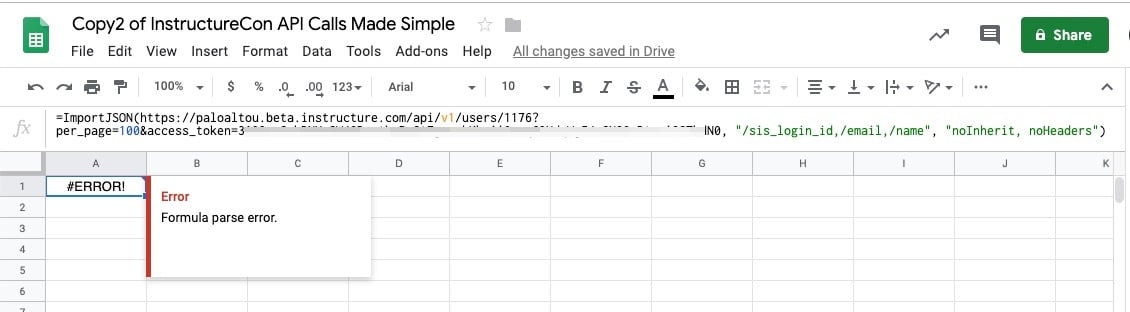
I'm a Canvas admin and I tried the following, but I'm getting an error (see image below). Any suggestions?
=ImportJSON(https://paloaltou.beta.instructure.com/api/v1/users/1176?per_page=100&access_token=xxxx, "/sis_login_id,/email,/name", "noInherit, noHeaders")
Hi. Is tiny.cc/InstConAPI still available or available elsewhere ? When I type that address into my browser (Chrome, latest updates) I get a page that starts with .."Sorry, we weren't able to locate that URL"
Thanks .
Hi Ryan
Sure - here you go … GitHub - bradjasper/ImportJSON: Import JSON into Google Sheets, this library adds various ImportJSON functions to your s…
In my Google sheet I've been simplifying the construction of the parameters, as it's so easy to make a typo.
I'll be happy to share it with you and the community if it's of any use ….
You should be able to download the sheet from here: ImportJSONSheet - ambiently fork for Canvas Community - Google Sheets
IMMEDIATELY TAKE A COPY OF THE SHEET AND USE THAT COPY OR YOU MAY LEAVE IMPORTANT DATA IN IT FOR EVERYONE TO SEE AND USE - SUCH AS YOUR ACCESS TOKEN - AND THAT WOULD BE BAD FOR YOUR STUDENTS, YOUR INSTITUTION ... AND YOUR CAREER !
Let me know if that doesn't work or you have any issues using it.
... and don't forget to take that copy - and use that copy not the original !
Hi all,
We got this working. The formula is populating the spreadsheet with data from Canvas. However, the data is limited to just 100 rows. We've searched for a solution but haven't found one. Anyone experience this issue and find a fix?
We're using the "per_page=10000" argument.
Many thanks,
Bill
Hi @All. While late to this content, I would value the sheet Curti Rose makes reference to in his InstructureCon 2017 video.Thanks in advance, community!