For various reasons I decided to write a little CSS & JS to do the following:
- Load the modules page with all modules collapsed by default
- Create a button on the modules page to Expand/Collapse all modules
- When a user clicks on a link that takes them to a module in the modules page, make the modules page load with all modules collapsed EXCEPT the module that was clicked on the previous page.
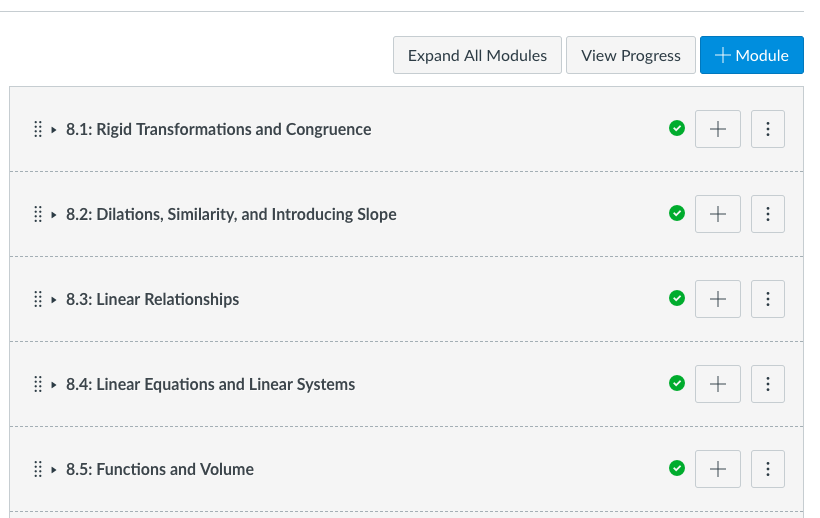
This is what the page looks like when first opened. Notice the button at the top "Expand All Modules."
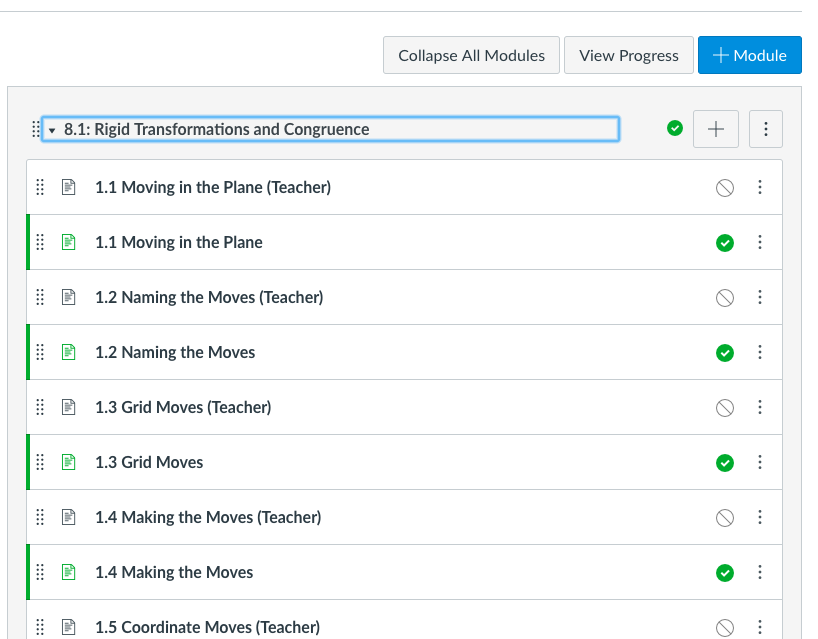
This is what the page looks like with the modules expanded. Notice the button at the top "Collapse All Modules."
I am putting the code here for others to use and improve. If you make improvements, please share them with the rest of the community. I am not a coding professional and consider myself to be an intermediate level, NOT an expert (although I got some help from some experts when I got stuck during this project  .)
.)
If you have suggestions, please feel free to let me know. I'm always looking to improve my coding
**DISCLAIMER**
This code is 100% unsupported by me and/or by Instructure. Use it at your own risk. Always try new code in your test or beta environments first. This will probably break. If you don't have someone on staff who can maintain it or fix it when it breaks, you will want to seriously reconsider using it in the first place.
Add this to the CSS file:
<SPAN class="comment token">/* Collapse all modules. <BR /> use this in combination with JS to auto-open the module link that was <BR /> clicked to navigate to the page */</SPAN><BR /><BR /><SPAN class="selector token">#content #context_modules .content,<BR />#content #context_modules .collapse_module_link</SPAN> <SPAN class="punctuation token">{</SPAN><BR /> <SPAN class="property token">display</SPAN><SPAN class="punctuation token">:</SPAN> none<SPAN class="punctuation token">;</SPAN><BR /><SPAN class="punctuation token">}</SPAN><BR /><BR /><SPAN class="selector token">#content #context_modules .expand_module_link</SPAN> <SPAN class="punctuation token">{</SPAN><BR /> <SPAN class="property token">display</SPAN><SPAN class="punctuation token">:</SPAN> inline-block<SPAN class="punctuation token">;</SPAN><BR /><SPAN class="punctuation token">}</SPAN><SPAN class="line-numbers-rows"><SPAN></SPAN><SPAN></SPAN><SPAN></SPAN><SPAN></SPAN><SPAN></SPAN><SPAN></SPAN><SPAN></SPAN><SPAN></SPAN><SPAN></SPAN><SPAN></SPAN><SPAN></SPAN><SPAN></SPAN></SPAN>Add this to the JavaScript file:
<SPAN class="comment token">//</SPAN><BR /><SPAN class="comment token">// Use in combination with CSS that loads all modules in a collapsed state.</SPAN><BR /><SPAN class="comment token">// When navigation to the modules page is to a specific module, </SPAN><BR /><SPAN class="comment token">// automagically click the module so it opens in an expanded state.</SPAN><BR /><SPAN class="comment token">//</SPAN><BR /><SPAN class="keyword token">var</SPAN> anchor <SPAN class="operator token">=</SPAN> window<SPAN class="punctuation token">.</SPAN>location<SPAN class="punctuation token">.</SPAN>hash<SPAN class="punctuation token">;</SPAN><BR /><SPAN class="keyword token">var</SPAN> underscore <SPAN class="operator token">=</SPAN> anchor<SPAN class="punctuation token">.</SPAN><SPAN class="token function">indexOf</SPAN><SPAN class="punctuation token">(</SPAN><SPAN class="string token">"_"</SPAN><SPAN class="punctuation token">)</SPAN> <SPAN class="operator token">+</SPAN> <SPAN class="number token">1</SPAN><SPAN class="punctuation token">;</SPAN><BR /><SPAN class="keyword token">var</SPAN> characters <SPAN class="operator token">=</SPAN> anchor<SPAN class="punctuation token">.</SPAN>length<SPAN class="punctuation token">;</SPAN><BR /><SPAN class="keyword token">var</SPAN> module <SPAN class="operator token">=</SPAN> anchor<SPAN class="punctuation token">.</SPAN><SPAN class="token function">substring</SPAN><SPAN class="punctuation token">(</SPAN>underscore<SPAN class="punctuation token">,</SPAN>characters<SPAN class="punctuation token">)</SPAN><SPAN class="punctuation token">;</SPAN><BR /><SPAN class="keyword token">var</SPAN> selector <SPAN class="operator token">=</SPAN> <SPAN class="string token">"span[aria-controls='context_module_content_"</SPAN><SPAN class="operator token">+</SPAN>module<SPAN class="operator token">+</SPAN><SPAN class="string token">"']"</SPAN><SPAN class="punctuation token">;</SPAN><BR />console<SPAN class="punctuation token">.</SPAN><SPAN class="token function">log</SPAN><SPAN class="punctuation token">(</SPAN>selector<SPAN class="punctuation token">)</SPAN><SPAN class="punctuation token">;</SPAN><BR /><BR />window<SPAN class="punctuation token">.</SPAN>onload <SPAN class="operator token">=</SPAN> <SPAN class="keyword token">function</SPAN><SPAN class="punctuation token">(</SPAN><SPAN class="punctuation token">)</SPAN> <SPAN class="punctuation token">{</SPAN><SPAN class="token function">expand_module</SPAN><SPAN class="punctuation token">(</SPAN><SPAN class="punctuation token">)</SPAN><SPAN class="punctuation token">}</SPAN><SPAN class="punctuation token">;</SPAN><BR /><SPAN class="keyword token">function</SPAN> <SPAN class="token function">expand_module</SPAN><SPAN class="punctuation token">(</SPAN><SPAN class="punctuation token">)</SPAN> <SPAN class="punctuation token">{</SPAN><BR /> document<SPAN class="punctuation token">.</SPAN><SPAN class="token function">querySelector</SPAN><SPAN class="punctuation token">(</SPAN>selector<SPAN class="punctuation token">)</SPAN><SPAN class="punctuation token">.</SPAN><SPAN class="token function">click</SPAN><SPAN class="punctuation token">(</SPAN><SPAN class="punctuation token">)</SPAN><SPAN class="punctuation token">;</SPAN><BR /> console<SPAN class="punctuation token">.</SPAN><SPAN class="token function">log</SPAN><SPAN class="punctuation token">(</SPAN><SPAN class="string token">"click attempted"</SPAN><SPAN class="punctuation token">)</SPAN><SPAN class="punctuation token">;</SPAN><BR /><SPAN class="punctuation token">}</SPAN><BR /><BR /><SPAN class="comment token">//</SPAN><BR /><SPAN class="comment token">// Add button and script to expand and collapse all modules</SPAN><BR /><SPAN class="comment token">//</SPAN><BR /><BR /><SPAN class="comment token">// Create the button on Modules pages</SPAN><BR /><SPAN class="keyword token">if</SPAN><SPAN class="punctuation token">(</SPAN>window<SPAN class="punctuation token">.</SPAN>location<SPAN class="punctuation token">.</SPAN>href<SPAN class="punctuation token">.</SPAN><SPAN class="token function">indexOf</SPAN><SPAN class="punctuation token">(</SPAN><SPAN class="string token">"modules"</SPAN><SPAN class="punctuation token">)</SPAN> <SPAN class="operator token">></SPAN> <SPAN class="operator token">-</SPAN><SPAN class="number token">1</SPAN><SPAN class="punctuation token">)</SPAN> <SPAN class="punctuation token">{</SPAN><BR /> document<SPAN class="punctuation token">.</SPAN><SPAN class="token function">querySelector</SPAN><SPAN class="punctuation token">(</SPAN><SPAN class="string token">'.header-bar-right__buttons'</SPAN><SPAN class="punctuation token">)</SPAN><SPAN class="punctuation token">.</SPAN><SPAN class="token function">insertAdjacentHTML</SPAN><SPAN class="punctuation token">(</SPAN> <SPAN class="string token">'afterbegin'</SPAN><SPAN class="punctuation token">,</SPAN> <SPAN class="string token">'<button class="btn" id="expand-collapse-modules" status="collapsed" onclick="expand_collapse_modules()"><span class="screenreader-only">Collapse or expand all modules</span>Expand All Modules</button>'</SPAN><SPAN class="punctuation token">)</SPAN><SPAN class="punctuation token">;</SPAN><BR /> <SPAN class="punctuation token">}</SPAN><BR /><BR /><SPAN class="comment token">// when the button is clicked, expand or collapse all modules that are not currently expanded or contracted.</SPAN><BR /><SPAN class="keyword token">function</SPAN> <SPAN class="token function">expand_collapse_modules</SPAN><SPAN class="punctuation token">(</SPAN><SPAN class="punctuation token">)</SPAN> <BR /><SPAN class="punctuation token">{</SPAN><BR /><BR /> <SPAN class="keyword token">if</SPAN> <SPAN class="punctuation token">(</SPAN>document<SPAN class="punctuation token">.</SPAN><SPAN class="token function">getElementById</SPAN><SPAN class="punctuation token">(</SPAN><SPAN class="string token">"expand-collapse-modules"</SPAN><SPAN class="punctuation token">)</SPAN><SPAN class="punctuation token">.</SPAN>status <SPAN class="operator token">==</SPAN> <SPAN class="string token">"collapsed"</SPAN><SPAN class="punctuation token">)</SPAN><SPAN class="punctuation token">{</SPAN><BR /> document<SPAN class="punctuation token">.</SPAN><SPAN class="token function">getElementById</SPAN><SPAN class="punctuation token">(</SPAN><SPAN class="string token">"expand-collapse-modules"</SPAN><SPAN class="punctuation token">)</SPAN><SPAN class="punctuation token">.</SPAN>innerText <SPAN class="operator token">=</SPAN> <SPAN class="string token">"Expand All Modules"</SPAN><SPAN class="punctuation token">;</SPAN><BR /> document<SPAN class="punctuation token">.</SPAN><SPAN class="token function">getElementById</SPAN><SPAN class="punctuation token">(</SPAN><SPAN class="string token">"expand-collapse-modules"</SPAN><SPAN class="punctuation token">)</SPAN><SPAN class="punctuation token">.</SPAN>status <SPAN class="operator token">=</SPAN> <SPAN class="string token">"expanded"</SPAN><SPAN class="punctuation token">;</SPAN><BR /> <SPAN class="keyword token">var</SPAN> items <SPAN class="operator token">=</SPAN> document<SPAN class="punctuation token">.</SPAN><SPAN class="token function">querySelectorAll</SPAN><SPAN class="punctuation token">(</SPAN><SPAN class="string token">"span[style='display: inline-block;'][aria-expanded='true']"</SPAN><SPAN class="punctuation token">)</SPAN><SPAN class="punctuation token">;</SPAN><BR /><BR /> <SPAN class="punctuation token">}</SPAN><BR /> <SPAN class="keyword token">else</SPAN> <SPAN class="punctuation token">{</SPAN> <BR /> document<SPAN class="punctuation token">.</SPAN><SPAN class="token function">getElementById</SPAN><SPAN class="punctuation token">(</SPAN><SPAN class="string token">"expand-collapse-modules"</SPAN><SPAN class="punctuation token">)</SPAN><SPAN class="punctuation token">.</SPAN>innerText <SPAN class="operator token">=</SPAN> <SPAN class="string token">"Collapse All Modules"</SPAN><SPAN class="punctuation token">;</SPAN><BR /> document<SPAN class="punctuation token">.</SPAN><SPAN class="token function">getElementById</SPAN><SPAN class="punctuation token">(</SPAN><SPAN class="string token">"expand-collapse-modules"</SPAN><SPAN class="punctuation token">)</SPAN><SPAN class="punctuation token">.</SPAN>status <SPAN class="operator token">=</SPAN> <SPAN class="string token">"collapsed"</SPAN><SPAN class="punctuation token">;</SPAN><BR /> <SPAN class="keyword token">var</SPAN> items <SPAN class="operator token">=</SPAN> document<SPAN class="punctuation token">.</SPAN><SPAN class="token function">querySelectorAll</SPAN><SPAN class="punctuation token">(</SPAN><SPAN class="string token">".expand_module_link:not([style='display: none;'])"</SPAN><SPAN class="punctuation token">)</SPAN><SPAN class="punctuation token">;</SPAN><BR /> <SPAN class="punctuation token">}</SPAN><BR /> <BR /> <SPAN class="keyword token">for</SPAN> <SPAN class="punctuation token">(</SPAN><SPAN class="keyword token">var</SPAN> i <SPAN class="operator token">=</SPAN> items<SPAN class="punctuation token">.</SPAN>length<SPAN class="number token">-1</SPAN><SPAN class="punctuation token">;</SPAN> i <SPAN class="operator token">>=</SPAN> <SPAN class="number token">0</SPAN> <SPAN class="punctuation token">;</SPAN> i<SPAN class="operator token">--</SPAN><SPAN class="punctuation token">)</SPAN> <SPAN class="punctuation token">{</SPAN> <BR /> console<SPAN class="punctuation token">.</SPAN><SPAN class="token function">log</SPAN><SPAN class="punctuation token">(</SPAN>i<SPAN class="punctuation token">)</SPAN><SPAN class="punctuation token">;</SPAN><BR /> items<SPAN class="punctuation token">[</SPAN>i<SPAN class="punctuation token">]</SPAN><SPAN class="punctuation token">.</SPAN><SPAN class="token function">click</SPAN><SPAN class="punctuation token">(</SPAN><SPAN class="punctuation token">)</SPAN><SPAN class="punctuation token">;</SPAN><BR /> <SPAN class="punctuation token">}</SPAN><BR /> <BR /><SPAN class="punctuation token">}</SPAN> <SPAN class="line-numbers-rows"><SPAN></SPAN><SPAN></SPAN><SPAN></SPAN><SPAN></SPAN><SPAN></SPAN><SPAN></SPAN><SPAN></SPAN><SPAN></SPAN><SPAN></SPAN><SPAN></SPAN><SPAN></SPAN><SPAN></SPAN><SPAN></SPAN><SPAN></SPAN><SPAN></SPAN><SPAN></SPAN><SPAN></SPAN><SPAN></SPAN><SPAN></SPAN><SPAN></SPAN><SPAN></SPAN><SPAN></SPAN><SPAN></SPAN><SPAN></SPAN><SPAN></SPAN><SPAN></SPAN><SPAN></SPAN><SPAN></SPAN><SPAN></SPAN><SPAN></SPAN><SPAN></SPAN><SPAN></SPAN><SPAN></SPAN><SPAN></SPAN><SPAN></SPAN><SPAN></SPAN><SPAN></SPAN><SPAN></SPAN><SPAN></SPAN><SPAN></SPAN><SPAN></SPAN><SPAN></SPAN><SPAN></SPAN><SPAN></SPAN><SPAN></SPAN><SPAN></SPAN><SPAN></SPAN><SPAN></SPAN><SPAN></SPAN></SPAN>The code is also attached to this blog for your convenience.
