You can access Canvas through the following:
Additionally, you can log in through a Canvas mobile app designed for your role:
You must have an account to log in to Canvas.
Notes:
- If you are a student and were given a join code or a secret URL to join a course, learn how to create a Canvas account.
- If you are an observer and do not have an account, learn how to create a Canvas account.
- For some users, the user interface may appear differently if the New Login/Registration UI for Identity feature option is enabled at the root account level.
- When you log in to Canvas from a new browser for the first time, a cookie consent banner appears. If you are at an applicable non-U.S. higher education institution, you can accept or decline analytics and tracking technologies in accordance with regional privacy requirements.
- This feature does not apply to Canvas K-12 institutions.
- If a user declines consent, non-essential tracking is disabled, which may limit usage insights available to Instructure.
View the video transcript
00:00:How do I log in to Canvas as a student?
00:03:You can access Canvas through an institution-specific Canvas URL. Canvas URLs use one of the following structures: [your institution's name].instructure.com.
00:15:or canvas.[your institution's name].edu. You can also locate your institution's Canvas URL using the Canvas Student iOS app or Canvas Student Android app. Some institution's may also allow access to Canvas via an institution-specific authentication system which redirects to Canvas, such as a school student portal or website.
00:39:After locating your institution's Canvas URL, you can log in to your Canvas account. To log in, enter your credentials (or login information) which may display as your email address, username, or login ID and password.
00:56:If needed and depending on your institution's settings, you may be able to reset your password by clicking the Forgot Password link.
01:04:If needed and depending on your institution's settings, you may be able to reset your password by clicking the Forgot Password link.
01:12:This guide covered how to log in to Canvas as a student.
Open Canvas URL
Using a supported Web browser, you can access Canvas through an institution-specific Canvas URL. Canvas URLs use one of the following structures:
[your institution's name].instructure.com or canvas.[your institution's name].edu.
Learn more about where to find your institution's URL.
Some institutions may also allow access to Canvas via an institution-specific authentication system which redirects to Canvas, such as a school student portal or website.
Log in to Canvas
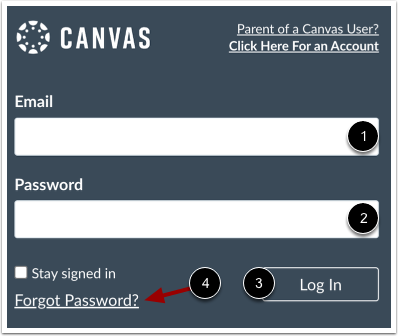
After locating your institution's Canvas URL, you can log in to your Canvas account using your credentials (or login information). Enter your email address, username, or login ID in the Email field [1]. Enter your password in the Password field [2]. Then, click the Log In link [3].
If needed and depending on your institution's settings, you may be able to reset your password by clicking the Forgot Password link [4].
Notes:
- If you are associated with an institution using Canvas and do not know your username and password, please contact your site administrator.
- The Login page may display differently depending on your instititution or if you are logging in via a Canvas mobile app.
Get Started
If you are new to Canvas, you can learn about the Global Navigation Menu or about all the getting started resources available for students, instructors, observer/parents, and admins.
You can also watch Canvas video guides on a variety of topics.