District admins can restrict teacher tracker creation for control of tracker creation and the resulting data.
View the video transcript
00:05: How do I manage teacher tracker creation as an admin?
00:09: In Global Navigation,
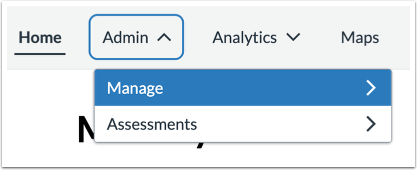
00:10: click the Admin drop-down menu.
00:13: In the drop-down menu, click the Manage link.
00:16: In the Manage list, click the Teachers link.
00:20: By default, the Allow teachers to create trackers
00:23: toggle is turned on. To prevent teachers in your district from creating trackers,
00:27: click the Allow teachers to create trackers toggle off.
00:32: When a teacher tracker creation is disabled by district admins, the
00:37: Create New Tracker option is unavailable to teachers.
00:41: This guide covered how to manage teacher tracker creation as an admin.
In Global Navigation, click theAdmindrop-down menu. In the drop-down menu, click the Manage link.
Open Manage Teachers
In the Manage list, click the Teachers link.
Manage Teacher Tracker Creation
By default, the Allow teachers to create trackers toggle is turned on. To prevent teachers in your district from creating trackers, click the Allow teachers to create trackers toggle off.
View Disabled Teacher Tracker Creation
When a teacher tracker creation is disabled by district admins, the Create New Tracker option is unavailable to teachers.