I recently migrated a quiz created with the current version of Quizzes in Canvas with New Quizzes. Some of the questions on the quiz were multiple drop-down questions with multiple options for each drop-down entry. After some necessary reformatting I previewed the quiz in New Quizzes and to my amazement the options for the drop-down questions were presented in random order, even though I needed the options in the order I have the choices listed in Build section. Is there a way to stop the randomizing of these options for these questions?
Thanks!
Hello @aaron_ayres and thanks for posting in the Community!
It seems we are looking into the ordering of answers in the multiple drop-down questions with multiple options for each drop-down entry, and seeing the options randomized in that list. When testing this with the same steps you were, I am not seeing my drop down lists randomized when migrated. I created a Classic Quiz and created a Multiple Drop Down question with ordered answers for those drop down menus. Then migrated to New Quizzes.In my tests, my answers in my drop down menus were not reordered, so it seems the function should retain the order of the answers when migrating from Classic to New Quizzes. If you are seeing something otherwise, we would want to look at trying the migrate option again to see if they come across in the correct order. If the order is not being retained this is something you could reach out to Canvas Support about and they would be glad to help make sure your questions answers are being ordered how you would like.
@aaron_ayres ,
First, I want to apologize for your question sitting in the community for so long without a response.
Second, it looks like you have stumped the Canvas Community. Were you able to find an answer to your question? I am going to go ahead and mark this question as answered because there hasn't been any more activity in a while, so I assume that you have the information that you need. If you still have a question about this or if you have information that you would like to share with the community, by all means, please do come back and leave a comment.
How we keep your questions flowing!
Robbie
@Robbie_Grant I am experiencing this as well. I am not sure there is workaround, but if somebody has one I would love to know.
I have this question as well. I have not selected "Randomize Answers" and yet the dropdown menu is always randomized. It is very frustrating when you are asking students to select from a sequential list when the sequence keeps changing. This seems like an easy fix to make.
Is there a solution to this issue? I am facing this issue as well and it is so frustrating.
Still randomizing the drop downs in the new quiz editor. Can not find anyway to fix even if the randomize answers button is turned off. Please fix.
Not sure why this is marked as solved. The issue persists! I filed a support request, hopefully this will finally get acknowledged by Instructure as an issue.
Hello, this issue has come up for one of our faculty, who would like to have the drop-down answer options in the same order that they are written. We've been told by Canvas Support that this is the expected behavior, and I understand that there are use cases where shuffling the order is needed. However, if it is the expected behavior, then why do these question types retain their order when the quizzes are migrated from Classic?
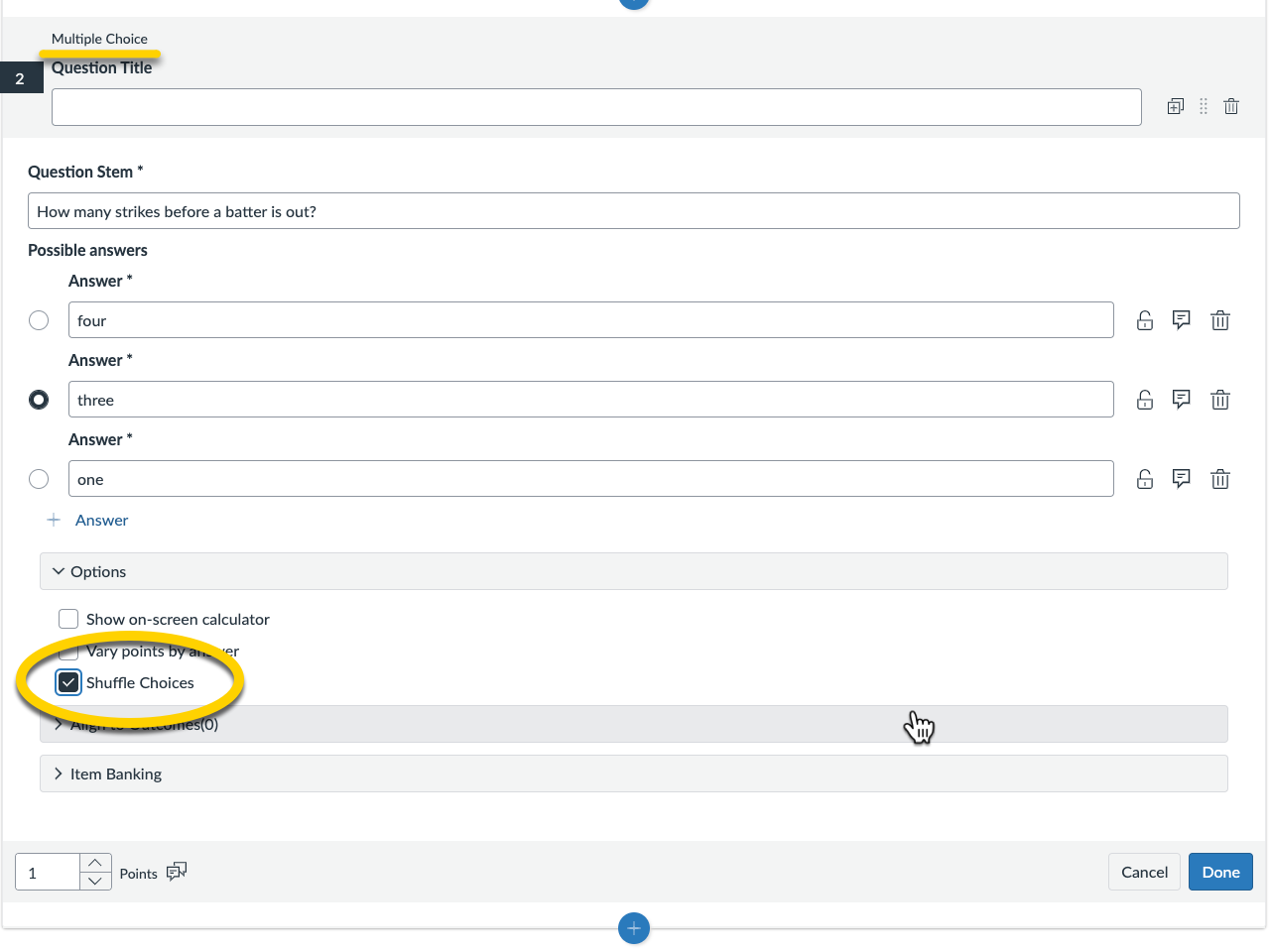
My suggested feature improvement here is to add a Shuffle Choices setting, like there is for Multiple Choice questions, to allow faculty flexibility in how they create their quizzes.
"Shuffle Choices" setting in a New Quizzes Multiple Choice question type
It is quite annoying that the Fill in the Blank Drop down answers cannot lock in order - it seems others have posted about this in 2022 and in 2026 it still does not have a lock feature
Enhance your access to articles, forums, and events—and to participate by sharing insights, engaging in discussions, and connecting with your network of edtech peers.
I'm working with a faculty member who is creating a writing quiz that asks students to respond to questions from 3 different banks (one pulling easy questions, one pulling hard/rewrite questions, and one pulling from an AI bank). There is some kind of glitch happening whereby students are getting duplicate questions from…
This is incredibly frustrating. I use a rubric with imported outcomes to grade my assignments. Each problem is mapped to an outcome, scored on a scale with 4 tiers (the upper 2 tiers granting mastery). For a few of my students—not all—grading a new assignment deletes their earned mastery on an earlier, unrelated…
Our institution is setting up 9 institutional outcomes in Canvas. Several of our outcomes have multiple skill sets within the rubric. For example: Critical Reading – Skill Set A Critical Reading – Skill Set B Critical Reading – Skill Set C Our understanding is that Canvas Outcomes data reports can provide the overall/total…
I am just curiousas to why there is not a field to enter a description for an outcome at the account level? Or at least edit the rating when you attach/link an account level outcome to a rubric. When you create a new criterion for a rubric, you enter a decription for a rating, but for an account level outcome.
We use a pre- post- model to measure learning which requires student-question matching from two time periods. This requires exporting quiz data to CSV to do the analysis properly. (I can get into more detail if needed.) The New Quizzes Student Analysis CSV export has repeated blocks of ItemID then columns related to that…