Release notes outline upcoming customer-impacting changes that are expected to be displayed in production environments. Please note that features considered for future development are not included in the notes.
Unless otherwise stated, all features in this release are available in the Production environment as of 2026-10-15.
Updated Features
Mastery Trackers
Expanded Demographic Filters- Instructor
Affects User Interface | Yes |
|---|
Affected Areas | Mastery Trackers, Analytics Dashboards, SIS Sync |
Summary
Educators can filter student results by two additional demographic groups: Section 504 and Gifted. These options display with the existing Individual Education Plan (IEP) and English Language Learner (ELL) filters in the Group filters. Mastery Connect ingests both groups from the SIS sync for districts that use Clever or Sistemic.
Change Benefit
- Complete Student Groups: Educators track Section 504 and Gifted students alongside the groups they already filter by.
Feature Workflow
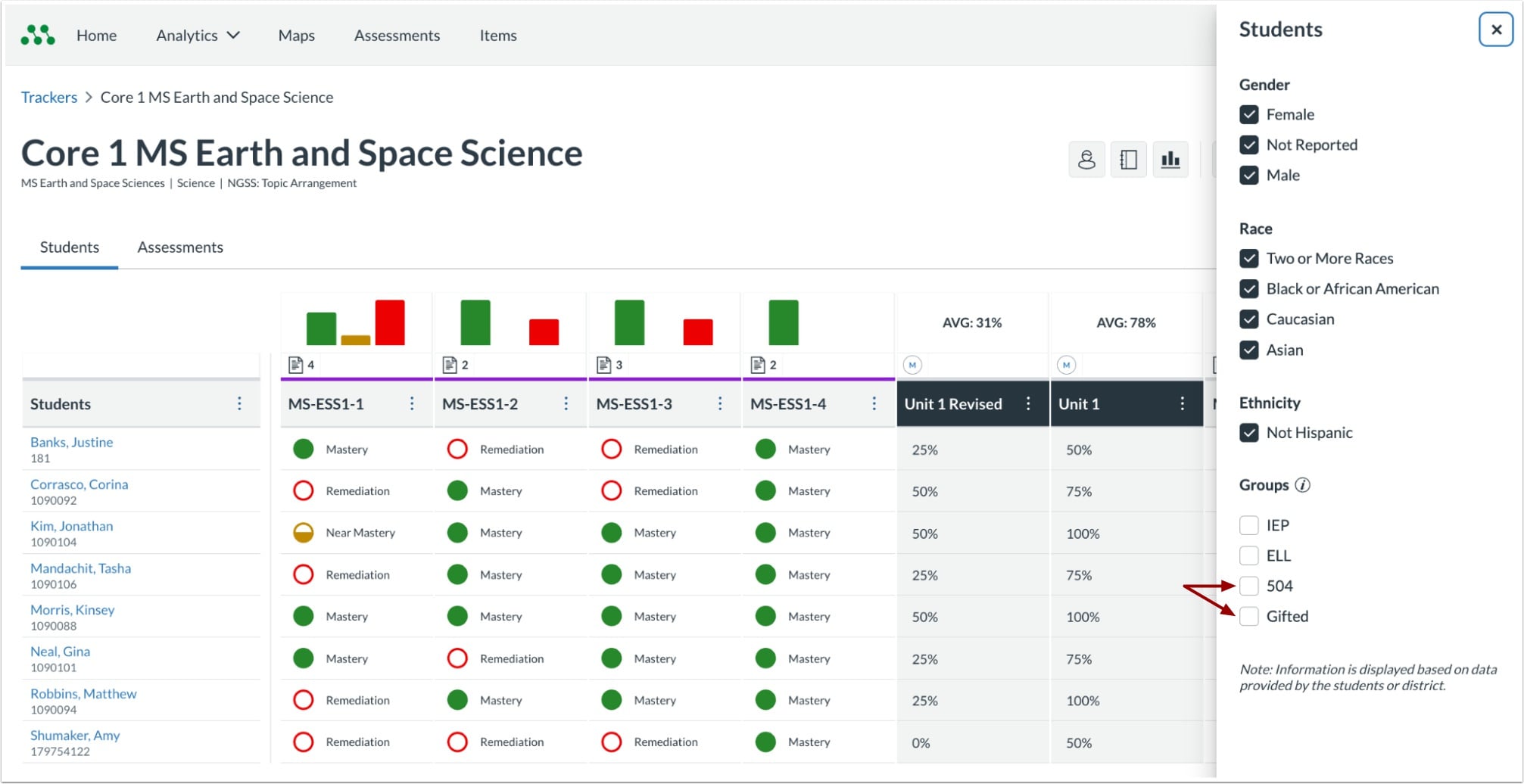
In the Student filter tray, select the 504 checkbox, the Gifted checkbox, or both to filter the list.
Assessments
Assessment Index Modernized Experience Updates- Instructor
Affects User Interface | Yes |
|---|
Affected Areas | Assessments Page, Filters, Bulk Actions, Bookmarks |
Summary
The modernized Assessments page matches the behavior of the legacy Assessment Index. Educators can switch between the modernized view and the legacy view until January 2027.
The modernized Assessments index includes the following updates:
- Source column: Icons in the Source column differentiate item-based assessments from document-based assessments.
- Benchmark management: District administrators and benchmark facilitators can manage benchmarks directly from the assessment index.
- Bookmarks: Educators bookmark assessments from the index and filter for bookmarked assessments. Bookmarking from the assessment details page remains available.
- Standard filter: The Standard filter narrows to the selected Subject, Class, and Pathway. Opening the index from a classroom standard filters the list to assessments for that standard.
- Delivery Status filter: The filter includes Available, Distributed, Scheduled, Completed, and No Status.
- District Approved: Approved assessments display the District Approved icon, and the filter tray includes the District Approved toggle.
- Assessment Source: The dropdown includes Teachers I'm Following and content providers. All sources is the default.
- Bulk Actions: The Bulk Actions menu is added, with options including Change Delivery, Export to CSV, Export to Server, Export Answer Keys, and Export to PDF.
Change Benefit
- Familiar Assessments behavior: Helps educators work in the modernized Assessments page the way they did in the legacy Assessment Index, so the transition takes less adjustment.
Feature Workflow

The Assessments page displays a modernized interface.
Curriculum Map
Modernized Experience Updates- Instructor
Affects User Interface | Yes |
|---|
Affected Areas | Curriculum Maps, Units, Standards |
Summary
The modernized Curriculum Maps experience matches the behavior of the legacy view. Educators can switch to the legacy view using the Legacy Curriculum Map View link until January 2027.
The modernized Curriculum Maps includes the following updates:
- Owner field: The Edit Curriculum Map flow includes the Owner dropdown, which allows reassigning a map to a team.
- Mastery scores: Mastery scores for formative assessments display the correct Total, Mastery, and Near Mastery scores instead of 0.
- Assessment labels: Formative assessments are correctly labeled, instead of showing as Benchmark Assessment.
- Standards in multiple units: A standard can display in more than one unit. Adding a standard to a unit leaves it in the other units.
- Unit colors: The color indicator on a standard matches the color of its unit.
- Multi-select: Instructors select multiple standards and remove them from a map in one action.
- Related Trackers: The Related Trackers tag opens a list of the Trackers that use the map. Each Tracker in the list links to its page.
- Unit attachments: Users who don't collaborate on a map can open the files attached to a unit.
- Deleting maps: District administrators can delete curriculum maps they created, and educators can delete their own maps.
Change Benefit
- Familiar Curriculum Maps behavior: Helps educators work in the modernized Curriculum Maps experience the way they did in the legacy view, so the transition takes less adjustment.
Feature Workflow

The Curriculum Map displays a modernized interface.
Mastery Tracker
Modernized Experience Updates- Instructor
Affects User Interface | Yes |
|---|
Affected Areas | Mastery Trackers, Benchmark Compare, Assess Modal, GradeCam |
Summary
The modernized Mastery Tracker matches the behavior of the legacy Tracker while keeping the accessibility improvements from the modernized interface. Educators can switch to the legacy view using the Legacy Classroom View link until January 2027.
The modernized Mastery Tracker includes the following updates:
- Benchmark Compare: The Benchmark Compare view is added. When a student's formative mastery level and benchmark mastery level don't match, the Compare view highlights those discrepancies.
- Unit colors: Units keep their color coding in the Tracker.
- GradeCam: The Scan Scores option for an assessment launches GradeCam from the Tracker.
- Assess link: Selecting Assess on the Home page opens the Assess modal in the Tracker.
- Reopening formative assessments: Educators can reopen a submitted formative assessment for a student.
- Secure benchmarking mode: When using secure benchmarking benchmark mode or restricting teacher answer changes, scores stay locked in the gradebook inline editor, the benchmark drilldown page, and the performance grader.
Change Benefit
- Familiar Mastery Tracker behavior: Helps educators work in the modernized Mastery Tracker the way they did in the legacy Tracker, while keeping the accessibility improvements from the modernized interface.
Feature Workflow
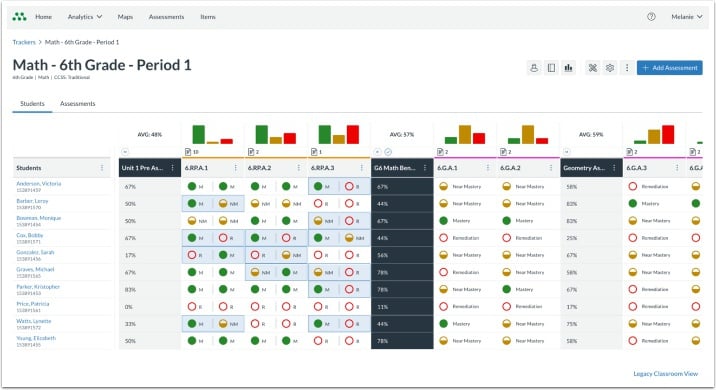
The Mastery Tracker displays the modernized interface.
Followed Teachers Index
Redesigned Accessible Layout- Admin, Instructor
Affects User Interface | Yes |
|---|
Affected Areas | Teachers Index |
Summary
The Followed Teachers index page is redesigned with a fully accessible layout. Labeled filter and pagination controls support screen reader and keyboard users. The page lists followed teachers in a table with the same look, filtering, sorting, and pagination as the rebuilt Assessments index, and it replaces the legacy Profiles page.
Users can follow teachers listed in the table to view their assessments. District admins can also view the Curriculum Maps that belong to teachers in their district.
Change Benefit
- Improved Accessibility: The Followed Teachers index is fully accessible, matching the rebuilt Assessments index in layout and behavior. Labeled filter and pagination controls support screen reader and keyboard users.
Feature Workflow

The Teachers Index page displays the redesigned interface.