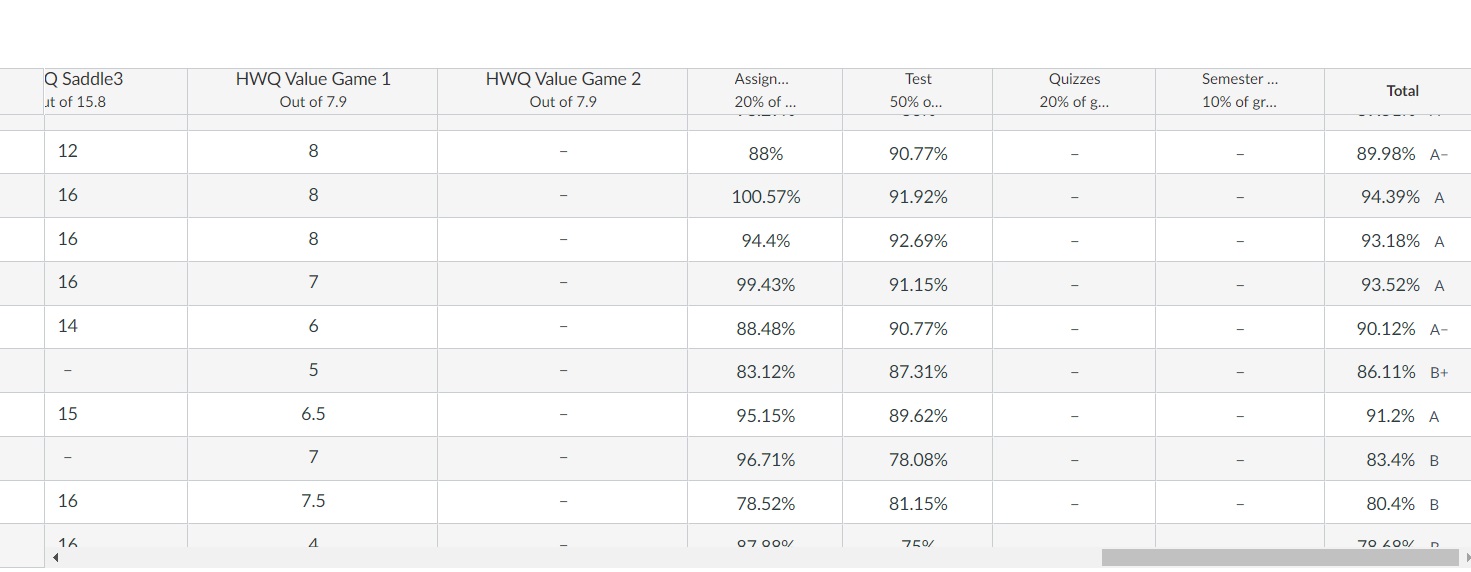
I am a teacher. can't see the information for the last student on my grade screen. Anyone else having this problem? Here's a screen shot:
As you can see, it is hard to read the information in the last row. Clicking on the scroll bar does not change the position...
Hi @NoahBoswell , @ThayerMerritt , and @stimme ...
It appears that this is a known issue, and will eventually be fixed as a Canvas Deploy. Please review this recent thread that I've recently seen in the Commnity:
Solved: Horizontal scrollbar obscuring the bottom row of G... - Instructure Community - 600711 (canvaslms.com)
Also, you can find the Canvas Release Notes and Deploy Notes here:
Canvas Releases - Instructure Community (canvaslms.com)
I hope this will be of help to you. Sing out if you have questions.
Hi @christopher_ch6 , @jim_walker1 , @ThayerMerritt , @NoahBoswell , and @stimme ...
I just wanted to let you know that there's a Known Issue document for this...which you can find here: [OPEN] Gradebook scrollbar is cutting off the last... - Instructure Community - 601863 (canvaslms.com).
Hi @jim_walker1 ,
I'm assuming the student you're trying to view is the one mostly covered by the scroll bar on the bottom?This issue usually relates to the size of your screen, sometimes if your screen is zoomed in too much (even at 100%!), it will display in a way that will cover up important information, such as student's grades in your case.
I recommend trying to minimize the size of your screen, and seeing if that works!Let me know if it works or not, and feel free to come back with any more questions!Have a wonderful day,Noah B.
Multiple users on our two institutions are seeing the same. Even removed all custom JS/CSS in our beta environment. It doesn't appear to be related to screen zoom either. There appear to be spacing issues with user names and spacing on some pages in addition to the gradebook
Removing the custom JS/CSS didn't resolve the issue; a team member and I both spot-checked this afternoon, and we're both seeing the last line being cut off, still.Names also appear to be offset up-from-center in the name column as well, where the grades themselves are center vertical/horizontal
I'm seeing the same thing in our Canvas system. One workaround is going into Student View to create a Test Student user for the course. The Test Student is always placed in the last row, so the horizontal scroll bar should not be blocking scores of actual students. Another workaround is setting scroll bars to show only when scrolling (at the operating system level).
Thank you!
Posted about this a week or so ago. Just wondering if anyone knows when the fix will be coming out?
Another screen shot is attached. The last line cannot be seen - scroll bar does not move it p, screen resolution is not the problem.
Thanks.
It seems they "fixed" the issue, but now the scrollbars are so small it's almost impossible to click and drag on one of them.
Enhance your access to articles, forums, and events—and to participate by sharing insights, engaging in discussions, and connecting with your network of edtech peers.
Hello - We have an issue where anytime a professor does a manual Relink of assignments or a Resync of Grades via the McGraw Hill Connect, it causes on overwrite in Canvas to assignments that have been configured (in Canvas) to be non-graded. Apparently the McGraw Hill rep indicated that there should be an option within the…
Has anyone successfully synced courses from Banner to a Canvas subaccount using Ellucian ILP? We are currently using Banner as our SIS and are trying to configure course-level subaccount assignments.
I am just curiousas to why there is not a field to enter a description for an outcome at the account level? Or at least edit the rating when you attach/link an account level outcome to a rubric. When you create a new criterion for a rubric, you enter a decription for a rating, but for an account level outcome.
We use a pre- post- model to measure learning which requires student-question matching from two time periods. This requires exporting quiz data to CSV to do the analysis properly. (I can get into more detail if needed.) The New Quizzes Student Analysis CSV export has repeated blocks of ItemID then columns related to that…
Hello! A caution to my fellow Admins and support folks that Instructure updated their live-chat link (the one in the "(?) Help" menu, if you license their Support Chat service) fairly recently, but the old broken one is still online and appears as if it still functions. If someone hits the old link, after entering their…